Social media management tools are vital to a brand’s success. No, really, do you know any thriving businesses that handle their online performance manually?
Social media management is the process of creating, posting, and analyzing content on various platforms. It involves planning your social media posts and managing audience responses. In short, social media managers have to:
- Plan their social media strategy
- Schedule and publish posts
- Analyze social media content performance
- Respond to comments and messages
- Monitor brand mentions and relevant discussions
And many more!
Small businesses don’t have the time, staff, and resources to do it all. So, investing in intelligent software is arguably one of the best social media practices they can follow.
In this article, we’re looking at the best social media management tools for small businesses. We’ll dive into interesting details, like pricing, features, and customer reviews.
Let’s get started.
{Updated on July 17th, 2026}
Table of Contents
- Why a small business should use a social media management tool
- Best social media management tools for small businesses
- How to choose the best social media management software for your needs
- Try a social media management platform for free
Why a small business should use a social media management tool
As mentioned above, small businesses could benefit from social media management tools. In this section, we’re talking about these specific benefits. So, what can the best social media management tools for small businesses help with?
To save time and effort
Managing multiple social media accounts can be time-consuming. A social media management tool centralizes all platforms into one dashboard, allowing businesses to do it all efficiently.
Scheduling automation ensures managers use the best posting times to publish content. Without a tool, this process requires constant manual updates. Small business owners can focus on other tasks while keeping a strong online presence.
To stay consistent
Consistency is key to building brand awareness! However, maintaining regular posting schedules can be challenging for small businesses. Social media management tools offer content calendars and reminders, helping managers to post consistently across platforms.
We’re not just referring to posting frequency, but also ensuring content consistency. Social listening tools can track whether your performance is improving over time. Additionally, many of these tools include AI features. They can assess whether your tone and messaging remain consistent across all posts.
To gain customer and performance insights
Social media management tools provide analytics that help businesses understand audience preferences and content performance. These insights can inform future content strategies, allowing companies to focus on what works best.
Additionally, tools often offer features for tracking customer feedback and engagement. For example, some tools track brand mentions even when users haven’t tagged a brand. This allows businesses to respond quickly and strengthen their relationship with audiences.
Best social media management tools for small businesses
Here is our list of the 14 best social media management tools for small business owners.
1. Mentionlytics
If you’re wondering what people think of your brand, Mentionlytics is the tool for you!

Mentionlytics is an AI-powered social listening tool that helps you manage your social presence effectively. Its social media management software tracks mentions of your brand, competitors, and industry.
Features like custom reports, influencer identification, and real-time alerts boost your social presence. It also offers a Publisher feature to schedule your posts on a monthly content calendar. Also, tags and labels streamline team collaboration.
Most useful features for social media management
- Sentiment and Emotion Analysis: Classify mentions into positive, negative, or neutral. Also identify more complex emotions such as joy, anger, sadness, or fear.
- AI Mention Clustering: Let the AI software group your mentions by topic and save time.
- Social Intelligence Advisor (SIA): Get personalized advice on social media management, like the best times to post. SIA also alerts you when it detects spikes in negative mentions to address a social media backlash before it gets out of hand.
From real customer reviews
Pros: “They have a lot of custom features. The overview page provides multiple keywords merge and instantly generates the necessary graph, word cloud, and other information. Show both unique and total reach. Have a lot of additional package options and let me customize my own setup. Only paid what I really needed instead of forcing myself to upgrade my plan and pay for features that I don’t need. Translate to cost-efficient for me and my client. Very responsive customer service when trouble occurs.”
Cons: “It is a bit tricky to understand how to set up keywords. But they have good support.”
Pricing
Small business plan starts at $69 per month.
2. Planable
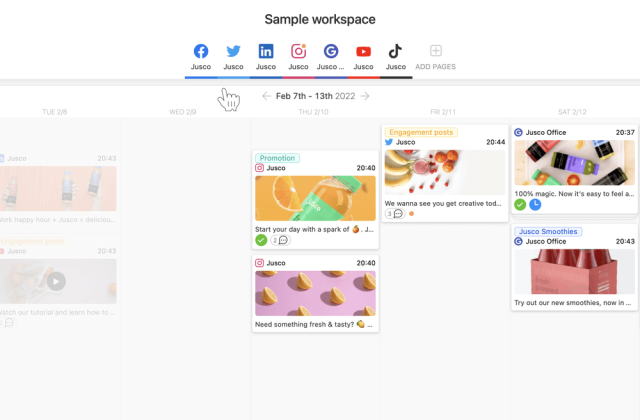
Planable helps you create, plan, and publish across social media platforms effortlessly.
Source: G2
Planable, one of the top social media scheduling tools, revolutionizes the way content teams collaborate by bringing all your digital marketing content into one streamlined workspace.
Users can create, preview, and fine-tune posts without leaving the platform. Planable allows real-time feedback, pixel-perfect previews, and custom reports, making it valuable for marketing teams.
Most useful features for social media management
- Intuitive interface and WYSIWYG design
- Multiple content views: Feed, calendar, list, and/or grid views
- Team collaboration, guest sharing, and approval workflows
From real customer reviews
Pros: “Planable is easy to implement and has become an essential part of my day-to-day tasks as a business owner and social media manager. I like how easy it is to plan posts across different social media platforms like Instagram and Pinterest. It’s great that you can connect multiple accounts, which makes managing everything in one place really convenient.”
Cons: “Planable is quite expensive, and even with the basic plan, some features are still locked. It’s priced higher than other similar apps, which can be frustrating if you’re looking for more affordable options.”
Pricing
Small business plan starts at $39 per workspace per month.
3. Vista Social
Take control of your social media presence with Vista Social’s AI-powered management platform.
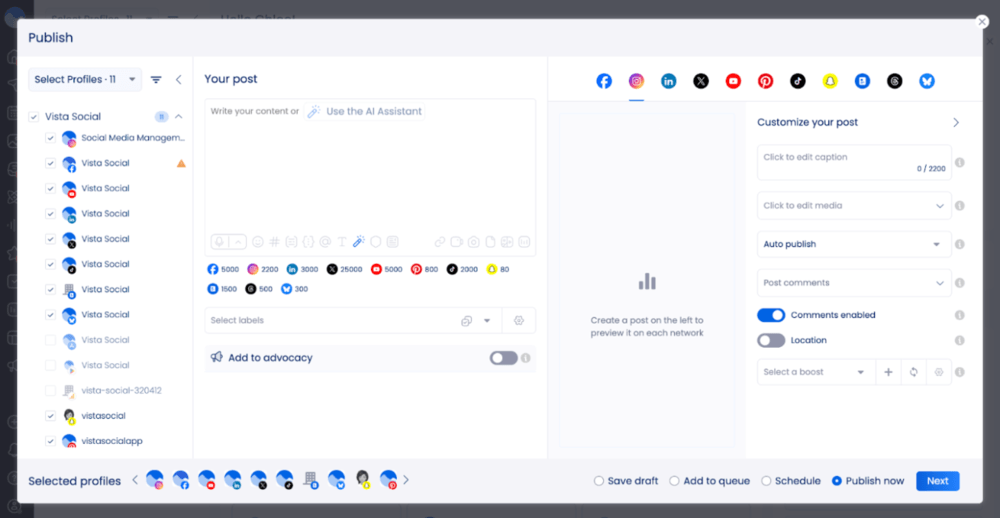
Vista Social is an all-in-one social media management tool built for small businesses that need to publish, engage, and report across multiple platforms without a large team. Its built-in AI assistant handles the heavy lifting — generating captions, recommending optimal posting times, and organizing your inbox — so you can focus on running your business.
The unified social inbox pulls every comment, DM, and mention from Facebook, Instagram, X (Twitter), LinkedIn, TikTok, YouTube, Pinterest, Bluesky, Threads, Reddit, and Snapchat into one place. A built-in CRM logs every audience interaction over time, while DM automation handles routine replies around the clock — keeping customer engagement consistent even with a small team.
Most useful features for social media management
- AI-powered content generation for captions, hashtags, and post ideas across all platforms
- Unified social inbox with DM automation and built-in CRM for audience relationship tracking
- Cross-platform analytics with performance reporting and smart scheduling recommendations
From real customer reviews
Pros: “Top factor that made me switch to Vista Social is the affordability and range of features that they offer. They have features that other platforms only offer for ‘premium’ members that most SMMs cannot afford — they make it accessible for us and make our work more efficient.”
Cons: “There’s a learning curve at first, but once you explore the features, it all starts to make sense and becomes easy to use.”
Pricing
Small business plan starts at $79/month, with a 14-day free trial available.
4. HubSpot Social Media Management
HubSpot’s Social Media Management Software helps plan, manage, schedule, and monitor posts, as well as keep in touch with followers and brand-relevant conversations through a unified social inbox with built-in listening tools.
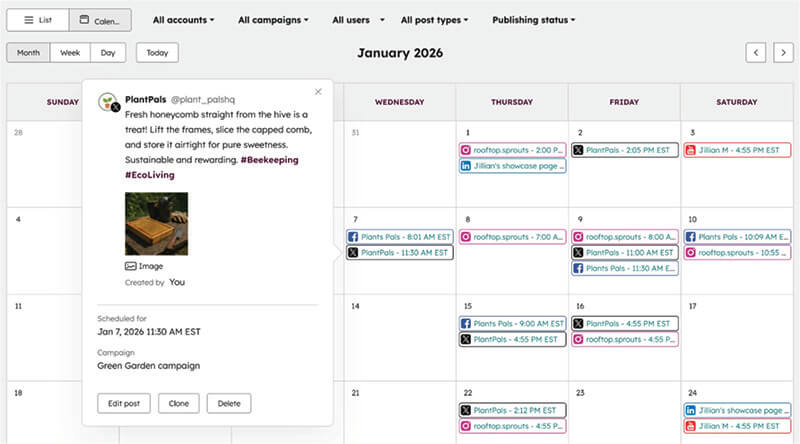
HubSpot’s social media capabilities are part of the software provider’s omnichannel marketing automation tool, Marketing Hub – one of its key standouts. You can schedule cross-channel campaigns across emails, socials, and advertising platforms under centralized dashboards.
Plus, its unified marketing analytics reports let you measure omnichannel campaign performance to help visualize how each marketing asset contributes to your end goals. For example, you can identify the website traffic each particular social network generates, and how much of that traffic results in monetary conversions.
Most useful features for social media management
- Keyword monitoring streams to surface social media conversations around particular brands or topics. Respond to followers across all networks within a centralized inbox.
- Native CRM useful for social selling or social customer service.
- AI features for social listening sentiment analysis, plus idea scheduling time, post type, content topic, and reply suggestions.
From real customer reviews
Pros: “I am most pleased with the wide array of functionality that HubSpot Marketing Hub gives us. We can manage all of our marketing efforts within one platform, and the social media capabilities are great. I am particularly drawn to the ability to build out automated workflows and elaborate form functionality. Automated workflows are extremely valuable because they can be fully customized, edited, and iterated in live time, giving us an automated way to nurture our leads, contacts, and customers.”
Cons: “The learning curve to fully maximize the platform’s potential is a headwind.”
Pricing
HubSpot’s social media tools are available starting from Marketing Hub Professional, which is priced at $800/month with three users and omnichannel marketing tools included.
5. NapoleonCat
NapoleonCat helps you manage, engage, and grow your social media presence from one powerful platform.
NapoleonCat is an all-in-one, AI-powered social media management and customer engagement tool that centralizes social inboxes, automates moderation, streamlines publishing, and delivers in-depth analytics. It’s designed for businesses, agencies, and e-commerce brands that need to manage conversations, content, and performance at scale.

Most useful features for social media management
- Unified Social Inbox: Manage messages, comments, reviews, and ad interactions across multiple social media platforms from a single dashboard.
- AI-powered Auto-moderation: Automatically hide or delete spam, respond to repetitive questions, forward urgent cases to your team, and detect customer sentiment using advanced rule-based and AI moderation.
- Social CRM: Build detailed customer profiles, tag conversations, track interaction history, and identify high-value or returning customers.
- Publishing & Scheduling: Plan, schedule, and publish posts with calendar views, team approvals, and cross-platform scheduling.
- Analytics & Reports: Monitor performance, track engagement trends, and generate customizable reports for social media, customer service, and moderation activity.
From real customer reviews
Pros: “The organization of everything. I have all of my SM platforms in one area, and I can go from platform to platform to go over reviews & comments without having to go to my individual SM accounts. I can do whatever action I need(reply, archive, delete, report user, whatever) and go onto the next one. Probably cuts down on the time by at least 50%.”
Cons: “The report section faces some issues from time to time, it glitches or gives wrong number“
Pricing
NapoleonCat pricing starts at $79 per month, with plans scaling based on the number of users and features. A 14-day free trial is available to test the platform before committing.
6. Buffer
If you want to simplify the entire content creation process, meet Buffer.

Source: G2
Buffer is an AI-powered social media management solution with a great calendar. It helps companies with scheduling posts across multiple social media profiles. Individuals use it to organize content and import media effortlessly.
Buffer also focuses on improving social media engagement with your audience. You can brainstorm, get posting inspiration, and let the software repurpose old content. It also offers performance tracking, reporting, and audience demographics.
Most useful features for social media management
- Library of content ideas and AI assistance
- Custom landing page building and link click tracking
- Permission levels and approval workflows for team collaboration
From real customer reviews
Pros: “It makes managing our social media posts so much easier because we don’t have to log in to each individual social media website to make one single post.”
Cons: “The unpaid version has limitations to the number of platforms you can use to schedule at once. So, if you want to schedule on multiple platforms, more than 3, you will need to do it separately.”
Pricing
Small business plan starts at $6 per month per channel.
Additionally, are you looking for the best social media management tools for small business owners? Buffer offers a free version with limited capabilities for budget-friendly plans.
7. ContentStudio
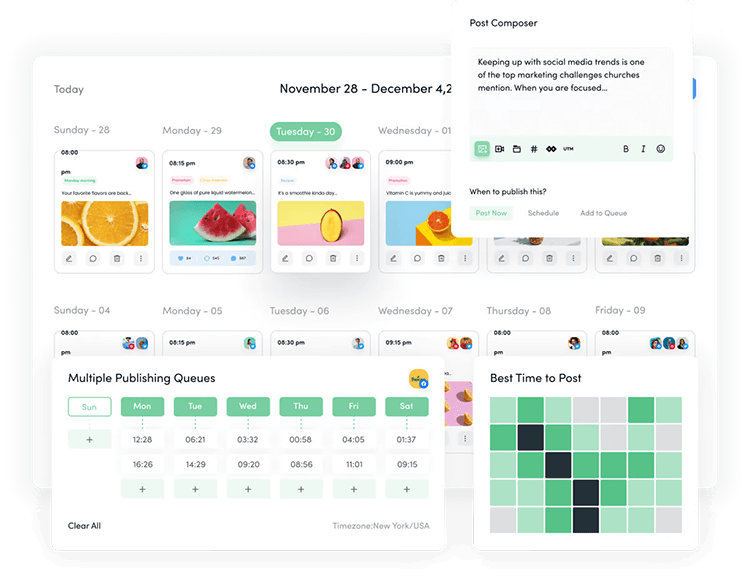
ContentStudio is a comprehensive social media management tool designed to streamline content creation, scheduling, and analytics for small businesses. With its intuitive interface, users can effortlessly manage multiple social media accounts, discover trending content, and automate posting schedules to enhance engagement. The platform also offers robust analytics tools, providing insights into content performance to inform strategy adjustments.
Most Useful Features for Social Media Management
- Content Discovery: Discover trending topics and curate relevant content for your audience with ease.
- Scheduling & Automation: Automate your posting schedules across multiple platforms to save time and ensure consistent engagement.
- Collaboration Tools: Work seamlessly with your team using built-in content approval workflows.
- Advanced Analytics: Gain actionable insights into post-performance and audience behavior.
- Unified Inbox: Manage all social media interactions from one place.
From real customer reviews
Pros: “ContentStudio’s ability to schedule and plan content (with previews) is second to none. I love the additional features as well such as the ability to create the first comment on an Instagram post, carousel posts, and Facebook posts with colored backgrounds.”
Cons: “Influencers tab needs some work for niche audiences and have the ability to dm or manage a campaign or work with them.”
Pricing
ContentStudio’s pricing is flexible, with plans starting at $19 per month, making it an affordable choice for small businesses seeking to enhance their social media presence.
8. Eclincher
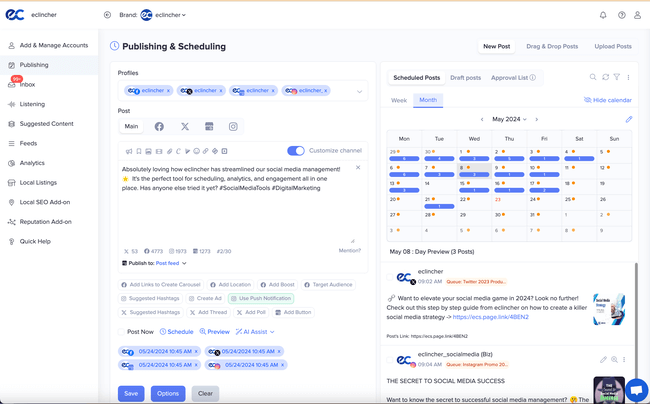
Brand management turns simple with Eclincher’s powerhouse software.
Source: G2
Eclincher is an intelligent social media management platform that takes your online presence further. It offers AI-powered tools for scheduling, publishing, and monitoring social media. The tool also focuses on improving brand reputation and local SEO.
Whether you’re a small business, agency, or enterprise, Eclincher helps you manage multiple social platforms. Management features also include tracking conversations and optimizing your content to boost engagement and visibility.
Most useful features for social media management
- AI-powered content creation and scheduling
- Unified social media inbox for effective communication
- Social media listening and sentiment monitoring
From real customer reviews
Pros: “One of the best parts of Eclincher is their support! The platform doesn’t have a ton of bells and whistles but they are always quick to help with any issues.”
Cons: “Previews often don’t download for PDF view. Would like to see TikTok and YouTube more integrated.”
Pricing
Small business plan starts at $65 per month.
9. SocialPilot
Effortlessly scale your social media efforts with SocialPilot’s all-in-one social media calendar.

Source: G2
SocialPilot is a comprehensive social media management tool for small, medium, and large businesses. Optimize your online presence and post engaging content across multiple platforms.
SocialPilot’s intuitive interface enables team members to collaborate seamlessly, assign roles, and manage approvals. The social media solution also offers automation tools to ensure consistent content delivery.
Most useful features for social media management
- AI Assistant for content creation and hashtag generation
- Bulk scheduling and publishing automation
- Advanced audience analytics and campaign reporting
From real customer reviews
Pros: “I love that an email goes out to my clients to encourage them to submit a review about their experience. I also love that once they do submit a review, it is automatically posted to all of my social media websites. It really takes a lot of work off my plate.”
Cons: “I’ve recently noticed that when a scheduled post generates an error, I don’t get immediate notifications. Usually, I’m alerted a few hours after the post is supposed to go live, and sometimes I receive the notice when I’m already out of the office. This means I might not be aware of the issue until the next day. While this doesn’t happen frequently, it’s a big inconvenience when it does.”
Pricing
Small business plan starts at $30 per month.
10. CoSchedule
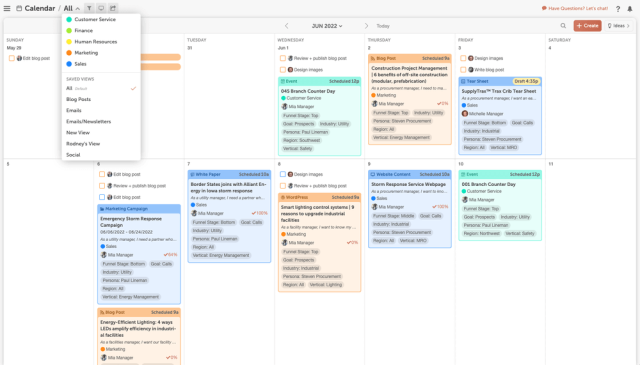
Stay on top of your game with CoSchedule’s Marketing Suite and calendars.
Source: G2
CoSchedule is a comprehensive marketing calendar platform that enhances content planning and execution. It helps schedule, publish, and track content performance across multiple social media channels.
Its sophisticated features improve team collaboration and productivity.
Most useful features for social media management
- AI Social Assistant for social message and copy generation
- Drag-and-drop rescheduling and schedule adjustments
- 500+ AI marketing prompts and template media library
From real customer reviews
Pros: “The integration with WordPress’ dashboard and the ability to schedule and customize social posts all in one place made CoSchedule a very impressive and useful tool.”
Cons: “One potential downside of the suite is that it can be overwhelming at first. With so many features and tools, it can take some time to learn how to use everything effectively. However, once you get the hang of it, the suite can be a powerful asset to your marketing efforts. Additionally, the suite’s pricing can be on the higher side, which may not be feasible for small businesses or those with limited budgets.”
Pricing
Small business plan starts at $29 per user per month but offers a free calendar with limited capabilities for social publishing.
11. Iconosquare
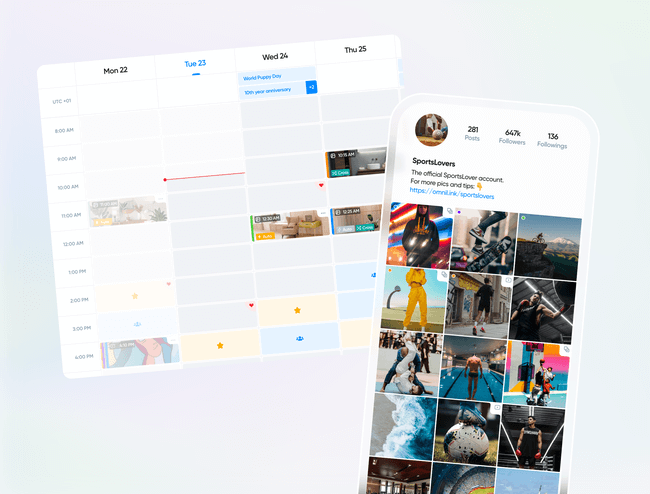
Iconosquare is the go-to platform for managing, analyzing, and scheduling content effortlessly for many brands.
Source: G2
It simplifies social media management for brands, agencies, and marketers by providing workflow enhancement tools. With valuable analytics, custom reporting, and social media listening, you can get data-driven insights.
Iconosquare schedules and posts content across major social media platforms, like Facebook, Instagram, and TikTok. Global brands trust it to save time and get content inspiration.
Most useful features for social media management
- Intelligent analytics and report automation
- Cross-platform scheduling and conversation monitoring
- Team collaboration and content approvals
From real customer reviews
Pros: “The insights available made monthly reporting a breeze at our agency. The format of everything was super intuitive and it not only saved our team time but gave deeper insights than most platforms allow.”
Cons: “I can’t add audio to my reels which means I have to post these directly in the Instagram app.”
Pricing
Small business plan starts at 59€ per month for a user.
12. Loomly
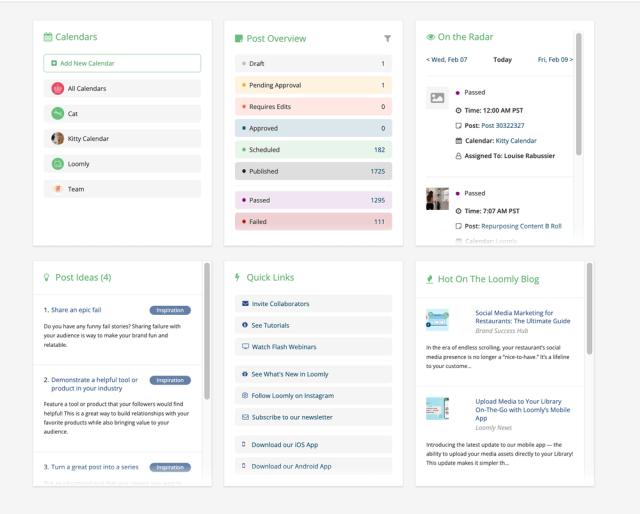
Loomly simplifies social media content creation and collaboration for businesses of all sizes.
Source: G2
Loomly is one of the best social media management tools for small business owners. While it offers engagement features, its true strength lies in content creation and optimization.
Loomly helps you craft engaging posts by offering suggestions, like word edits or visual recommendations. From planning to publishing, the platform ensures that every step of the process is successful.
Most useful features for social media management
- Loom.ly link shortener with click-tracking
- Post ideas, RSS feed integration, and trending topics
- Hashtag suggestions and asset management with unique visuals
From real customer reviews
Pros: “I like how they advise you on the best times to post. Being able to post the same content across multiple platforms is a huge time saver.”
Cons: “Analytics aren’t as complete as I’d like. Some weird pricing choices make having multiple accounts more attractive, yet more cumbersome. I expect more bang for my buck the more I pay, not less.”
Pricing
Small business plan starts at $42 per month.
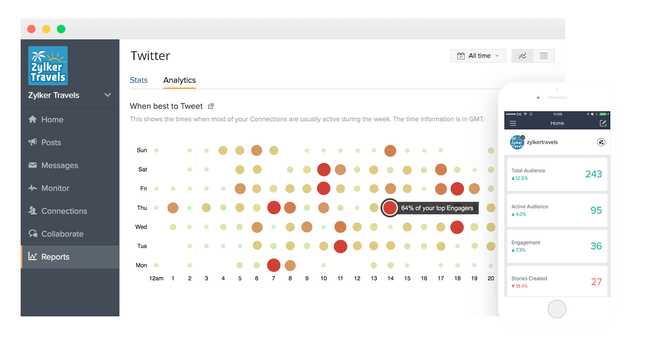
13. Zoho Social
Manage multiple social media accounts from a unified dashboard with Zoho Social.
Source: G2
Zoho Social is a social media management platform that integrates with Zoho’s business suite. It helps businesses manage and monitor social media activity while optimizing performance with data tracking.
In addition to a powerful social calendar for scheduling, it also excels in brand monitoring. Zoho Social allows you to track important keywords, top hashtags, and product reviews.
Most useful features for social media management
- Social media analytics and audience demographics
- Zia: AI-powered assistant for content creation
- Integration with Zoho CRM, Desk, and Canva
From real customer reviews
Pros: “What I like best about Zoho Social is its comprehensive suite of tools that make social media management effortless. From intuitive content scheduling to insightful analytics, Zoho Social provides everything we need to maintain a strong and consistent online presence.”
Cons: “What I dislike about Zoho Social is the limited advanced analytics and the less robust mobile app. While the platform excels at basic metrics, it falls short when it comes to more sophisticated analytics like sentiment analysis or competitor benchmarking, which are essential for deeper strategic insights.”
Pricing
Small business plan starts at €15 per month.
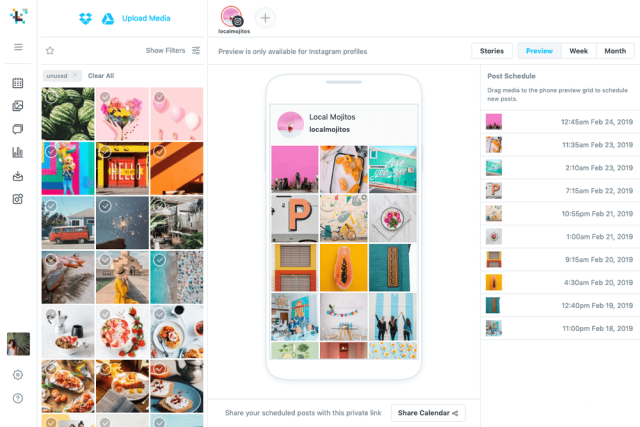
14. Later
Later completes our list of the best social media management tools for small business budgets.
Source: G2
Later is a social media management tool for scheduling and content creation. Users can effortlessly create, edit, and optimize their social media posts, ensuring their content is both engaging and visually appealing.
Later also shines in influencer marketing, providing access to a Creator Database where brands can find and collaborate with meaningful influencers, streamlining communication and payment processes directly within the app.
Most useful features for social media management
- AI-powered caption generator and hashtag recommendations
- Performance analytics to identify optimal posting times
- Linkin.bio building feature to drive website traffic and engagement
From real customer reviews
Pros: “It is easy to use and helps me to schedule social media content easily. The implementation was easy and customer support always helps me when I have questions.”
Cons: “I really dislike when Later tells me a video I’m posting is too long, or the dimensions aren’t right and when I try to edit the content in Later, it doesn’t update. I then have to manually send myself the content, edit it on my phone, and post it manually. It is very time-consuming and seems glitchy.”
Pricing
Small business plan starts at $25 per month.
How to choose the best social media management software for your needs
Now, let’s dive into some tips to help you choose the best social media management tool for your needs.
Do thorough research
Start by researching a wide range of social media management tools for small business budgets. Familiarize yourself with their key features and read user reviews and relevant blog posts online.
Exploring many options will give you a clear understanding of which tools align with your goals and offer the most value for your business.
Compare features
Look for tools that offer a variety of features, like scheduling, reporting, and AI software. Make sure the tools you’re looking for can handle the needs of multiple platforms.
Try to find social media management tools with advanced features, like AI analytics and suggestions. The more advanced suite, the better equipped you’ll be to manage your social media efficiently.
Test tools with free trials
A straightforward, user-friendly interface is essential. Most tools offer free trials, so take advantage of them to evaluate ease of use. The best social media management software should simplify your social media marketing, not complicate it.
Make sure you find a tool that allows you to focus on content, not troubleshooting. Also, it’s important to test management platforms that offer free social media tools as well.
Get demos and ask questions
Customer support and training are just as important as features. Sign up for demos and ask plenty of questions to assess the quality of support you’ll receive. Also, search for online opinions on customer support functionality.
A tool with strong onboarding and training resources can make a world of difference. This is especially important for businesses when onboarding valuable teams or clients.
Compare prices
Value for money is always a top consideration for company owners and department managers. Don’t forget you’re always looking for the best social media management tools for small business budgets. Compare pricing plans against the features offered.
The cheapest option may not provide everything you need, but the expensive one isn’t always better. Ensure you’re investing in software that will save you time and boost productivity in the long run.
Try a social media management platform for free
Hopefully, looking through some of the best social media management tools for small businesses worked out for you. Undoubtedly, one of these gems will help you find what you’re looking for!
Ready to upgrade your social media management? Sign up for a free trial with Mentionlytics and improve your online presence today!