


Social media reach represents the number of unique users who saw your post. It is one of the most commonly used metrics for measuring brand awareness.
Besides that, it’s handy when you want to calculate the impact of your influencer campaigns or the success of your own posts.
Now, most social media platforms have reach as a metric in their native analytics, but some don’t.
In that case, you can use the formulas that we’re about to share with you to calculate your social media reach. We’ll also give out some tips on how to increase reach and tools that will help you do the work!
Let’s get started!
Table of Contents
How to Calculate Social Media Reach: Basic Formula
So, it’s very easy to see reach on LinkedIn, Facebook, and Instagram. But what about TikTok or YouTube when it comes to organic posts, and X (Twitter), Bluesky, or Pinterest, both paid and organic? Their social media analytics don’t offer that option.
In that case, you’ll need to calculate it yourself with the following formula. Math is always trendy.

We see here “Impressions” and “Frequency” as metrics you’re gonna need for calculation. And before you jump to the conclusion, no, reach and impressions are not the same.
The main difference is in the number of unique users. While reach represents the exact number of those who saw your post, impressions show how many times your content was displayed to the audience (not necessarily different users).
We can calculate reach depending on the frequency (how many times your post appeared to the same user).
- Impressions are the number of times your content was displayed on users’ screens.
- Frequency is how many times it jumped up in a feed for one individual user.
Now, social networks such as TikTok and YouTube consider views to be a more important social media metric.
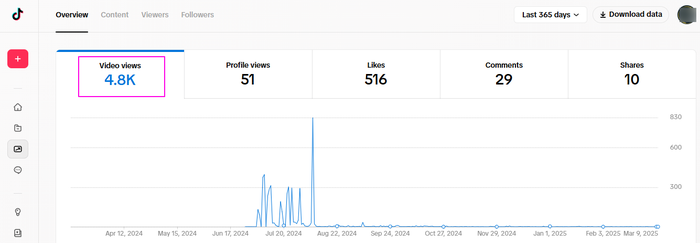
Facebook and Instagram are shifting in the same direction when it comes to metrics. The algorithm focuses on views because they are a form of engagement.
Views represent the total number of times the content was watched.
Again, it doesn’t have to represent the unique users, but those who engaged in some form (they watched it).
Practical Example
Let’s say you have a LinkedIn account for a year and want to see what topics or posts draw the most attention. Are your posts hitting the target audience?
- You go to your LinkedIn business account.
- Click on Analytics on the left side menu.
- Choose the metrics: Impressions.

- Hover the spike and you will see the exact number of impressions for that month.
- Then choose reach metrics (on LinkedIn it’s Members Reached).

- Repeat the process by hovering the spike, and find out how many members your content reached in that particular month.
The graphs above show a spike in July, both for impressions and reach.
In this example, the impressions for July were 470, and the reach was 382. The total reach represents 382 unique accounts that saw your post. And your post showed up in the users’ feed 470 times.
Your next step would be to check what content you published in July and create more similar content since it’s obvious it drew attention.
5 Different Types of Social Media Reach to Measure
Calculating reach is complex because different forms of content are involved.
Depending on whether the content is paid, organic, viral, campaign, or hashtag-focused, you’ll need different formulas (and sometimes a social media listening tool) to determine its reach.
Organic Reach
Organic reach represents the number of social media users your content organically reaches. It is often overlooked in favor of paid ads, but it offers insights that money can’t buy.
Here’s why organic reach is so important and what it reveals that paid reach never will:
- Shows true audience interest — not just targeting efficiency
Paid reach puts your content in front of people’s eyes based on targeting settings (demographics, interests, behaviors). But just because an ad reaches someone doesn’t mean they care about it. - Builds brand loyalty & trust (instead of just visibility)
Let’s be honest — anyone can pay for reach, but you can’t pay for trust. If people engage with and share your content organically, they are acting as brand advocates, extending your reach without any ad spend. - It’s free & sustainable (paid reach is temporary)
Paid reach disappears the moment you stop paying. Organic reach, however, can continue to grow over time, especially on platforms like Pinterest, LinkedIn, and YouTube.

How to Calculate Organic Reach
You can calculate organic reach by dividing impressions by frequency. But if the social media platform you’re using doesn’t have these metrics, you can use engagement and engagement rate.

If your brand uses several social media platforms, it might be useful to opt for a tool such as Mentionlytics, which measures social media reach across platforms to keep your metrics consistent.
One Tool, All Your Reach!
Why struggle with scattered metrics when you can have them all in one place? See beyond platform limits, track your true reach, and finally know what’s working with Mentionlytics!
Paid Reach
While organic reach is all about authenticity and algorithm-driven exposure, paid reach gives you precision, control, and scalability — things organic content can’t guarantee.
Here’s what paid reach uniquely offers:
- Guaranteed visibility (no guesswork)
Organic reach depends on the algorithm’s mood — some posts take off, others flop. Paid reach, however, ensures your content gets seen, no matter what. - Targeted audience insights
With organic content, you’re at the mercy of who the algorithm decides should see your posts. But with paid reach, you choose your audience based on specific demographics, behaviors, and interests. - Audience expansion beyond your followers
Organic reach is limited to your existing followers (and their extended network if they engage). Paid reach breaks through that barrier and exposes your content to new, high-intent audiences.
How to Calculate Paid Reach
The good thing is that you don’t need to calculate it. Every ad manager tool on every platform already calculates it. And you have metrics such as CPM (Cost per 1,000 impressions) that you can easily turn into reach by using the impression-frequency formula.

Viral Reach
Now, we’re moving to every marketer’s dreamland — viral posts. Yes, those are the ones everyone shares, likes, and comments on and that spread uncontrollably across platforms.
If a post goes viral, it reveals key insights about your audience and content strategy:
- Your audience’s top interests
Viral posts highlight the topics, formats, and styles that resonate most. - Community-driven growth
Virality is a sign that your audience is spreading the message for you. - Potential for repurposing
If one post goes viral, you can repeat and repurpose its format for future success.
How to Calculate Viral Reach
Since organic viral posts don’t come with frequency metrics, we can’t use the traditional reach formula. Instead, we estimate viral reach based on:

- Shares = How many times the post was shared.
- Average Audience per Sharer = How many people, on average, will see the post through shares (varies by platform).
Example: If your post gets 1,000 shares, and on average, each of the users who shared has 200 followers, your estimated viral reach is 200,000 people.
You can also include likes and comments since they increase algorithmic distribution.
Does it look complex? That’s probably because it is. That’s why it’s best to use an analytics tool that automatically calculates viral reach (no math homework for you).
PR Campaign Reach
PR campaign reach measures how many unique people see your campaign, whether it’s for a new product, feature, initiative, event, etc.
This reach shows the total number of people exposed to a brand’s message through media coverage, press releases, influencer mentions, or other earned and paid digital PR efforts.
Unlike regular post reach, campaign reach focuses on multi-channel exposure, combining:
- Organic posts (social media, email, blog)
- Paid ads (social ads, PPC, influencer collaborations)
- Earned media (PR campaigns, media mentions, shares, word-of-mouth)
Campaigns aim for maximum reach, but quality matters too — it’s not just about being seen; it’s about being seen by the right people.
How to Calculate Campaign Reach
Campaigns are complex, and therefore it’s almost impossible to do a PR campaign measurement on foot. That’s why you should use a tool that covers news websites, social media, blogs, forums, and influencer mentions.
Overall, you need a tool that can do:
- Multi-Channel Tracking: PR campaigns spread across news sites, social media, and blogs, making it impossible to track everything manually.
- Real-Time Monitoring: Mentions can appear on new platforms anytime — without a tool, you’ll miss them.
Measure Your PR Campaign’s Reach Easily
No complex formulas, no running around social platforms gathering metrics. Measure everything through Mentionlytics.
Hashtag Reach
Hashtag reach refers to the total number of unique users who have seen posts containing a specific hashtag on social media platforms. Using hashtags the right way can significantly enhance your content’s visibility and engagement by connecting it to broader conversations and audiences.
All big brands are using hashtags for campaigns, their brand name, slogans, etc. Look at Adobe’s #AdobeExperience, IBM’s #EverySecondCounts, or Slack’s #SoYeahWeTriedSlack
View this post on Instagram
But if you want to track a specific hashtag, you’ll need a tool to gather all social media posts using the hashtag of your campaign, brand, slogan, etc.
Now, why would you go through all the trouble to find out hashtag reach? Because hashtag reach tells you if the hashtags you use are actually getting your content seen.
- High reach, low engagement?
You’re using popular but irrelevant hashtags. People see it, but they don’t care. - Low reach, high engagement?
Your hashtags are too niche — great for community-building, bad for exposure. - No reach at all?
Ouch. Either you’re shadowbanned (oops), or your hashtags are way too competitive.
How to Calculate Hashtag Reach
You know by now that you need a social listening tool for this, and each one works differently.
For example, with Mentionlytics tracking hashtag reach is super simple:
- Add hashtags you want to monitor.
- Gather mentions where those hashtags are being used.
- Check reach directly in the Top Keywords feature — no guesswork needed.
- Look at key metrics:
– Unique reach = How many individual users saw posts with that hashtag.
– Total reach = The overall number of times it appeared (a.k.a. impressions).

Tools to Calculate Reach on Social Media
The Native Way
Of course, you don’t need a tool if your brand is active only on one or two platforms. But how to measure reach from a combination of social platforms?
Every platform tracks reach differently — or not at all. Here’s where you can find it for both organic and paid content.
Facebook & Instagram
- For organic posts, check Meta Business Suite → Insights → Content Overview to see unique viewers.
- For ads, go to Meta Ads Manager under the Campaigns or Ad Set Level, where “Reach” represents unique users who saw your ad.
- Organic reach appears in LinkedIn Analytics → Post Performance, where “Members Reached” shows unique viewers.
- For ads, check LinkedIn Campaign Manager → Ad Performance to see the number of unique accounts exposed to your ad.
TikTok
- Organic reach isn’t explicitly shown, but you can estimate it in TikTok Analytics → Content → View data (for a specific video), under “Total Play Time” and “Average Watch Time.”
- For ads, go to TikTok Ads Manager → Reporting → Audience Breakdown, where “Reach” tracks unique viewers of your paid content.
X (Twitter)
- Organic reach isn’t available, but impressions can be found in Tweet Analytics, accessible only for paid users.
- For ads, check X Ads Manager → Analytics, where “Impressions & Reach” data is available for advertisers.
YouTube
- Organic reach is labeled as “Unique Viewers” in YouTube Studio → Analytics → Audience Tab.
- For paid content, check Google Ads → Campaigns → Audience Metrics, where “Unique Reach” shows the number of people who saw your ad.
- For organic content, go to Pinterest Analytics → Overview → Audience Insights, where “Total Audience” represents reach.
- For ads, check Pinterest Ads Manager → Campaign Overview, where the same metric applies to promoted content.
Bluesky
- Currently, Bluesky does not provide reach metrics — only likes, reposts, and replies are visible.
- Since there are no paid ads, no reach metrics exist for promoted content either.
With a Social Listening Tool
If you think tracking different sources is too complicated and time-consuming, you want to have the average reach rate across social media platforms, or you want to track organic reach on platforms without reach metrics, you’ll need a social listening tool.
But the true value of using social listening tools is not just about getting a unified approach. Besides that, it enables you to calculate (or estimate) influencer’s or user-generated content (UGC) reach as well.
And if you want to see how your competitors are doing, you can also check their posts’ reach, which is the basic metric for competitive analysis that can be the starting point for your social media marketing strategy.
How to calculate the reach of an influencer
Whether you want to see how your existing influencer collaboration is going, or you want to estimate (or check) how many people this particular influencer is reaching, you can use Mentionlytics.

The process is pretty much straightforward.
Mentionlytics has a “Social profiles to monitor” option within the Keyword setup. Once you do that, the platform will automatically display some older posts from the influencer, and all new ones, and you’ll be able to see their total reach estimation (based on the number of their followers) and engagement.
How to measure the reach of your competitors
The process is similar to the influencer checkup if you want to sneak a peek at your competitors’ performances and check where you stand compared to them.
All you have to do is to add the competitor’s name to the Keyword setup and Mentionlytics will gather their latest posts within the Overview Dashboard, with calculated reach for each post and in total.
How to measure the social media reach of your UGC
Want to find social media content your users made? So, instead of going through all the mentions you had (some of them might not even be tagged or linked to your profile), you can easily do that with a social listening tool.
In Mentionlytics, all you have to do is use Filters and uncheck the Owned Media in trackers. That way you’ll be able to see only posts from others about your brand.
And that’s it! You’ll see all the UGC of your brand and campaign.
Measure Your Social Media Reach for Free with Mentionlytics
Calculating social media performance was always a tough one. Different platforms have different metrics, some of them none, and you can never get a big picture using segmented data.
So, how can you calculate social media reach with all these fragmented data?
You don’t need multiple tools; you need just one. Measure your social media reach with Mentionlytics for free, and stop stressing about metrics!
Frequently Asked Questions
Are views and reach the same?
No, Views and Reach are not the same. While Reach represents the number of unique users your content reached, Views show how many times users saw your content (the same user might see your content multiple times).
How to calculate reach on TikTok?
You can calculate Reach by dividing Total Play Time by the Average Watch Time for a specific video.
What is a good social media reach rate?
Each platform has its own average, but you should compare your own rate with your competitors when determining what is a good or low reach rate for you. Use social listening tools to check your competitors’ reach and adjust your strategy if needed.
Which social media has the highest reach?
The highest organic reach has TikTok, with an average reach rate from 8% to a whopping 15% rate.


