


Oh my, it seems that Instagram is changing fast, with its team being busy tweaking algorithms to better serve the audience and (yes) beat its biggest competitor: TikTok. We’ve seen new Instagram features, old features updated, new metrics, and statements that confirm the change.
If you’re an Instagram user with a business or creator account, and you woke up one day and noticed your reels underperform compared to the same period last year, you’re not alone. That is a sign your Instagram strategy needs to change because the algorithm prioritizes something else now.
But we get it, it’s almost impossible to keep track of everything (and it seems that 2026 will be full of changes), so we’ll give you a hand with this article. Here we’ll keep an eye on Instagram news and user feedback, and inform you every time something significant changes, month by month.
Table of Contents
- Instagram New Features: June 2026
- Instagram New Features: May 2026
- Instagram New Features: April 2026
- Instagram New Features: March 2026
- Instagram New Features: February 2026
- Instagram New Features: January 2026
- Instagram 2025 Recap: The 5 Updates That Actually Mattered for Marketers
- Instagram New Features: December 2025
- Instagram New Features: November 2025
- Instagram New Features: October 2025
- Instagram New Features: September 2025
- Instagram New Features: August 2025
- Instagram New Features: July 2025
- Instagram New Features: June 2025
- Instagram New Features: May 2025
- Instagram New Features: April 2025
- How Instagram’s Algorithm Works in 2026
- Good to Know about the Latest Instagram Updates
Instagram New Features: June 2026
June took an interesting turn. Instead of focusing on flashy new features, Instagram gave creators more control over how they present their content, from customizable profile grids to individual carousel captions. Meanwhile, Edits surprised us once again with prompt-based editing and several workflow improvements that make content creation even faster. But the update that stirred the pot was a subscription based accounts option.
1. Instagram Plus: More Visibility for Stories
Instagram introduced Instagram Plus, a new subscription aimed at creators who want a little extra help growing their audience. Alongside exclusive creator perks, two features stand out for anyone relying on Stories as part of their content strategy.
View this post on Instagram
Subscribers can now extend a Story’s lifetime by another 24 hours, giving followers more time to discover it. Since Stories often continue accumulating views throughout their lifetime, this extension can significantly increase overall visibility. In addition, creators receive one Story Boost per week, allowing Instagram’s algorithm to push a selected Story to a broader audience.
2. There Is No Universal Best Time to Post
One of Instagram’s biggest myths was officially put to rest this month. According to Adam Mosseri, there is no universal “best time” to post that works for everyone.
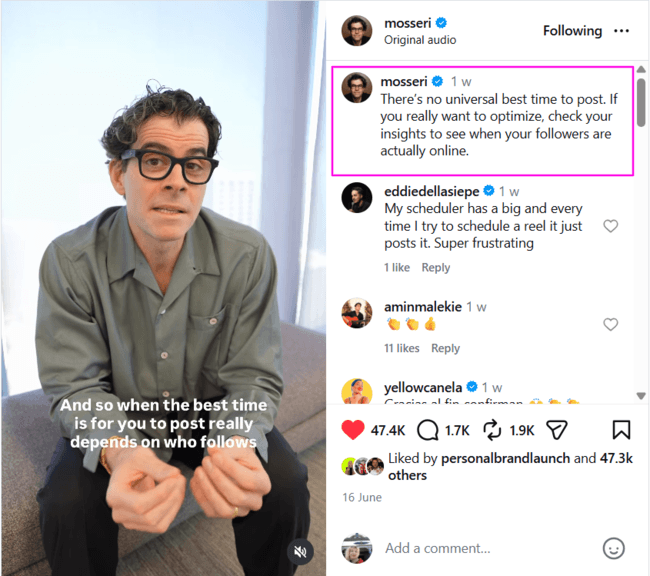
Instead, Instagram recommends looking at your own Insights to understand when your audience is online. Every community behaves differently, so the ideal posting schedule depends entirely on your followers’ habits, not on generic charts circulating the internet.
3. Individual Captions for Carousel Slides
One of the most requested carousel features has finally arrived. Instagram now lets creators add a unique caption to every individual slide within a carousel post.
Instead of relying on one long caption for the entire post, each slide can now provide its own explanation, context, CTA, or story. This opens up new opportunities for tutorials, educational content, product showcases, portfolios, and step-by-step storytelling.
4. Reorder Your Profile Grid
One of Instagram’s most requested features has finally arrived. You can now rearrange the posts on your profile grid, even after they’ve been published.
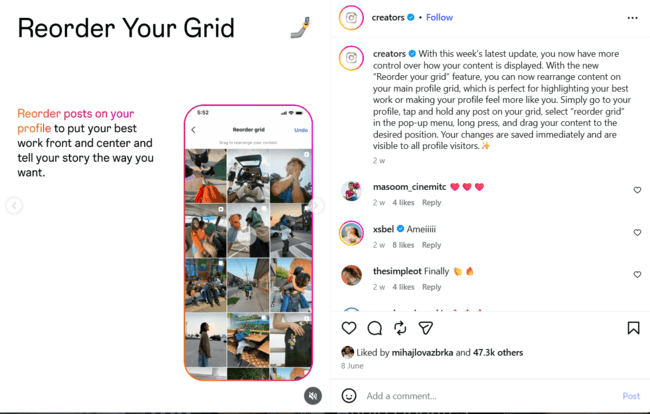
Simply head to your profile, tap and hold any post, choose “Reorder Grid”, then drag posts into their new positions. Your changes are saved instantly and become visible to everyone visiting your profile. Whether you’re showcasing a portfolio, highlighting your latest campaign, or simply creating a more aesthetically pleasing layout, you no longer have to plan your feed months in advance.
5. Edits Updates: Better Audio, Better Workflow
This month’s Edits updates focus on improving audio production and making the editing workflow even smoother. While the list isn’t as extensive as previous months, each feature removes another small friction point for creators producing content on a regular basis.
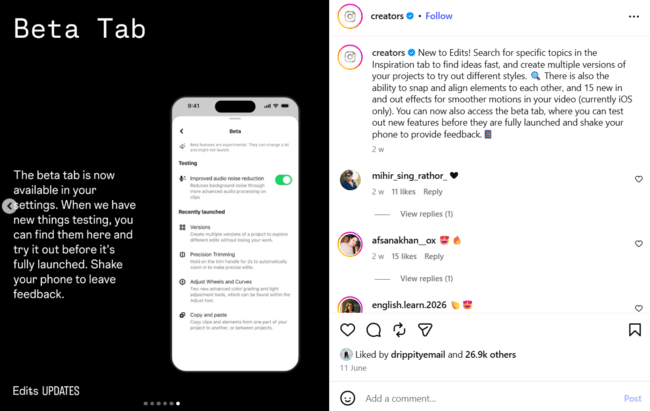
Here’s what’s new this month:
- Search topics in the Inspiration tab: Find inspiration faster by searching for specific topics instead of endlessly scrolling.
- Project Versions: Create multiple versions of the same project to test different editing styles before publishing.
- Snap & Align: Elements now automatically snap into position, making layouts cleaner and more precise.
- 15 new transition effects (iOS): Smooth “in” and “out” animations give videos a more cinematic feel.
- Beta Tab: Try experimental features before everyone else, and simply shake your phone to send feedback directly to the Edits team.
- Compare Reels performance: Analyze up to four Reels side by side to understand which content performs best.
- Audience insights & PDF reports: Dive deeper into your audience and export reports to share with your team or clients.
- Olivia Rodrigo font: Add a pop-inspired typography style to match current creative trends.
- Opacity blending controls: Fine-tune transparency for text, stickers, and overlays to create more polished compositions.
- Restyle improvements: Use AI prompts to completely transform an image into a new visual style.
- Long exports: Export videos up to 15 minutes long, opening the door to tutorials, interviews, podcasts, and longer storytelling formats.
- Import and save your own audio: Bring your own voiceovers, music, or branded sounds directly into Edits and reuse them across future projects.
- Automatic volume matching: Edits now balances volume levels between clips, music, and voiceovers, creating a much more professional final result.
- 200 new sound effects: The library keeps growing, with plenty of new keyboard, typing, transition, and ambient sounds for storytelling.
- Search the font library: Instead of scrolling through dozens of fonts, simply search by name and jump directly to the style you need.
Instagram New Features: May 2026
We can see, throughout May, that Instagram is putting all its effort to level up the quality of the content that is pushed out on this platform, starting with giving more credits to original creators for reels, carousels, or regular posts, clearly labeling AI content and creators, showing you what impacts views rate the most (and what you need to improve to have higher scores), and making so many updates on Edits to help creators do what they know best: create content with ease.
1. Original Creators Get More Protection
Instagram is officially expanding its originality protections beyond Reels. Over the next month, the same policy that already applies to Reels will now cover photos and carousels, too. In simple terms: if your account mostly reposts content you didn’t create or meaningfully transform, Instagram may stop recommending your content to non-followers.
View this post on Instagram
This is a major signal from Instagram about where the platform is heading. Original creators are being prioritized, while repost-heavy “curation accounts” may lose visibility. If you regularly use third-party content, Instagram advises adding meaningful edits, commentary, or creative transformations rather than simply reposting.

You can check your standing anytime in Account Status, where Instagram now shows whether your content is eligible for recommendations and lets you appeal if needed.
2. AI Creator Labels
Instagram is testing a new “AI Creator” label for accounts that regularly create AI-generated content. The label appears directly on profiles and alongside posts, giving audiences more transparency about the type of content they’re consuming.
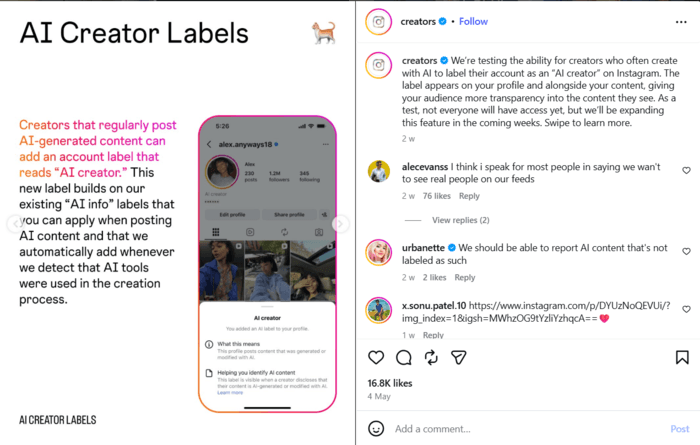
The rollout is still limited, but it’s another sign that Instagram expects AI-generated content to become mainstream enough that users should know when they’re interacting with it. Instead of hiding AI involvement, Instagram seems to be normalizing disclosure.
3. What Actually Impacts Your Reach (According to Instagram)
Instagram also clarified which engagement signals matter most when it comes to distribution and recommendations. And surprisingly, likes are no longer the star of the show.
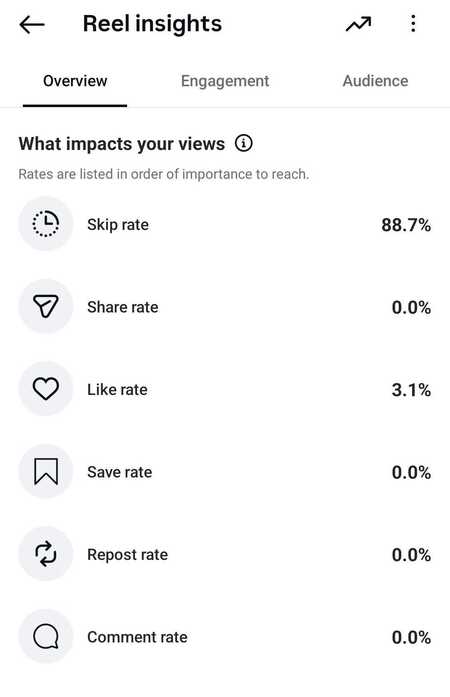
Here’s the order of importance:
- Skip rate
- Share rate
- Like rate
- Save rate
- Repost rate
- Comment rate
This reinforces what Instagram has been hinting at for months: the platform increasingly values intentional viewer behavior. If users skip your content quickly, it sends a stronger negative signal than a lack of likes. On the other hand, shares and saves indicate genuine value and relevance.
4. Edits Updates: AI Generation, Smarter Captions & More Creative Control
May Edits updates leaned heavily into AI generation, customization, and workflow improvements. The biggest addition is Generate, a feature that allows creators to generate clips directly inside Edits using AI. It’s currently rolling out across selected regions, including the U.S., Canada, Australia, South Africa, Singapore, and several others.
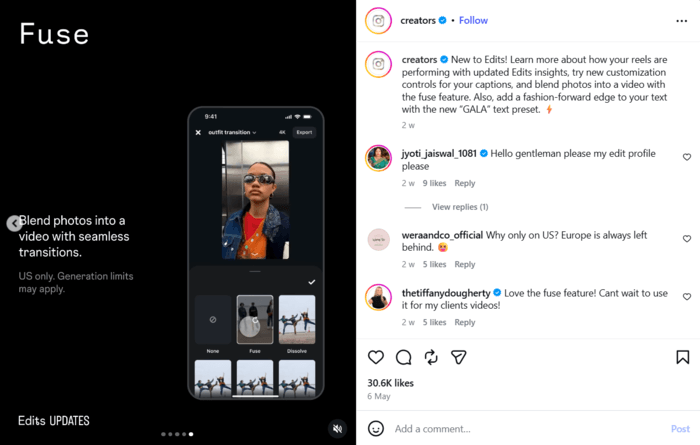
Instagram also introduced the exclusive Euphoria filter, inspired by the show’s cinematic aesthetic, because apparently everyone deserves to look emotionally devastated but beautifully lit.
Here’s what’s new this month:
- Save favorite adjustments and effects: Reuse your preferred editing settings without rebuilding them every time.
- New text emphasis controls: Highlight important words and create more dynamic captions.
- Generate AI clips directly inside Edits: Create visuals without leaving the app.
- Exclusive “Euphoria” filter: Adds a cinematic, moody visual style inspired by the series.
- Beta testing page in Settings: Experiment with unfinished features and give feedback (yes, by literally shaking your phone).
- Updated Edits insights: See which engagement signals are actually driving your reach.
- Advanced caption customization: Censor words, manage filler words, and control punctuation/title formatting automatically.
- Fuse feature: Blend photos together into a moving video sequence.
- “GALA” text preset: Gives your typography a more editorial, fashion-inspired look.
- Adjustable text opacity: Make text subtle or bold depending on your aesthetic.
- 200+ new sound effects: More audio variety for transitions, humor, and storytelling.
- Transition pace controls (iOS): Fine-tune the speed of transitions between clips.
- Live Photos → Video Clips: Turn existing Live Photos into editable video content instantly.
Instagram New Features: April 2026
Except for the usual Edits updates, April was pretty quiet on Instagram. But there’s still one major thing you might want to pay attention to, along with a reminder of a maybe-forgotten option that could be a great help for businesses.
1. Instagram Insights Just Got Upgraded
Insights just got a meaningful upgrade, from layout to depth. The interface is now cleaner, with the most important metrics front and center, making it easier to quickly understand what’s working. What’s particularly interesting is that Instagram is now adding more context tailored to each creator’s growth stage.
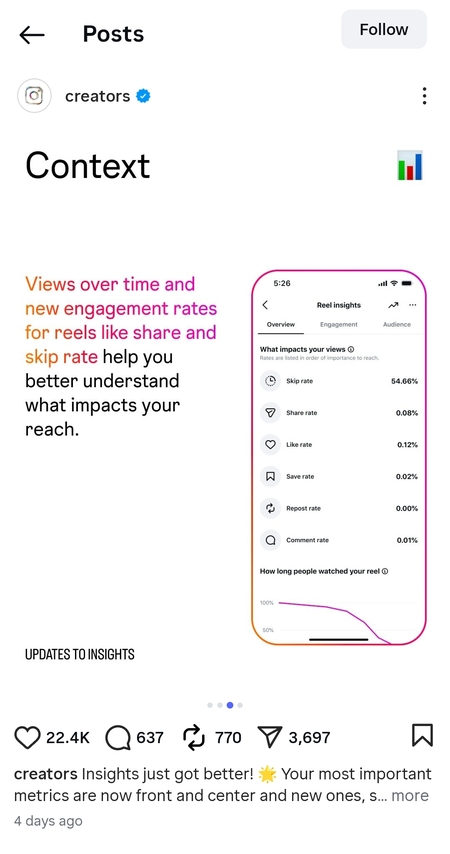
When it comes to metrics, Reels analytics got more detailed. You can now track views over time, along with share rate and skip rate, and even see what users do after watching your content, whether they visit your profile, follow you, or engage further.
2. DM Settings Reminder
DMs are crucial for businesses, and in case you forgot, Adam Mosseri reminded us of a few features that can seriously improve how you manage communication.
View this post on Instagram
Just a reminder that you can:
- Set notifications to be alerted only for DMs, without distractions from likes or comments.
- Schedule messages by long-pressing the send button.
- Turn off read receipts, either per conversation or globally.
These small features can make a big difference in managing customer communication, collaborations, or even internal workflows without chaos.
3. Edits Updates
Edits continues to be one of Instagram’s fastest-evolving tools. April focuses on control, speed, and brand consistency, making it easier to manage projects and maintain a recognizable visual style.
Here’s what’s new this month:
- Find and replace captions: Quickly edit text across your project without manually fixing every instance.
- Text highlighting: Emphasize key words to improve readability and make hooks stand out instantly.
- Save favorite fonts and text styles: Keep your branding consistent and avoid wasting time searching for the same style again.
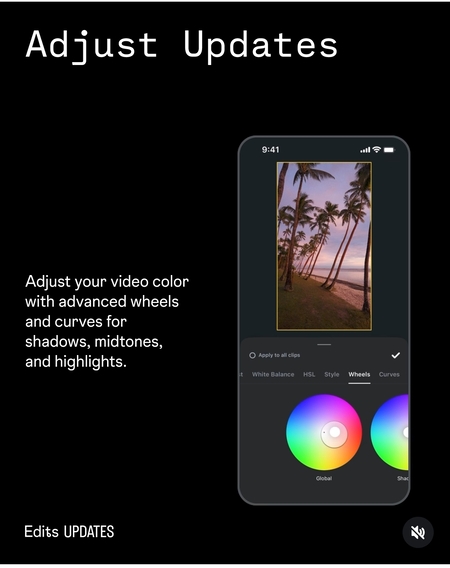
- Advanced color adjustments (wheels & curves): Fine-tune shadows, midtones, and highlights for a more polished, professional look.
- Improved project management: Pin important projects and recover deleted ones within 7 days, so nothing important gets lost.
Instagram New Features: March 2026
March was focused on Edits updates, everything to make life easier for creators. As for the rest of the app, we can see the algorithms’ trends slightly leaning towards keeping the attention rather than just scrolling.
1. Reorder Your Carousel
Instagram finally added a feature many creators have wanted for ages: you can now reorder the slides in your carousel even after publishing. That means if your strongest visual should have been slide 2 instead of slide 5, you can fix it without deleting the whole post and starting over.
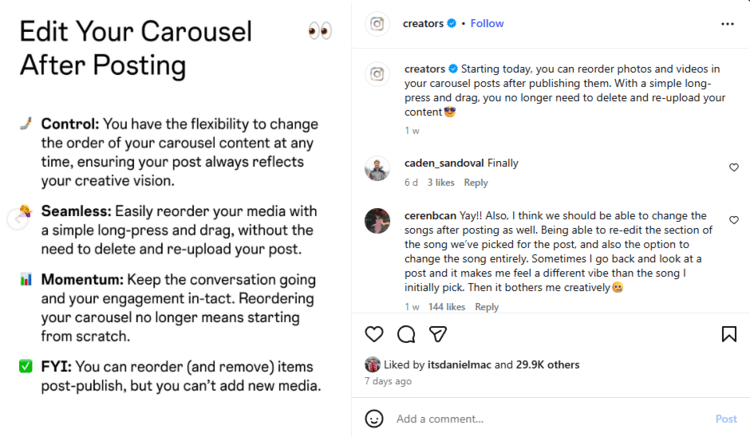
This is especially useful for storytelling, product walkthroughs, educational carousels, and any post where sequencing matters. It also gives marketers more room to optimize content after seeing early engagement patterns, rather than living with one bad slide-order decision forever.
2. Instagram Is Looking for Intentional Views
Instagram also clarified that it’s no longer treating every “view” the same way. The platform is increasingly paying attention to intentional viewer behavior, things like pausing on a video, watching longer than a quick pass, liking, saving, sharing, or commenting, instead of counting a blink-and-scroll as meaningful attention.
In other words, the platform is getting better at telling the difference between content people actually care about and content they just accidentally brushed past with their thumb. That means watch quality matters more than vanity numbers, and creators need to focus on holding attention, not just appearing in the feed.
3. Edits Updates: More Precision, More Effects, More Control
This round of Edits updates is all about making videos more dynamic, easier to customize, and faster to polish. The headline additions include new visual effects, stronger caption tools, more cinematic controls, and easier access to linked accounts and Reels inside the app.
Instagram is clearly pushing Edits further into “full creative suite” territory, not just “cute sidekick editor.”
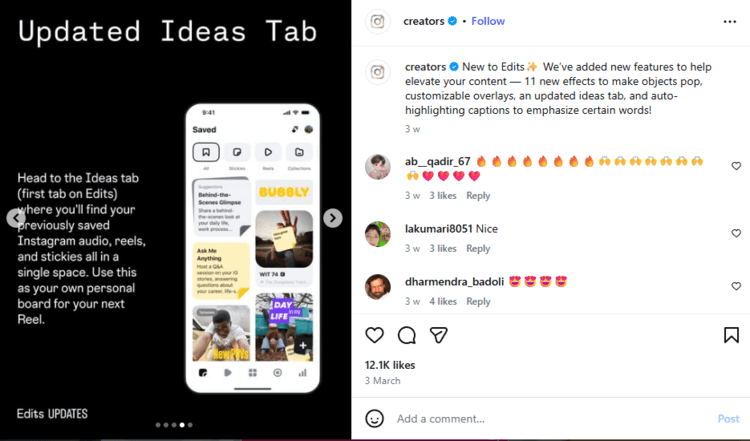
Here’s what’s new this month:
- 11 new effects, including Clone and Amplify: Add more visual drama and make your edits feel less basic, more “wait, how did they do that?”
- Overlay effects, including Pulse: Great for adding movement and emphasis without overcrowding the frame.
- Ideas tab update: Makes planning content smoother, so inspiration doesn’t disappear into the digital void.
- Auto-highlight captions: Important words now pop automatically, which is especially useful for hooks, offers, and key phrases.
- Freeze frame: Pause on a specific moment to build suspense, highlight a detail, or land a punchline.
- Sound effect suggestions (“sound effects for you”): Helps match your visuals with relevant audio faster, without endless searching.
- Voiceover teleprompter: Read your script while recording, which makes voiceovers cleaner and much less chaotic.
- 5 new cinematic effects: Perfect for moodier edits, storytelling content, or anything that needs a more polished visual vibe.
- Adjustable retouch button for camera: Lets you fine-tune your look before recording, instead of fixing everything later.
- Masks and keyframe animations on the main track: Gives you more precise control over motion and layering, without jumping through editing hoops.
- Frame-by-frame trimming precision: Helpful when timing needs to be exact, especially for transitions, beat syncs, or product reveals.
- Cinematic sound effects: Adds more depth and emotion to your edits, especially in trailers, teasers, or dramatic reveals.
- New fonts, including Dhurandhar The Revenge and AI-generated fonts: More room to play with tone, branding, and personality in your text overlays.
- Transform tools: Resize, rotate, or reposition elements more freely, which makes layout adjustments much easier.
- Template updates: Speeds up content creation and makes it easier to reuse formats that already work.
- Easier access to linked accounts and your Reels inside the app: Useful if you manage multiple accounts and don’t want to waste time bouncing around menus.
Instagram New Features: February 2026
The shortest month of 2026 didn’t bring dramatic launches, but it did bring clarity. Instagram refined who gets access to what, doubled down on algorithm control, and, as usual, continued upgrading Edits.
Sometimes, quiet months are the most strategic ones.
1. Who Can Use Creator Tools
Instagram clarified access levels for creator and monetization tools, which many users had been confused about.
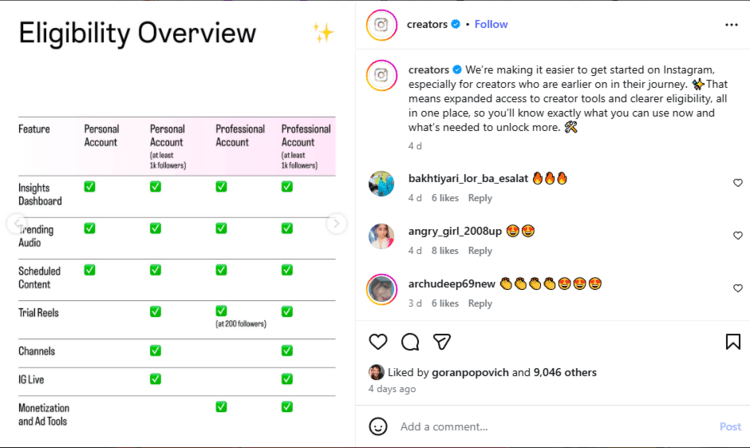
Here’s how it works now:
- All public accounts have access to basic creator tools, including performance dashboards and content metrics.
- Professional accounts unlock monetization and ad tools.
- Trial Reels are available to:
- Private accounts with 1,000+ followers
- Professional accounts with at least 200 followers
- Channels and IG Live are available to:
- Personal accounts with 1,000+ followers
- Professional accounts with 1,000+ followers
- Monetization and ad tools are available only for Professional accounts with at least 200 followers.
You can check your eligibility in Settings → Creator Tools / Professional Dashboard.
2. “Your Algorithm” Button Launched in Reels Tab
We already know this AI-powered feature, but February made it more visible and clearer for users. When you open the Reels tab, you’ll now see two hearts in the top right corner.

Once clicked, Instagram shows an AI-generated overview of the topics it believes you’re interested in, based on your past activity.
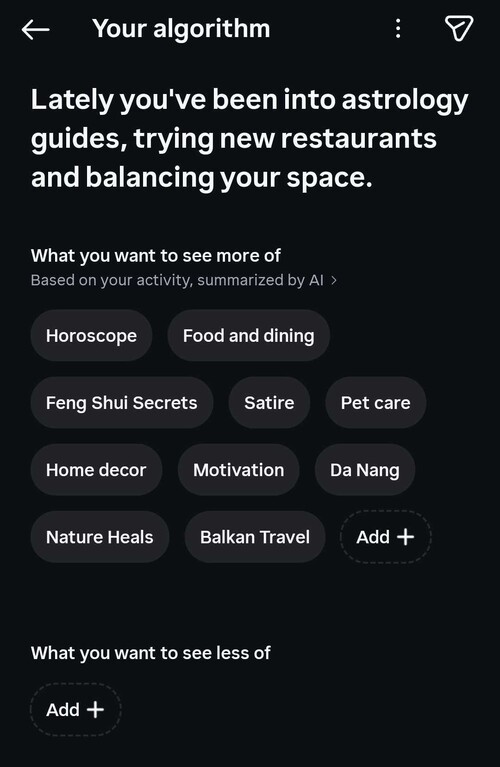
From there, users can:
- Add new topics
- Remove interests they no longer care about
- Adjust recommendations manually
In short, the algorithm is no longer entirely passive: users can actively reshape what appears in their feed.
3. Official Tips for Better Reach
Instagram also shared official guidance on improving visibility and increasing your chances of being recommended. Nothing revolutionary, but when the platform spells it out, it’s worth paying attention.
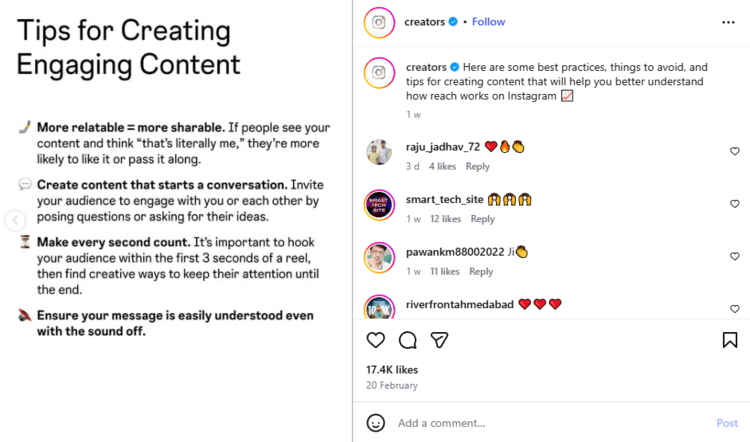
Here’s what Instagram says does help your reach:
What To Do:
- Be authentic: Original, real, personality-driven content performs better than overly polished, generic posts. Instagram is actively rewarding authenticity over perfection.
- Maintain video quality: Reels should be at least 720p resolution and 30 frames per second. Low-quality uploads may not be prioritized in recommendations.
- Use trending audio: Audio still plays a major role in discoverability. Leveraging trending sounds increases your chances of surfacing in Reels recommendations.
- Engage with comments: Like and reply to comments on your Reels. Instagram treats this as a strong engagement signal, reinforcing that your content sparks conversation.
- Study your insights: Retention rate, skip rate, shares, and saves matter more than ever. Instagram wants creators to actively analyze what works and iterate.
What To Avoid:
- Non-recommendable content: Content that violates guidelines or falls into restricted categories won’t be recommended, even if it’s not removed.
- Reels with watermarks: Content reposted from other platforms (with visible watermarks) may receive reduced distribution.
- Taking credit for content that isn’t yours: Unoriginal content without transformation or proper credit limits reach and can hurt account trust signals.
- Overly long Reels (3+ minutes): While longer formats exist, most Reels perform better when concise and retention-focused.
4. Edits February Updates
February continued refining Edits with both practical and seasonal upgrades.
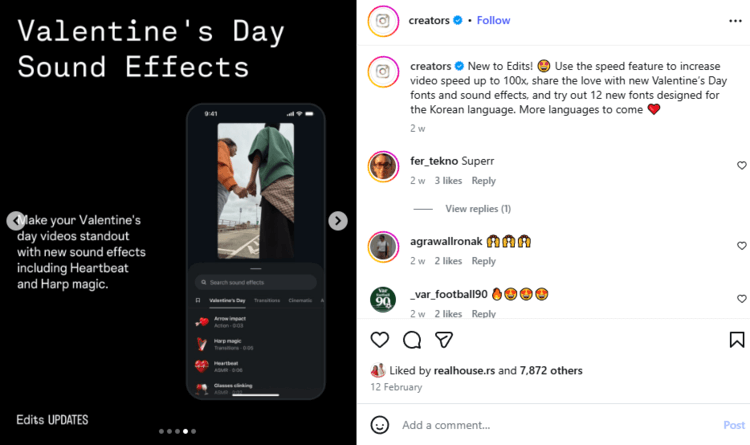
Here’s what’s new:
- Reverse a video clip: Instantly flip footage for creative transitions or storytelling twists.
- Audio ducking: Automatically lowers background music so voiceovers remain clear.
- Clickable links: Links exported from Edits now remain clickable when published.
- Save drafts: Publish later or share drafts via DM for collaboration.
- Teleprompter support: Use sticky notes as script prompts while recording.
- Templates: Create your own templates and let others reuse them.
- Speed control up to 100x: Dramatically adjust pacing for dynamic edits.
- Valentine’s Day fonts & sound effects: Seasonal creative tools.
- Korean fonts: Expanded localization support.
This month focused less on flashy AI tricks and more on workflow, collaboration, and accessibility.
Instagram New Features: January 2026
“New year, new me”… that’s something Instagram could say after changes during the previous year, but they didn’t stop there. They continued to adjust and adapt their platform to users’ needs.
January was pretty calm on Instagram, with most updates revolving around Edits, but we mustn’t forget that Mosseri clearly announced the direction Instagram will take in 2026, emphasizing one thing that stands out: authenticity.

So, what we can expect, according to him, in the following year is:
- Originality being rewarded.
- Individual posts will no longer have the influence they had before. Instead, it’s profiles that will send the trust signals.
- Shares, DM, and recommendation has more influence than likes.
- Ads need to look less like ads.
- Your brand will need a face.
- Speed up, and leave perfectionism at the door.
- More AI content, which will eventually need to be labeled.
Edits Updates
January started with the Insight Tab, a new feature that lets creators see and sort their reels by most likes, comments, shares, new followers, or lowest skip rate. You can filter it out by 7, 14, 30 days, 1 year, or all time.
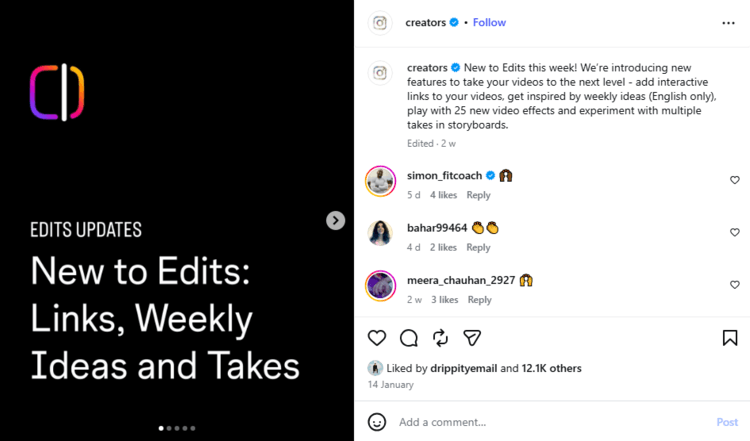
Furthermore, here are all the new things you can do with Edits:
- Download and share your account insights as an image or PDF via message or email.
- Do the same for a specific reel.
- Use AI Comment Summaries to summarize all your comments and see what your audience wants to see next.
- Compare reels and their performance, just by swiping through them.
- Insert links as clickable overlays.
- Weekly Ideas — a feature that gives you 10 ideas a week based on your previously published content.
- New effects such as bounce, fisheye, blackout, and more.
- You can add multiple audio and video clips to your storyboard, compare them, and take what you like to editing.
- Use the Crop and Paste feature for easier editing. You can copy and paste elements, such as font, from one project to another (or within the same project).
- New Timeline settings: expanded setting menu appears when you click on your project name.

- You now apply edits from the main track.
- The Edit’s effects, such as reverse, blur, tag, scribble, and new animations, are now available on Android as well.
Instagram 2025 Recap: The 5 Updates That Actually Mattered for Marketers
Congratulations, we’ve survived another turbulent year of Instagram updates!
2025 brought algorithm shifts, new metrics, AI-powered creativity, and more tools than ever before. Some changes were loud, others quietly transformative. But only a few truly reshaped how marketers plan, create, and distribute content.
Here are the five Instagram updates from 2025 that actually mattered.
Views Became the Primary Metric (Not Reach)
In 2025, Instagram made one thing very clear: Views matter more than Reach. Across Insights, Reels analytics, and creator guidance, the platform consistently emphasized watch behavior, replays, retention, and completion over how many unique accounts merely saw a post.
This shift changed how performance is measured. Scroll-by impressions lost importance, while content designed to be watched (and rewatched) gained algorithmic priority.
Edits Became a Full Creative Suite
What started as a lightweight editor turned into one of Instagram’s biggest strategic moves. In 2025, Edits evolved into a full production environment with templates, teleprompters, lip-syncing, advanced text styling, brand color control, remixing, analytics exports, and seasonal effects.

Source: creators.instagram.com
By the end of the year, marketers could ideate, script, edit, brand, remix, and publish content without leaving Instagram.
Algorithm Control & Transparency Increased
Instagram took meaningful steps toward algorithm transparency and user control. Features like Your Algorithm (topic tuning for Reels), detailed retention and skip-rate metrics, and clearer explanations of how content is recommended signaled a shift away from a complete black box.
Users can now influence what they see, and creators can better understand why content performs.
Instagram Content Escaped the App (Google Search and Amazon TV)
In 2025, Instagram content officially broke out of the feed. Public posts began appearing in Google search results, turning Instagram into an off-platform discovery channel. Later in the year, Instagram also landed on TV screens with the launch of Instagram on Amazon Fire TV in the U.S.
Social content is no longer mobile-only. It’s searchable, discoverable, and watchable beyond the app.
Partnership Ads Scaled Creator Marketing
Partnership Ads matured into a serious growth channel. Brands could amplify creator content directly from creators’ profiles while maintaining full control over targeting, budget, and measurement.
It blended the trust of creator content with the precision of paid media, without rebuilding creatives from scratch.
Instagram New Features: December 2025
December came with lots of game-changing updates for Instagram, so let’s dive right in!
1. Instagram on TV (Amazon Fire TV, U.S. only)
Instagram is officially stepping into the living room. In December, Meta launched Instagram for TV, starting with Amazon Fire TV in the U.S. The experience is optimized for lean-back viewing, focusing heavily on Reels and longer video content, rather than static posts or Stories.
View this post on Instagram
This move aligns with Instagram’s ongoing push toward video-first discovery. While interaction is limited compared to mobile, it positions Instagram as a competitor in the “casual viewing” space, somewhere between TikTok compilations and YouTube Shorts on TV.
2. Restyling Text in Stories with Meta AI
Instagram introduced AI-powered text restyling in Stories, letting creators transform plain text into eye-catching designs using @meta.ai. After typing your text, you can restyle it with presets like balloons, gummy, or gold, or go fully custom by describing the style you want in a prompt.

This makes Stories more expressive without needing design skills or third-party tools. It’s quick, playful, and lowers the barrier to creating visually rich content that stands out in fast-moving Story feeds.
3. Up to 5 Hashtags Allowed
Instagram clarified (and reinforced) that posts now support up to five hashtags, and that more isn’t better. This aligns with Instagram’s broader move away from keyword stuffing toward cleaner captions and algorithm-driven discovery.
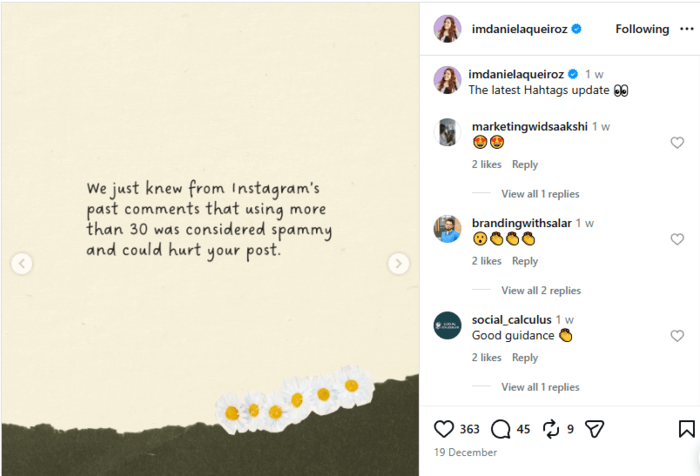
The idea is relevance over volume. Hashtags still help categorize content, but Instagram relies far more on engagement signals, content analysis, and user behavior to decide distribution.
4. “Your Algorithm” Controls (U.S. only)
Instagram is testing “Your Algorithm”, a feature that lets users adjust what they see in their Reels tab. Instagram’s AI still predicts interests based on behavior, but users can now add or remove topics to actively shape recommendations.
View this post on Instagram
This is a big philosophical shift. Instead of pure algorithmic guessing, Instagram is inviting users to co-pilot their feed, starting with Reels, where discovery plays the biggest role.
5. Edits Updates: Templates, Remixing & New-Year Energy
December brought one of the most feature-packed Edits updates so far, focused on speed, remix culture, and seasonal creativity.
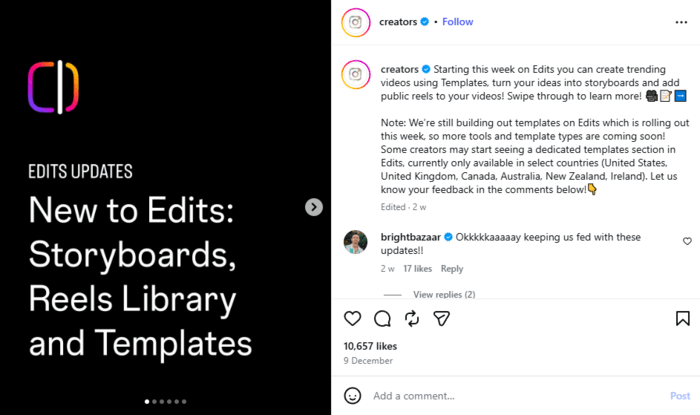
The biggest addition is video templates, available in the US, UK, Canada, Australia, New Zealand, and Ireland. Creators can build videos using trending formats (music, fonts, pacing) or share their own templates for others to reuse, boosting reach and consistency.
Here’s what’s new this month:
- Create videos from templates: Speed up production with trending structures or share your own.
- Idea sticker → storyboard: Turn ideas into full scripts with teleprompter cues, clips, and notes.
- Remix public Reels from libraries: Reuse content ethically, with automatic creator credit.
- Second color support: Add contrast to backgrounds or emphasize text.
- Edits lock-screen widget: Jump into editing faster.
- Catchy title prompts: Optimize hooks before publishing.
- New Year’s effects: 150+ sounds (air horns, countdowns, fireworks).
- Text & caption styling: Choose color, font, and style more precisely.
- 38 new fonts for Indian languages: Better localization and accessibility.
- Word highlighting: Emphasize key phrases dynamically.
- Object & people effects: Add outlines, blur, labels, sparkles, and focus effects.
Instagram New Features: November 2025
November wasn’t the busiest month in terms of new developments on Instagram. But the IG team is always up to something new.
1. Instagram Competitive Insights: Benchmark What Others Do
Ah, this feature came with a lot of fuss among creators. The Competitive Insights tool inside the Professional Dashboard lets business and creator accounts compare themselves against up to 10 other profiles.

You can benchmark parameters like follower growth, posting frequency, Reels & feed activity, and even boosted-post (ad) usage side-by-side.
Even if a competitor hides their like count, you’ll still see likes inside Competitive Insights, giving you a clearer sense of which posts resonate, without manual spying or third-party tools.
2. Partnership Ads
Instagram is doubling down on creator–brand collaboration with an expanded version of Partnership Ads, enabling brands to turn creator posts into full-funnel advertising assets.
View this post on Instagram
You don’t have to rely solely on your own branded content; you can now amplify a creator’s Reel, Story, or carousel, running it as an ad directly from their handle while keeping all the targeting, budget control, and reporting inside your ad account.
This approach blends authenticity with performance. Creators get visibility in a brand-safe way, while marketers get the credibility boost of creator content plus all the optimization tools of Meta Ads.
Also, because many types of collaboration posts (including boosted organic creator posts) can be turned into Partnership Ads, brands can scale what’s already working instead of reinventing their creative library every time.
3. Edits Updates: Lip-Syncing & Creative Control
This month’s highlight inside Edits is the new Lip-Syncing feature (iOS, U.S. only), which lets you bring still photos to life by syncing them to a recorded voice line.
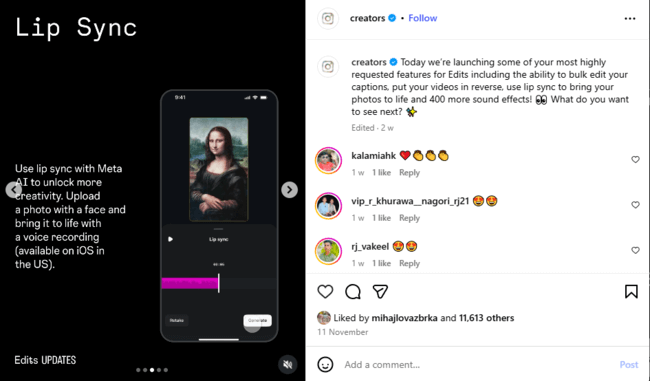
It’s a great way to create personality-driven content without ever turning on the camera. Whether for memes, product explainers, or storytelling, it’s a “wait, what did I just watch?” effect that grabs attention instantly.
But Lip-Syncing is just the headline, Edits rolled out a whole toolbox of new enhancements that make video creation faster, more polished, and more on-brand than ever.
Here’s what’s new this month:
- Bulk-edit captions, reverse videos, and 400+ new sound effects: Speed up your workflow and get more control over tone and pacing.
- Stranger Things font + new mask shapes and mask properties: Add retro drama and fully customize shapes, transitions, and overlays.
- Automatic music ducking + improved volume control: Keep your voice crystal clear even over loud tracks.
- Enhanced color correction + new text styles, animations, and effects: Give your Reels a sharper, more branded visual aesthetic.
Instagram New Features: October 2025
October Instagram updates are all about making your posts more accessible (to various markets), more attractive, and more engaging. And a perfect month to reward genuine creators.
1. Expanded AI Voice Translation for Reels
Instagram added support for more languages (e.g., Hindi and Portuguese) in its AI-powered voice translation for Reels.

Creators can now toggle “Translate voice with Meta AI” when posting, helping them reach audiences who speak different languages, and lip-syncing is handled automatically.
2. “Rings” Program for Creators
Instagram introduced “Rings”, a new award program recognizing standout creators who push creative boundaries.
This time, 25 winners are: Mika Ninagawa, Futura, Gabriel Moses, Aki and Koichi, Mohammed and Humaid Hadban, Mimi Choi, Golloria, Thalita and Gabriela Zukeram, Dolly Singh, Elyse Myers, Zarna Garg, Katie Krejci, Tyshawn Jones, Nigel Sylvester, Chris Brickley, Ashley Gordon, Laufey, Ari Miller, Sebastian Jern, Cole Bennett, Brian Lindo, Linda Lomelino, lifeonfilm (an account run by Grant Weintrob, Christian Baiocco, and Griffin Katz), Olivia Dean, and Adrian Per.
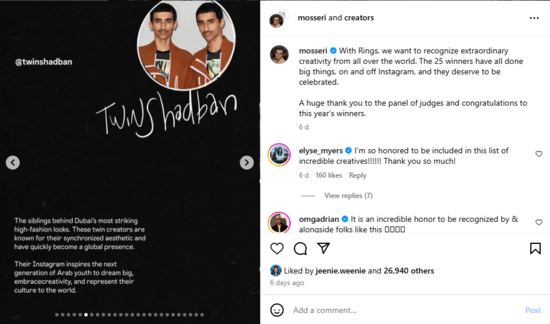
Winners receive a special golden ring around their profile and can customize their profile landing page with unique visuals.
3. Watch History for Reels
As Adam Monseri announced, Instagram rolled out a Watch History feature, letting users revisit every Reel they’ve watched. You can now filter by date and creator, and toggle between newest and oldest views.
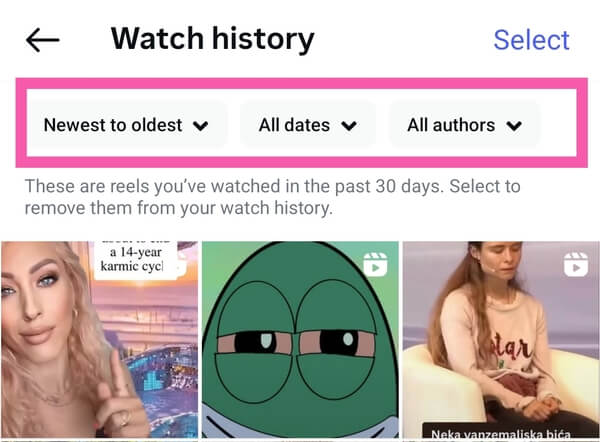
This gives people an easy way to rewatch or rediscover content that caught their eye. This update makes browsing habits more transparent and gives creators a second chance at visibility when users go back through their watched list.
It’s a small but powerful change that rewards memorable content. If your Reel captures attention, you’re in their Watch History for good.
4. Algorithm Control: “Your Algorithm” Topics Feature
Instagram announced an upcoming feature where users will soon be able to tune their algorithm by adding/removing topics based on interests, starting with Reels.
5. Edits Updates: Halloween Effects & Custom Styling
October brought a spooky-good round of Edits updates. The highlight: A brand-new Halloween effect, packed with eerie transitions, fog filters, and themed overlays to make your Reels perfectly seasonal.
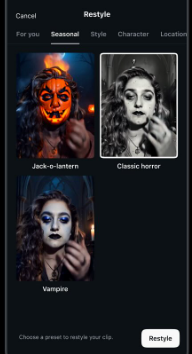
But that’s just the treat; there are plenty of new tricks for editors, too.
Here’s what’s new this month:
- Share Reels metrics as PDF: Download and share your performance reports in a sleek format for clients or teammates.
- 250 new sound effects: From eerie whispers to cinematic booms, the sound library just exploded.
- Sound effect search: Type a mood or keyword and find the perfect track instantly.
- New fonts (including “Zen Serif”): Refine your text aesthetic with hundreds of fresh options.
- Enhanced text styles: Combine fonts, colors, animations, and effects in one layout.
- Custom HEX colors: Enter exact brand colors to keep visuals on-brand every time.
Instagram New Features: September 2025
It seems that September has been a relatively quiet month for Instagram, considering the number of updates in the previous months. However, the platform did release one major and several minor updates related to the Edits app.
1. Instagram Comes to iPad
After years of anticipation, Instagram launched a native iPad app on September 3rd, 2025, finally optimized for larger screens and no longer a stretched-up iPhone version.
View this post on Instagram
The app puts Reels front and center, offers a “Following” tab for chronological viewing, and takes advantage of the extra screen space to display DMs/comments side-by-side with video.
2. Horizontal, Ultra-Wide Reels & Posts 5120×1080
Speaking of iPads… have you tried the new Instagram dimension in reels? 5120×1080. Yep, shocking.
Δείτε αυτή τη δημοσίευση στο Instagram.
For some, it’s a visual treat, for others, deeply disturbing. But actually, it works surprisingly well for certain types of content: landscape shots, sweeping panoramas, B-roll, moody vibes, cinematic storytelling, product reveals, basically anything that thrives on negative space and visual drama.
3. Story Reach Bug Fix
There was a bug that wrongly limited reach when you posted many Stories in one day. Mosseri confirmed that the bug has been fixed, and reach should no longer drop simply because you published multiple stories.
Some users, however, are still reporting inconsistencies, so it might not be fully stabilized yet.

4. 3 Billion Users & Algorithm Topic Controls
Instagram hit a major milestone: 3 billion monthly active users. To give users more control over what they see, Mosseri also announced an upcoming test allowing users to tune their algorithm by adding or removing topics (starting with Reels).
This is Instagram signaling that recommendation-based reach will become increasingly central, and giving creators some control over where their content surfaces.

5. More Edits Tools: Fades, Overlays & Noise Control
Edits got upgrades again! You can now:
- Control fade-ins/fade-outs for clips and overlays.
- Save sound effects for reuse.
- Convert clips to overlays, or vice versa.
Instagram New Features: August 2025
1. Friends Map: Location Insights on Your Terms
Instagram’s opt-in Friends Map is now live in the U.S., letting you share your last active location with friends you pick and explore location-tagged content from creators or pals around you.
View this post on Instagram
This feature is optional and highly customizable, so you choose whom to share with, including custom lists or Close Friends. Parents also get visibility if teens start sharing, aiming to balance community connection with privacy oversights.
2. Friends Feed: What Your Circle is Watching
Instagram officially launched the Friends Feed, a Reels tab that shows content your friends have liked, commented on, reposted, or created, making it easier to spark conversations around what’s trending among your community.
You can also control what your friends see by muting activity or hiding your interactions, ensuring that the connection remains personal and not invasive.
3. Instagram Insights: Zooming In on Reels, Carousels & Demographics
Instagram is doubling down on transparency, offering creators and marketers more precise engagement and audience data than ever before. And these updates are related to your reels and carousels (a hint: perhaps that’s the direction they want us to go).
- When People Liked Your Reel: You can now pinpoint the exact moment in your Reel when viewers hit that Like button, revealing what scene, phrase, or product shot actually triggered the engagement.
- When People Liked Your Carousel: For carousels, you’ll see which slide got the most love, helping you understand what caught attention and what fell flat.
- Extensive Demographics for Posts: Demographic insights also got a serious upgrade. In addition to age, gender, and country, you can now see which cities your audience is from, the age range split by gender, and when your followers are most active. This makes targeting and content scheduling way more precise, especially for region-based campaigns or account growth planning.

4. Top Follower Drivers
Instagram added a new section in your Followers Insights that highlights which posts brought in the most new followers. It’s displayed as a slider or list, showing your most effective content for growth.
Whether it’s a viral Reel or a high-performing carousel, you’ll now see exactly what’s converting viewers into followers.

If your account has been a bit quiet lately, you might not see anything yet, but once you’re active, this becomes a valuable compass for planning your next post, campaign, or content theme.
5. Focus on Views instead of Reach
Instagram made it clear (again): Views matter more than Reach. While Reach tells you how many unique accounts saw your content, Views show how many times your content actually got watched, which is especially important for Reels and videos.
It is now clear that it’s a metrics mindset shift. Instagram’s own Insights now highlight Views more prominently than ever, reinforcing that repeated engagement and replay-worthy content should be your creative goal.

Source: @creators
6. Edits Updates
Just like every month, Edits is going through a transformation and upgrade. This time, the Edits app introduced these new features:

Source: @creators
- Share Edits drafts via DMs: For speeding up the collaboration by sending in-progress videos directly to teammates or clients.
- Stickers to Teleprompter: Instantly convert your sticky notes into on-screen script prompts for smoother filming.
- Sound goes to 150%: Give your audio an extra boost when you need your message to punch through the scroll.
- Compare Reels’ engagement: Swipe through Reels insights side-by-side to see which one really performed best.
- Safe zones: Visual overlays now show exactly where not to place text or elements (hello, Like button blind spots).
- Align with the edges: Snap stickers, overlays, and text cleanly to the frame edge for a more polished look.
- Curves for smooth animation (for iOS only): Add natural movement and flow to animated elements using curves.
- Detailed export progress: See exactly how your video is rendering, frame by frame, so you’re not left guessing.
7. Meta AI Translation for Reels
This free new AI translation feature opens the door for you to reach the audience that speaks other languages. For now, it’s only English to Spanish and vice versa.
As an addition, you can also check the metrics to see which language your audience speaks.
“Your voice, different language!” has finally knocked on the marketers’ doors.
You can access the feature by clicking “More options” before publishing and then selecting “Translate voice”. After that, make sure to select “Translation settings” to turn off lip synching and turn on approvals. That way, you can preview the reel before you post it.
Best fit for:
- Solo video, when facing the camera without covering your mouth.
- No background noise or music.
8. Link Reels for Seamless Storytelling
Finally, no more scrolling through the feeds to find Part 2. It was pretty much frustrating for your audience.
Instagram now lets you link Reels together in captions or via the overflow menu, so your multi-part stories flow cleanly from one video to the next.
9. New Metrics for Reels: Retention and Skip Rate
Instagram now offers granular insights to improve content performance. New Reels analytics include a Retention chart (showing where viewers drop off) and a Skip Rate metric to flag weak openings.

Source: @creators
- Retention Chart: You can now check the percentage of the audience who watched your reel and at what point the retention dropped.
- Skip Rate: This metric is a red flag for weak content. It shows the percentage of people who skipped your video, without watching it for at least the first 3 seconds.
Instagram New Features: July 2025
Instagram continued rolling out a mix of creative tools, safety enhancements, and new ways to connect throughout July.
1. 1,000 Followers Required to Go Live
As of July, you need at least 1,000 followers to go live on Instagram. Users below that threshold received a pop-up notice removing their Live access, with no official announcement from Instagram, just an updated policy.

This shift probably aims to reduce spammy or low-quality broadcasts, aligning Instagram with platforms like TikTok, which already require a similar follower count.
For smaller creators, it’s a new milestone to unlock, while for larger ones, it means less clutter in the Live feed.
2. Edits App: Ideas, Voice Tweaks & Animated Layers
Instagram’s standalone video editing app, Edits, keeps evolving into a serious creative studio. July brought a lot of updates helpful for content planners, storytellers, and perfectionists alike.
Whether you’re scripting, syncing, or fine-tuning, this round of updates puts even more power at your fingertips.
New tools added this month include:
- Ideas tab: Save creative ideas as audio clips or sticky notes, mark them as done, and filter by status or last edit.
- Explore reels by audio: See more Reels using the same tracks you’ve saved.
- New insights: View net new followers, accounts reached, and sort Reels by likes, comments, and saves.
- Voice enhancement: Reduce background noise and highlight your voice with smart volume/speech balancing.
- Direct sharing: Post straight from Edits to Instagram, Facebook, or iOS, with flexible export options.
- Keyframe animation: Animate stickers, text, cutouts, and overlays frame by frame.
- New voice effects: Try 10 fresh sound filters.
- Royalty-free music: Easily find high-quality, copyright-safe tracks.
- Fonts galore: Pick from over 150 new font styles.
- Save progress: Store Edits drafts directly on Instagram.
- AI Restile button: Allows you to change anything you want through a text prompt quickly.
View this post on Instagram
3. Repost Button in the Works
After years of relying on Stories and third-party apps, Instagram is testing a native repost feature for feed posts. It allows you to reshare someone’s content (with their permission) and display it in a dedicated “Reposts” tab on your profile.
The test is limited for now, but it’s a clear signal Instagram is embracing a more share-friendly model, giving users an easier way to amplify creators, causes, or just great content.
4. Reels Up to 20 Minutes (Testing Phase)
Instagram began testing longer Reels — up to 20 minutes — for select U.S. users. This feature has been quietly rolled out to a few creators and appears to target YouTube-style content like vlogs, tutorials, and mini-documentaries.
It’s still in beta, but it’s clear Instagram wants a piece of the long-form video pie. If released widely, it could attract creators looking for a one-app solution for both short and long-form content.

Source: @holler.academy
5. More Protection for Teens and Kids’ Accounts
Instagram introduced new protections for Teen Accounts and those managed by parents on behalf of kids. Family or kid-focused profiles are now defaulted to the strictest privacy and DM controls, and the Hidden Words filter is automatically activated to block inappropriate comments before they even appear.
Teens also get enhanced in-app guidance, like warnings when chatting with suspicious new contacts, visible join dates, and an easy one-tap report-and-block feature.
Instagram New Features: June 2025
June brought numerous core changes to Instagram. Let’s go together through some major ones.
1. 3:4 Photo Ratio Support
It finally happened! Instagram now supports the 3:4 aspect ratio — the natural format for most smartphone photos. Until now, creators had to crop or rely on third-party apps to fit their vertical shots into Instagram’s layout, often sacrificing composition or clarity.

Source: Instagram Creators Page
This update means your photos can now take up more vertical space in the feed without looking awkward or forced. Whether you’re a product photographer, fashion blogger, or food stylist, your shots just got a little more breathing room — and a lot more visibility.
2. AI-Powered Story Expansion
U.S.-only for now (most of the states) — you can expand your Stories images using Meta’s AI. It lets you take an image and extend it beyond its original frame using AI, adding sky, background, or texture around your photo. It’s like content sorcery for Stories.

The feature is not available on computers, but it works on your mobile app (both Android and iPhone).
The best part? You don’t need to be a designer or Photoshop wizard to make it happen. A single tap and voilà — your story gets more cinematic, more immersive, and more scroll-stopping.
3. Recaps & Celebrations
Instagram’s new Recaps give you weekly and monthly snapshots of performance, including non-follower reach and engagement spikes. Even better, they come with Celebrations — those full-screen popups when your content hits a milestone.
View this post on Instagram
It’s part analytics, part motivation boost. For creators, it’s a subtle nudge to keep going. For marketers, it’s one more way to spot which content is pulling weight.
4. Custom Font, Courtesy of Rosalía
Instagram has added a custom font inspired by Rosalía’s handwriting, and it’s… muy fuego. You can use it in Reels captions, Stories, and more — perfect for creators wanting to add a little flair and personality to their content.

Source: rosalialivevocalss
It’s not just a font; it’s a vibe. Think emotional, stylish, and culturally current, ideal for brand activations and seasonal campaigns.
5. Posts Now Indexed by Google
Big news for visibility: public Instagram posts are now eligible to appear in Google search results, starting July 10th, 2025. It’s a quiet but powerful shift that makes your content discoverable beyond the app.
View this post on Instagram
For marketers and creators, this means captions, hashtags, and metadata matter more than ever. SEO isn’t just for websites anymore.
6. Shared Access for Accounts
Instagram is introducing a much-needed shared access feature, allowing teams and collaborators to manage a single account without sharing passwords. You can now assign roles, control permissions, and avoid awkward “who posted that?” moments.

Source: shemeanssocial
Perfect for brands, creators with managers, or even small businesses juggling multiple hands in one account.
7. 5-Minute Voice Messages (with Transcription)
Voice notes just got an upgrade. You can now send 5-minute-long messages in DMs. Even better? Instagram will auto-transcribe them so recipients can read or listen as they please.

This opens the door for more authentic connection and accessibility, especially for creators engaging with their audience on a deeper level.
8. Edits App Update
Most recent Instagram updates related to the Edits App include some interesting new features:
- Restyle (AI) U.S.-exclusive: Edits now has Restyle, an AI video editing tool that applies preset prompts to transform outfits, backgrounds, and styles. Edit smart and stay on brand with minimal effort.
- Teleprompter & Overlays: Edits also added a built-in teleprompter for smooth, scripted recording, plus new overlays and deeper insights — ideal for creating polished, professional content in-app.
Instagram New Features: May 2025
This chapter will help you track new features on Instagram chronologically. We’ve seen many important updates during May 2025.
Edits App Update
Edits just got better. According to the Instagram new update, here are all the changes:
- A wider variety of text animations, transitions, filters, and visual effects – plus new caption style options
- New beat markers make it easier to sync clips perfectly with the music
- Instagram captions can now be auto-generated for any audio track
- Faster and more stable exporting for a smoother editing experience
Instagram New Features: April 2025
1. New Meta AI App
We’ve all met a new Meta AI popping up in our chat box. But did you know that from now on, you can use this app as your personal AI assistant or producer (a sort of GPT specialized in social media).
Here’s where it can help you:
- Get answers: Ask questions on various topics, and Meta AI will provide relevant answers.
- Generate content: You can use it to generate text, images, or other creative content based on your prompts.
- Plan and organize: It can help you plan and organize tasks, such as scheduling events or creating to-do lists.
- Learn and explore: You can learn new things, explore topics, or get information on specific subjects.
- Creative expression: The thing that sparks is that you can use Meta AI to generate creative content, such as stories, poems, or dialogues.

Source: about.fb.com
2. Views Over Time Chart
Now, if you’re concerned about your Reels performance but not quite sure how to compare it with the previous ones, the new Instagram feature – Views over time chart – is here to address the issue.
View this post on Instagram
This new Instagram metric provides comprehensive insights into your reels’ performance to followers and non-followers, to understand if your video efforts are paying off (or not) with a glimpse!
3. Blend
On April 17th, the head of Instagram posted about a new feature called Blend. It allows you to share your Reels feed within Direct Messages (DMs).
According to Mosseri, the feature is designed to bring users closer through content they both enjoy. It’s basically a shared feed of reels.
View this post on Instagram
By clicking the Blend icon inside a DM thread, friends or groups can opt in and create a personalized feed that curates Reels based on their combined interests and interactions.
This shared experience adds a layer of social discovery to content consumption, transforming Reels from a solo scroll into a more communal and interactive feature.
All participants in the DM must opt in, making it a consent-based, exclusive space that mirrors the vibe of private group chats but with curated video content.
It’s a smart move from Instagram to fuse entertainment with relationship-building, encouraging more meaningful time spent on the app. And more Reels will be watched and shared among friends.
4. Teen Accounts Update
Instagram is expanding its Teen Accounts feature, which was designed to automatically apply safety settings for younger users. Based on parent feedback, new protections are being added, specifically around live video and images in DMs.
These safeguards are now rolling out not just on Instagram, but also on Facebook and Messenger. The goal is clear: to make Meta’s platforms the safest spaces online for teens.
5. Content Notes: Went to History
Since Instagram is testing new features and updates, not all of them stick. It seems that their Content Notes feature has been removed, as it was not as well-received by users as they expected.
This decision is part of a broader effort to simplify the app and focus on what users actually use.
How Instagram’s Algorithm Works in 2026
First of all, Instagram doesn’t have one algorithm in charge of everything; many of them work simultaneously, doing their best to provide the best possible experience for users, creators, and businesses.
In 2025, we saw the shift Instagram was making through its updates, and it was toward Reels.
From launching a video editing app called Edits, which is here to help creators produce more interesting and catchy short-form videos, to algorithm tweaks and new metrics especially for videos, we can surely tell that if you want to conquer Instagram feeds, you need video content.
All these new features in Instagram are screaming: Create videos and make them so irresistible that people want to share them with others (through stories and private messages).
Be the brand people talk about, not just your target audience, but wider.
Good to Know about the Latest Instagram Updates
Think of this article as a dynamic and endless source of inspiration, guidelines, and a map to your Instagram success.
We’ll track everything happening on Instagram and update the article monthly with new insights, whether it’s testing a feature or introducing a new one.
Until next time, bookmark this page, and see you next month for more Instagram updates!

