


For almost a decade, backlinks were the backbone of ranking. If you wanted to get on Google’s first page, you would have to have numerous links pointing to your website. But that’s only partially true.
SEO beginners believe that more backlinks = higher rankings. But in reality, not all backlinks are beneficial. Some can drag your rankings down, get your website penalized, or even lead to deindexation. The key is knowing how to monitor backlinks effectively.
You must check domain authority, content relevance, and the credibility of referring domains, and also constantly do backlink monitoring in case something changes.
Besides that, we are currently undergoing an SEO shift, stepping away from traditional SEO practices toward more AI-friendly ones. But don’t let this fool you; backlinks are still important in the sense that they help get your website to rank in ChatGPT and other AI tools. They are not primary parameters, but they can help (or harm) your credibility.
If the backlinking world seems too complex for you, or you think you can do better in this field, this article is for you.
Let’s find out how you can protect your website, check backlinks, and what tools to use to monitor backlinks.
Table of Contents
Why is Backlink Monitoring Essential for Protecting Your Website?
Let us tell you a story. Kinsta, a managed WordPress hosting provider, experienced a negative SEO attack back in 2017 when numerous spammy links from .tk domains pointed to a specific article on their blog.
These links were part of a massive scraping effort, which, although possibly unintentional, resulted in a form of negative SEO. Kinsta addressed this by monitoring their backlink profile using a backlink checker tool and submitting a disavow file to Google to mitigate potential harm to their site’s ranking.
While you might think it’s an old story, and due to Google’s switching to the LLM model, backlinks don’t play a crucial role anymore, the thing is… they still count. This kind of “black-hat” marketing trick still exists and hits especially small and new websites. That’s probably why there are more than 25.000 conversations related to this topic on Reddit.
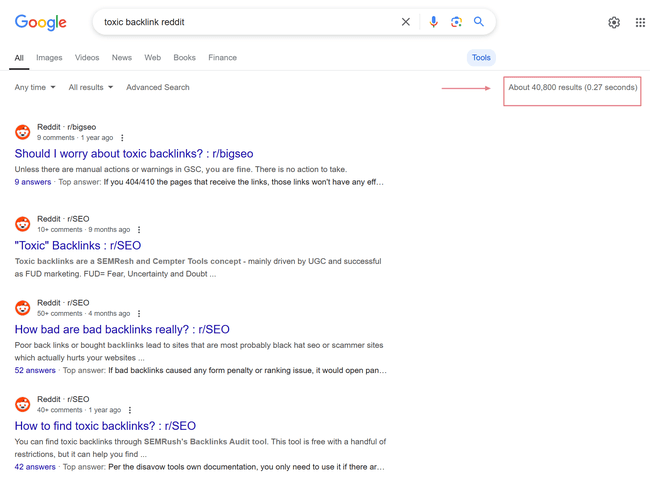
Your thoughts might not go in this direction, but that doesn’t prevent you from becoming a target of this kind of behavior and actions. So, let’s see why monitoring backlinks is so important and how it can protect your website.
1. To Identify Toxic Backlinks
The internet is full of surprises — and not all of them are good. One day, you’re working on your content strategy, and the next, you notice a sudden spike in backlinks from suspicious, low-quality sites. What’s going on?
Spammy directories, link farms, and irrelevant foreign-language sites linking back to you? That’s not just bad news; it’s a flashing red alert that your website could be at risk, jeopardizing your optimization efforts for AI search engines and Google of course!

Google’s algorithms have gotten smarter, but toxic backlinks can still raise red flags and damage your site’s credibility.
And here’s the kicker — sometimes, you don’t even know it’s happening until your rankings take a hit. If an AI search engine (or Google itself) scans your backlink profile and sees a mess of bad links, it may decide your site isn’t as trustworthy as it once was.
That’s why regular backlink monitoring is essential — it helps you identify harmful links before they start dragging your rankings down.
So, what can you do? Keep an eye on your backlink profile with tools like Ahrefs or Google Search Console. With those tools, you can do backlink research and find backlinks that might potentially harm you.
If you notice something shady, don’t panic — just disavow those links and let Google know you want nothing to do with them.
2. To Monitor Your Link Building Progress
Now, let’s talk about the good backlinks — the ones you actually want. If you’ve been investing time (and possibly money) into building high-quality backlinks, you want to make sure it’s paying off, right?
Monitoring your backlinks isn’t just about finding the bad ones — it’s about tracking the good ones, too. If your team has been pitching guest posts, networking with bloggers, or getting featured in industry round-ups, those backlinks should be working for you.
Checking your backlink profile regularly can help you:
- See which sites are linking to you
- Identify which link-building strategies are working best
- Make data-driven decisions on where to focus your efforts
Without monitoring, you might be wasting time on link-building tactics that aren’t actually moving the needle. So, track your progress and double down on what’s working!
3. To Discover New Link Opportunities
How many times did you spend hours crafting high-value content, and someone mentions your brand in an article but forgets to link to your site? Frustrating, right?
But here’s the good news: backlink monitoring tools can help you find those unlinked mentions and turn them into real, SEO-boosting backlinks.
Many SEO and even web monitoring tools (yes, like ours!) can track brand mentions across the internet. A simple outreach email can often turn that mention into a new backlink if you find a website that’s talking about you but not linking back.
Here’s why that matters:
- It’s low-hanging fruit — they already like your content, so adding a link is an easy ask
- It helps boost your authority without having to build new links from scratch
- It gives you insights into where your brand is being talked about online
How to Track Your Backlinks
Keeping tabs on your backlinks isn’t just about checking a list — it’s about understanding what’s helping (or hurting) your rankings. There are tons of tools out there, from SEO platforms (like tools for monitoring backlinks) to web monitoring tools (like Mentionlytics).
But here’s the thing: not all tools do the same job. Some are designed to analyze link quality and SEO impact, while others help you track brand mentions and discover new opportunities. So before diving in, ask yourself:
- Are you trying to spot harmful backlinks?
- Do you want to measure your link-building success?
- Or are you looking for unlinked brand mentions?
Once you define your goal, choosing the right tool becomes much easier.
Which tool is commonly used for monitoring backlinks?
A backlink checker is a common tool for monitoring backlinks, helping users track which websites are linking to them, assessing link quality, and detecting harmful links.
Many SEO platforms offer backlink-checking features, but the right choice depends on your needs — whether you’re auditing, tracking, or discovering new link opportunities.
What Is a Backlink Checker?
A backlink checker is a tool for identifying which websites are linking to yours. Think of it as your website’s “who’s mentioning me” app. By analyzing these inbound links, you can assess their quality and relevance, helping you understand how they’re influencing your site’s SEO performance.
Features often include identifying referring domains, evaluating link authority, and spotting any potentially harmful links. This insight is crucial for refining your link-building strategy and boosting your search engine rankings.
Does Google Have a Backlink Checker?
Yes, Google offers a tool called Google Search Console that includes a “Links” report. This feature provides basic information about your site’s backlinks, such as which sites link to you the most and your top-linked pages.
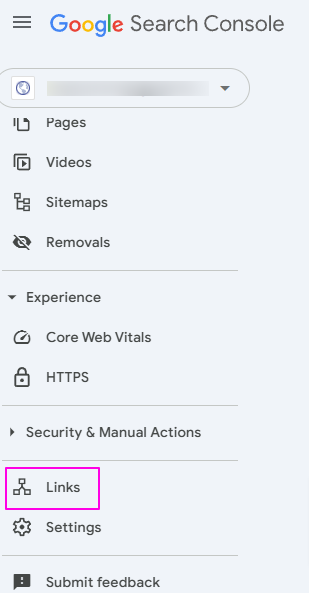
While it’s a solid starting point for monitoring your backlinks, for more detailed analysis — like assessing link quality or spying on competitors’ backlinks — you might want to explore specialized tools that offer more advanced insights.
6 Top-Performing Tools to Monitor Backlinks
Monitoring your backlinks is crucial for maintaining a healthy SEO profile. Here are seven top tools to help you keep track of who’s linking to your site and ensure your backlink strategy is on point.
1. Backlink Monitor
Effortlessly tracks your backlinks in real-time and notifies you about the changes.
Backlink Monitor helps you monitor your backlink profiles closely without spending too much time. It offers features like automated link checking and monitoring backlinks and notifies you via email about changes. Providing insights into which links are active, broken, or removed ensures you stay informed about your site’s linking status.

Just a note before you start: you’re going to need to link MOZ API for your trial version.
Our Highlight:
The tool’s automated link checking saves time by regularly verifying the status of your backlinks without manual intervention.
From Real Customers:
Positive: “I used this tool, and it’s quite good for backlink analysis, especially love the email notification feature to lose or gain new backlinks.”
Negative: “Need a more in-depth analysis of backlinks like other backlink tools are doing.”
Source: G2
Pricing:
They have a free trial, and their Starter package starts at $15 a month.
2. Free Backlink Checker by Ahrefs
Ahrefs’ Free Backlink Checker provides a snapshot of a website’s backlink profile, allowing users to analyze link sources and authority metrics.
Ahrefs is one of the marketers’ favorite tools. Among other features, it offers a Free Backlink Checker that provides a snapshot of your website’s backlink profile.
Users can see the top 100 backlinks pointing to any domain or URL, along with metrics like Domain Rating (DR) and URL Rating (UR). This tool is beneficial for those seeking a quick overview without committing to a paid plan.
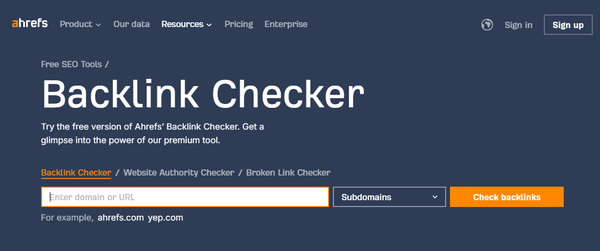
Note: This free backlink checker might not give you the most accurate results since you’re able to use only the exact URL and Subdomain option, not the others (Path and Domain), as they are not available within the free plan.
Our Highlight:
The ability to view the top 100 backlinks and key metrics for free makes it a valuable resource for quick insights.
From Real Customers:
Positive: “Ahrefs has every toolset or feature that you need to do including keyword research, backlink checker, and so on. However, the best feature of Ahrefs is their Webmaster tool which is free for everyone. So, you can simply integrate with Google Search Console and you’ll get access to all your website insights such as ranking, traffic, backlinks, and technical SEO health.”
Negative: “The pricing could be improved and simplified more for a small team or individual freelancer. Also, the search volume data accuracy is not up to the mark, considering the search volume/traffic potential it shows on the tool and the number of clicks you actually get every month. Sometimes, there is a big mismatch in the data accuracy.”
Source: G2
Pricing:
A free version is available; the Starter plan starts at $29 for more comprehensive features.
3. Majestic
A comprehensive tool for monitoring backlinks, specialized in backlink data analysis, offering unique metrics.
Majestic is a renowned SEO tool specializing in backlink analysis. It offers features like Trust Flow, Citation Flow, backlink language analysis, Follow/NoFollow counts, number of outbound links, backlink history, a summary of top anchor texts, and many other useful features for monitoring backlinks.

With its vast index, Majestic helps users understand their link landscape comprehensively as a great backlink analyzer.
Our Highlight:
The Trust Flow and Citation Flow metrics clearly show link quality and influence, aiding in effective SEO decision-making.
From Real Customers:
Positive: “The trust flow and citation flow scores along with the link graphs. It also gives topical flow for each website on URL, subdomain, or domain level which can help you identify legit sites and what sort of industry they are more involved in.”
Negative: “Sometimes the backlink fetcher misses out on certain links. You can try the same by exporting backlinks from SemRUSH and notice the difference in numbers. But the same thing can be said about SemRUSH as it also misses out on certain links that are fetched by Majestic. Also, I would like to be able to have a running project stored for my account for a particular site which can help me keep track of that website with ease rather than entering the website every time.”
Source: G2
Pricing:
They have a free trial, and their monthly plans start at $49.99.
4. SE Ranking
All-in-one SEO platform with robust backlink monitoring capabilities.
SE Ranking offers a comprehensive suite of SEO tools, including a powerful backlink monitoring feature. Users can track all backlinks pointing to their website, analyze their quality, and receive alerts on any changes.
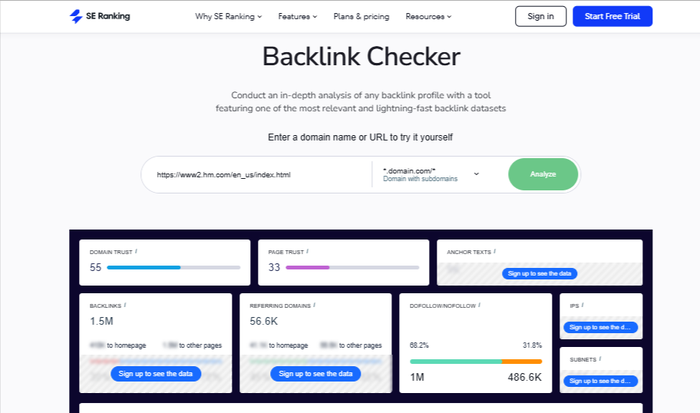
Our Highlight:
The combination of monitoring backlinks with other SEO tools makes SE Ranking a versatile choice for comprehensive SEO management.
From Real Customers:
Positive: “I have been using it for a while to organise and execute my digital marketing campaigns effectively. Additionally, the platform’s professional reporting capabilities allow me to create customized reports with my branding, impress the client, and demonstrate the impact of my efforts through clear and data-driven results.”
Negative: “I didn’t find anything to dislike, it’s going well till now but I will consider that there was an increase in the pricing model, this will surely affect small businesses. Also sometimes, the backlink checker does not respond accurately.”
Source: G2
Pricing:
Besides a free trial, plans start at $69 per month.
5. LinkBox
A backlink management tool designed for bulk link analysis, monitoring index status, and tracking anchor text usage.
LinkBox is a backlink management tool that offers features like bulk backlink checking, Google index status verification, and anchor text analysis. It helps users monitor the status of their backlinks, ensuring they remain active and effective in their SEO efforts.

Our Highlight:
The bulk backlink checker allows users to analyze multiple links simultaneously, saving time and effort in large campaigns.
From Real Customers:
Positive: “LinkBox is a very much needed tool for SEO Experts who manage backlinks for Big to medium websites. It frequently checks the quality of the recently created backlinks, and anchor texts and checks whether the created backlink is indexed or not. Reduces manual efforts and increased productivity.”
Negative: “Its dashboard is a bit complicated. It doesn’t show all the values against all the parameters like Response Codes, Referring Page, Indexing Status and Date, etc.”
Source: G2
Pricing:
Pricing is credit-based. For detailed information, contact them directly.
6. Mentionlytics
One step beyond: Discover unlinked brand mentions and turn them into valuable backlinks.
While not a traditional SEO tool, Mentionlytics excels in web monitoring. It allows you to find unlinked mentions of your brand across various websites and social media platforms.
There’s no place on the internet where the mention of your brand can hide from Mentionlytics. By identifying these mentions, you can contact site owners to establish backlinks, enhancing your SEO profile.
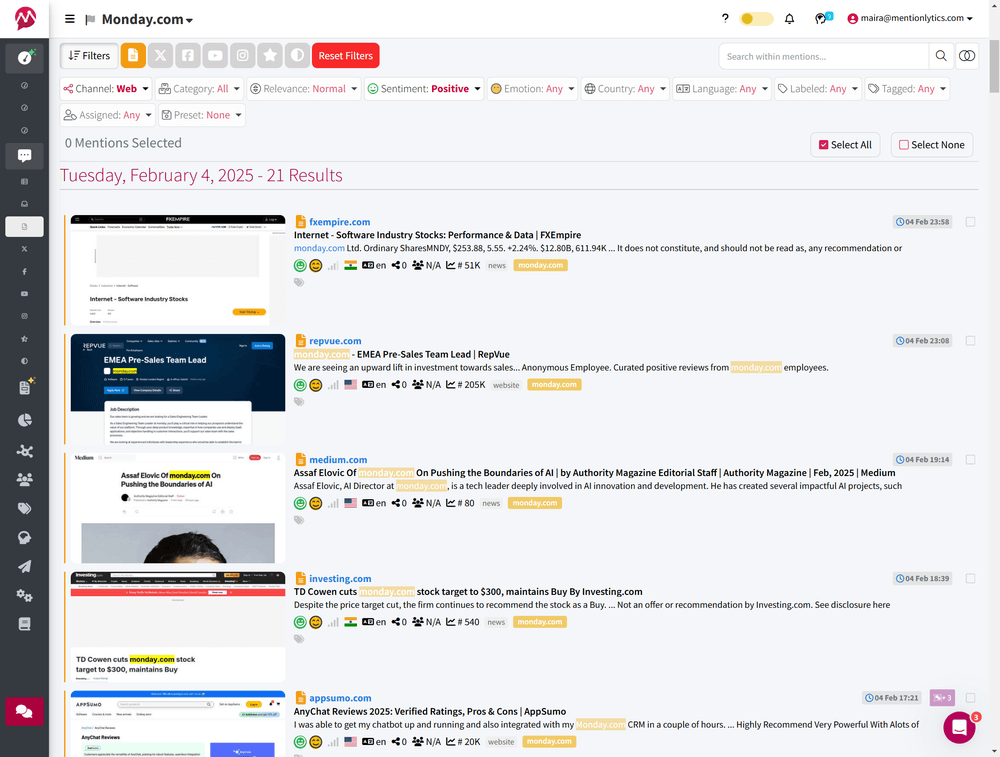
The best thing is that you can track your mentions by date and promptly get in touch if you notice the mention is not linked.
Our Highlight:
Real-time notifications of new unlinked mentions enable proactive and timely engagement. You can react the moment you see the unlinked mention on your dashboard. That increases the success rate of turning potential mentions into SEO assets.
From Real Customers:
Positive: “Mentionlytics has a very good tool for configuring and analyzing alerts, making it a standout experience for monitoring online mentions. I have been testing it for some weeks and, comparetevely to other social listening tools, it actually captures everything. Also, the artificial intelligence analysis is pretty complete, and the cost/benefit is very comfortable, especially taking into consideration the vast amount of social media platforms that can be tracked. Highly recommended for anyone looking to enhance their social listening strategy or researching about specific issues online.”
Negative: “The platform can be a bit overwhelming at the beginning, due to the vast amount of features it has. I wish to have more details in its documentation, with more links to guides and HowTo’s on their blog. Something I learned while testing the app is that it’s not possible to delete keywords as you can do with mentions. Also, it would be very nice if it was possible to add specific web sources to analyse, so the tool could prioritize those websites.”
Source: G2
Pricing:
Plans start at $69 (or $49 if you catch a time-limited offer) per month, but you can start for free for 14 days, and no credit card is required!
9 Backlink Monitoring Best Practices to Keep Your Website Safe
Monitoring backlinks is all about understanding the bigger picture of how links impact your SEO.
Following the best practices below can protect your site from harmful backlinks, capitalize on valuable ones, and keep your SEO strategy strong.
1. Use a Combination of Tools
There’s rarely an SEO expert who uses only one tool. It’s always a combination of well-balanced tools because no single tool gives the full picture of your backlink profile.
For example, Google Search Console provides a basic overview of the linked profile. SEO tools like Ahrefs or Majestic check whether these are quality backlinks, and social media and web monitoring tools like Mentionlytics uncover brand mentions that could become backlinks.
Cross-referencing data allows you to validate backlink insights and detect patterns one tool might miss.
For example, a link flagged as “live” in one tool may actually be broken or removed when checked elsewhere.
2. Regularly Schedule Monitoring
Backlinks can disappear overnight, and toxic links can appear just as fast. Setting up a monitoring schedule — whether weekly, biweekly, or monthly — ensures you stay on top of link changes.
With backlink tracking software you can:
- Spot sudden drops in high-value links
- Catch new spammy backlinks before they harm your rankings
- Keep your SEO strategy agile
3. Prioritize Identifying Toxic Backlinks
Search engines may associate your site with spam if too many toxic links point to it. That’s why it’s important to discover these toxic backlinks on time before things get messy.
Which Backlinks Should Be Avoided?
Over the years, we’ve concluded that some backlinking practices can do more harm than good. Here’s the no-no list:
- Paid links – Google considers these a direct violation of its guidelines. Buying backlinks is seen as an attempt to manipulate rankings and can result in penalties.
- Exchange links – While once common, excessive link swapping is now ineffective. Google can easily detect when two websites are linking just for the sake of it rather than genuine relevance.
- PBNs (Private Blog Networks) – These networks exist purely to pass SEO value to a target site. Google actively penalizes them because they manipulate rankings and provide no real user value.
- Links from spammy or low-quality websites – Instead of boosting your authority, these links can damage your site’s credibility if left unchecked. Worse, they could signal to Google that your site is associated with shady practices.
- Hidden links – If humans can’t see them, but search engines can, that’s a problem. Google treats hidden links as deceptive and will flag them as a violation.
- Links from irrelevant websites – A backlink from a high-DA website means nothing if it’s unrelated to your niche. If you run an integration tool, a link from a cosmetics brand won’t help — Google values relevance over authority.
- Nofollow links – While not harmful, they don’t pass SEO value. If you’re investing time in link-building, focusing on nofollow links is a wasted effort.
- Links from penalized domains – If a website has been hit with a Google penalty, its backlinks are toxic. Links from these domains can negatively impact your site’s rankings.
- Links with over-optimized anchor text – If too many backlinks use the same keyword-rich anchor text, it looks unnatural. Google prefers a diverse mix of branded, generic, and contextual anchor text to ensure organic link-building.
4. Analyze Anchor Text Distribution
If 90% of your backlinks have the exact same keyword as the anchor text, that’s a red flag. Search engines expect diversity, not forced optimization.
A natural backlink profile includes:
- Branded anchor text (e.g., “Mentionlytics”)
- Generic anchor text (e.g., “click here”)
- Partial-match keywords (e.g., “best social listening tool”)
A healthy mix tells search engines your backlinks are organic — not manipulated.
5. Monitor Lost Links
Backlinks aren’t forever. Sometimes, links get removed due to:
- Website updates (content restructuring)
- Broken links (404 errors)
- Competitors taking over the link
Losing backlinks is normal, but losing high-quality links hurts. If a valuable link disappears, reach out to the website owner and request a replacement or an update.
6. Set Up Alerts and Notifications
Manually monitoring backlinks is exhausting. Instead, automate the process by setting up alerts for:
- New backlinks (so you can track your growth)
- Lost backlinks (to investigate issues)
- Unlinked mentions (opportunities for outreach!)
Get notified when your brand is mentioned!
With Mentionlytics, you can track unlinked mentions even in real time and turn them into backlinks.
7. Analyze Referring Domains
It’s not just about the number of backlinks — it’s about who is linking to you. High-authority sites? Great. Spammy domains? Not so much.
By analyzing referring domains, you can:
- Identify authoritative websites sending quality traffic
- Spot untrustworthy sites linking to you too often
- Maintain a balanced backlink profile
A single bad referring domain linking to dozens of your pages? That’s worth investigating.
8. Monitor Your Competitors’ Backlinks Too
SEO isn’t just about your own site — it’s about staying one step ahead of competitors. That’s why competitive benchmarking should be a part of your SEO strategy.
By tracking the backlinks of your competitors, you can:
- Spot sudden spikes in their link-building activity
- Identify new link opportunities for your site
- See who’s linking to them (and reach out for a link too!)
9. Document and Track Progress
SEO isn’t about quick wins — it’s about long-term strategy. By keeping records of backlink data over time, you can:
- Track link-building campaign success
- Identify trends (e.g., link growth, lost links)
- Demonstrate the impact of SEO efforts to stakeholders
A simple spreadsheet or SEO dashboard can do wonders for organizing your backlink history.
Discover More Backlink Opportunities that AI Loves
Backlinks aren’t just an old-school SEO thing — they’re the backbone of online authority, even in AI-driven search. The more quality backlinks you have, the stronger your credibility, and yes, AI search engines notice that, too.
But here’s the deal: you need a full-spectrum approach to stay ahead. A mix of SEO tools, Google Search Console, and web monitoring gives you the full picture — helping you catch bad links before they hurt you and spot fresh opportunities before your competitors do.
And speaking of smart opportunities, why chase backlinks when you can let them come to you? With Mentionlytics, you get real-time alerts whenever your brand is mentioned online — so you can turn those unlinked mentions into SEO gold. Give it a try!


