

So, you love Sprinklr, but you need to switch to another tool for some reason, and you can’t decide which one is the best fit. So many Sprinklr alternatives… who could try them all?
We did what any curious marketer would do. We went to Reddit, dug through real user conversations, tested the tools people actually recommend, and put together a list of Sprinklr alternatives that don’t just look good in demos; they hold up in real life.
In this article, we’re sharing our experience with 13 tools that could serve as alternatives to Sprinklr, outlining the selection process, and providing a comparison table so you don’t have to read the whole article just to compare their features.
1. Sprout Social: Best for Social Media Management and Reporting
2. Statusbrew: Best for Customer Care and High Engagement Volume Teams
3. Mentionlytics: Best for Affordable Enterprise-Level Social Listening
4. Help Scout: Best for Customer Support
5. Zoho: Best for Budget-Friendly All-in-One Social Media Management
6. Emplifi: Best for Enterprise Brands Managing Multi-Market Social
7. RecurPost: Best for Simple Social Media Content Creation, Scheduling and Publishing
8. Brandwatch: Best for Enterprise Teams Driven by Data
9. Hootsuite: Best for All-in-One Social Media Management
10. Zendesk: Best for Support and Ticketing Workflows
11. Napoleon Cat: Best for Auto-Moderated Social Media Management
12. Freshdesk: Best for Ticketing System for Small Businesses
13. HubSpot: Best for CRM-Centric Customer Experience
Table of Contents
- Our Methodology: How We Selected These Sprinklr Competitors
- Best Sprinklr Alternatives for 2026 – Comparison Table
- The Best Sprinklr Alternatives from Reddit Conversations Tested by Us
- Try the Best Budget-Friendly Alternative to Sprinklr for Free
- FAQ
Our Methodology: How We Selected These Sprinklr Competitors
You’ll probably notice this isn’t the usual “top tools” list. We didn’t build it by recycling the same names and calling it a day. Instead, we looked at Sprinklr from the perspective real users have once they’re deep into it: powerful, yes… but also complex, expensive, and sometimes just too much for what you actually need.
So we started where honest opinions live: Reddit, and went through discussions across subreddits like:
- r/socialmedia
- r/SocialMediaManagers
- r/marketing
- r/digital_marketing
- r/PublicRelations
- r/CustomerExperience
- r/CustomerSuccess
- r/AskMarketing
- r/SaaS
- r/EntrepreneurRideAlong
We wanted to see what tools people recommend when they’re actively looking to replace Sprinklr. Not in polished case studies, but in real conversations where users talk about pricing, usability, support, and day-to-day frustrations.
Since all tools are changing rapidly, we focused on Reddit threads not older than 12 months.
From there, we shortlisted the tools that kept coming up and tested them based on what matters most when switching from Sprinklr:
- Social listening capabilities
- Customer experience & engagement features
- Reporting and analytics depth
- Ease of use (and onboarding time)
- Customization and scalability
- Pricing transparency and overall value
We also cross-checked everything against recent G2 reviews to make sure Reddit sentiment wasn’t just loud but consistent.
The result: not a random list of competitors, but a curated set of tools that solve real Sprinklr pain points, whether that’s simplifying workflows, lowering costs, or just making the platform easier to actually use.
Best Sprinklr Alternatives for 2026 – Comparison Table
You can first check the table of the most important features and shortlist the alternatives based on the features they offer, then read the rest, or read the whole text and return to this comparison table of Sprinklr alternatives to pick your favorite.
| Tool | Best for | Free trial | Pricing | G2 rating | Social Listening | Social Media Management | CX Features |
| Sprout Social | Reporting & social media management | ✅ 30-day | From $199/seat/mo | ⭐ 4.4 | ⚠️ Paid add-on | ✅ Advanced | ✅ Yes |
| Statusbrew | Team collaboration & inbox workflows | ✅ 14-day | From $89/mo | ⭐ 4.8 | ✅ Yes | ✅ Advanced | ✅ Yes |
| Mentionlytics | Affordable enterprise-level listening | ✅ 14-day | From $69/mo | ⭐ 4.9 | ✅ Advanced | ⚠️ Basic | ⚠️ Basic |
| Hootsuite | All-in-one social media operations | ✅ 30-day | From $99/user/mo | ⭐ 4.3 | ✅ Strong | ✅ Advanced | ✅ Yes |
| Help Scout | Lightweight customer support | ✅ 15-day | From $30/user/mo | ⭐ 4.4 | ❌ | ⚠️ Limited | ✅ Strong |
| Zoho Social | Budget-friendly management | ✅ 15-day & free plan | From $15/mo | ⭐ 4.6 | ⚠️ Basic | ✅ Strong | ⚠️ Basic |
| Emplifi | Multi-market enterprise teams | ❌ Demo-led | From $1,249/mo | ⭐ 4.4 | ✅ Advanced | ✅ Advanced | ✅ Strong |
| Brandwatch | Deep consumer intelligence | ❌ Demo-led | From $800/mo | ⭐ 4.1 | ✅ Advanced | ✅ Strong | ✅ Yes |
| RecurPost | Evergreen content scheduling | ✅ 14-day | From $9/mo | ⭐ 4.7 | ❌ | ✅ Yes | ❌ |
| Zendesk | Enterprise support operations | ✅ 14-day | From $19/agent/mo | ⭐ 4.3 | ❌ | ❌ | ✅ Advanced |
| NapoleonCat | Moderation & auto-replies | ✅ 14-day | From ~$32/mo | ⭐ 4.6 | ⚠️ Basic | ✅ Strong | ✅Yes |
| Freshdesk | Affordable omnichannel support | ✅ 14-day | From $15/agent/mo | ⭐ 4.4 | ❌ | ❌ | ✅ Strong |
| HubSpot | CRM-driven customer experience | ✅ 14-day & free plan | From €45/seat/mo | ⭐ 4.4 | ⚠️ Limited | ✅ Strong | ✅ Advanced |
The Top Sprinklr Alternatives from Reddit Conversations Tested by Us
And now, the moment you’ve been waiting for: the top 13 competitor tools that might be a perfect fit to replace Sprinklr.
Sprout Social: Best for Social Media Management and Reporting
Sprout Social is one of the most well-known social media management platforms, designed for teams that want to manage publishing, engagement, and analytics in one place. Compared to Sprinklr, it feels much more approachable, with a cleaner interface and faster onboarding, while still offering solid reporting and listening features.
What Reddit users say
Reddit users often describe Sprout Social as one of the most user-friendly social media tools, with easy-to-customize reports. But of course, per-seat pricing is not what users appreciate most, especially for those with larger teams.
What we found in our tests
Sprout has an excellent interface, which is one of its biggest strengths. You don’t need a long onboarding process to figure out where things are or how to use them. Publishing, replying to messages, and pulling reports all feel intuitive, unlike on heavier platforms.
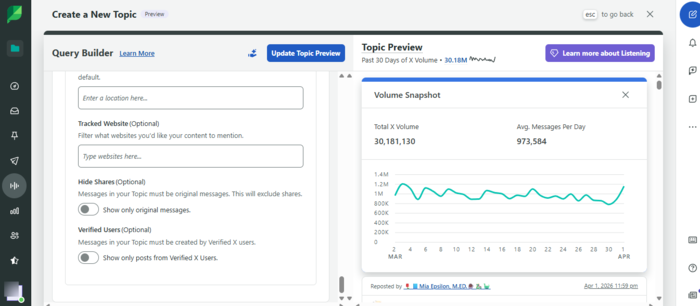
Its reporting is also strong. You can quickly generate clean, client-ready reports without spending hours customizing dashboards or exporting data. We really liked their Topic preview chart, which lets you instantly see how much volume a topic gets.
That said, we have to mention that if you expect social listening features, you’ll need to use an add-on, which significantly increases the price. And while it covers most use cases well, it may feel limiting for teams that need highly customized workflows or advanced analytics.
Key features
- Social media publishing and scheduling: Plan, publish, and manage content across multiple platforms from one dashboard.
- Smart inbox: Centralized inbox to manage messages, comments, and mentions across channels.
- Analytics and reporting: Clean, easy-to-understand reports for performance tracking and client presentations.
- Social listening: Tracks brand mentions and trends, though less advanced than enterprise tools (available as a paid add-on)
- Team collaboration tools: Assign tasks, manage workflows, and collaborate across teams.
Pricing
The Standard plan starts at $199/seat/month, while most teams end up on the Professional or Advanced tiers ($299–$499/seat/month) if they need serious reporting or listening. You can check which plan works best for you during a 30-day free trial. Because full listening as a module can push total costs toward $999+/month, those with a more strict budget may want to consider some Sprout Social alternatives.
Pros
- Very easy to use and quick to onboard
- Clean, client-ready reporting
- Strong all-in-one social media management
Cons
- Expensive, due to per-seat pricing
- Social listening is an add-on
- Limited report customization compared to platforms like Sprinklr
Best for
Marketing teams and agencies that want a clean, easy-to-use platform for social media management and reporting, where social listening is not the primary focus, or are willing to pay additionally for it.
Statusbrew: Best for Customer Care and High Engagement Volume Teams
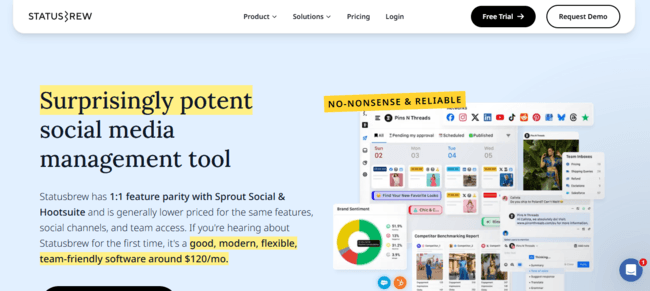
Statusbrew is a social media management platform built for teams that deal with high message volume, multiple accounts, and structured workflows. It combines publishing, engagement, automation, and reporting in one place, with a strong focus on collaboration.
What Reddit users say
Users on Reddit generally acknowledge that Statusbrew is a cheaper alternative to Sprout Social, with similar capabilities, but also note it may lack some features marketing agencies often use, such as influencer marketing features.
What we found in our tests
We found that Statusbrew is built for teams that live inside their inbox. Its biggest strength is the unified inbox. Everything from comments, messages, to mentions is in one place, and more importantly, it’s organized. You can assign conversations, track history, and avoid that classic “who already replied to this?” question.
The automation layer is also impressive. You can set rules to filter, assign, or prioritize messages, which makes a huge difference when volume grows. Collaboration is another strong point. Approval workflows, role-based access, and task assignments make it very agency-friendly.
The flip side? We couldn’t test some important features, such as social listening and an AI assistant, since they’re available on higher-tier plans.
Key features
- Unified Social Inbox: Manage all messages, comments, and mentions across platforms in one place.
- Multi-Platform Publishing: Schedule and publish across major networks
- Social Listening (available on higher-tier plans): Tracks keywords, trends, and competitor activity across platforms.
- Team Collaboration: Multi-level approval system for teams and clients.
- Automation rules engine: Automatically filter, assign, or respond to messages based on conditions.
Pricing
The plans start at $89 a month for one user, with a 14-day free trial.
Pros
- Excellent unified inbox for high-volume engagement
- Strong automation and workflow features
- Great for team collaboration and approvals
Cons
- Limited advanced features (like influencer marketing)
- Slight learning curve compared to simpler tools
- No strong AI content generation features
Best for
Agencies, support teams, and growing brands that need structured workflows, strong inbox management, and team collaboration, especially when handling high engagement volume.
Mentionlytics: Best for Affordable Enterprise-Level Social Listening
Mentionlytics is an AI-powered social listening and media monitoring platform that gives you enterprise-level capabilities without enterprise-level pricing. It tracks mentions across social media, news, blogs, forums, and review sites, and adds an AI layer that helps you actually understand what’s going on, not just collect data.
What Reddit users say
Recent Reddit discussions position Mentionlytics as the tool that offers great value (like those enterprise tools) but is very easy to use. In one thread, an agency owner mentioned using it for mid-sized clients because it offers real-time alerts, reliable sentiment analysis, and social listening without enterprise pricing or complexity.
What we found in our tests
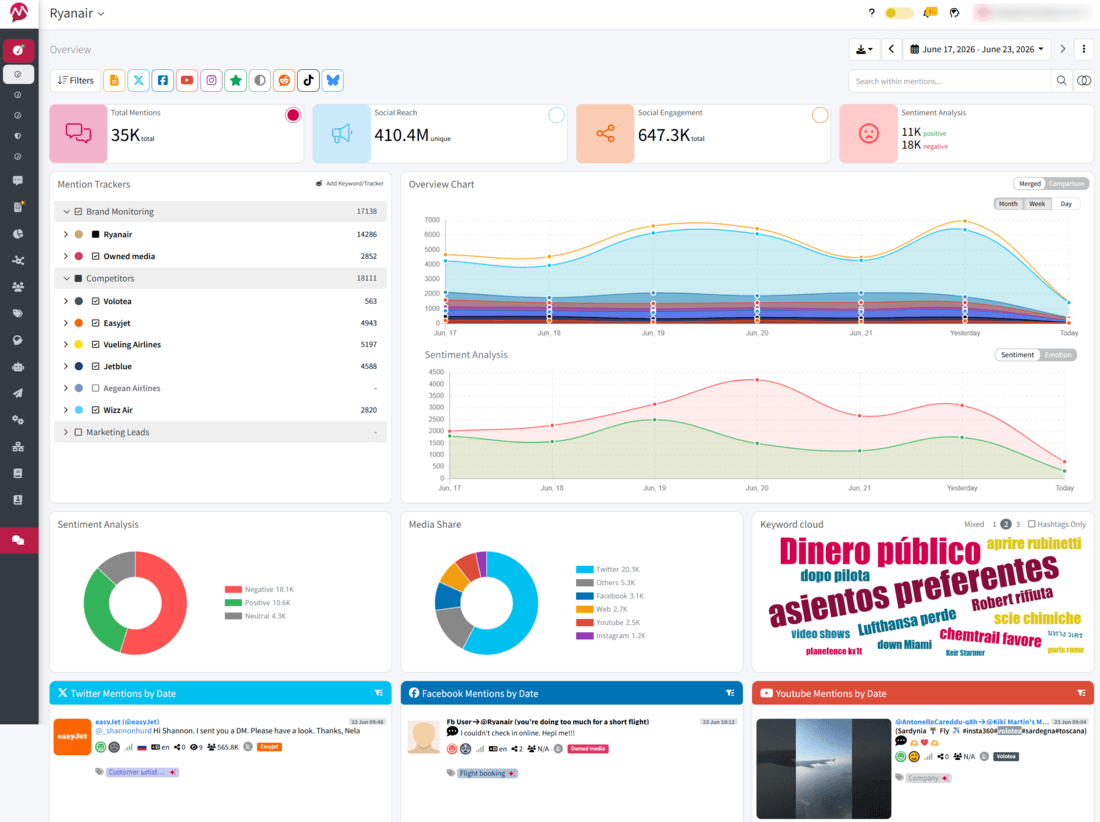
Mentionlytics hits that rare balance between power and usability. You get broad coverage, social media, news, blogs, podcasts, and review sites, but the platform doesn’t feel overwhelming. The dashboard is clean, and you can actually find what you need without clicking through five layers of menus.
Also, Mentionlytics AI is where it gets interesting. Instead of just showing mentions, it helps interpret them, analyze sentiment with 95%+ accuracy, spot trends, identify spikes, and even generate personalized recommendations.
Another big advantage (especially for agencies) is flexibility. You can customize dashboards and reports depending on what matters most, whether that’s campaigns, competitors, or brand reputation monitoring.
Compared to Sprinklr, it’s a much more practical and flexible option. You still get strong analytics, sentiment tracking, and reporting, but without the complexity, long onboarding, or pricing that requires a small negotiation team.
Key features
- AI-powered social listening: Tracks mentions across social media, web, news, forums, and review platforms.
- Sentiment and emotion analysis: Uses AI to detect tone, trends, and potential risks in real time.
- Anomaly detection alerts: Flags unusual spikes in mentions or sentiment before they become bigger issues.
- Custom dashboards and reports: Build reports around what actually matters for your team or clients.
- Competitor analysis and Share of Voice: Helps you understand where you stand compared to competitors.
Pricing
Mentionlytics plans start at $69 per month, with a 14-day free trial (no credit card required). If you check the pricing page regularly, you can catch a time-limited offer from time to time, with lower prices.
Pros
- Strong social listening without enterprise complexity
- High level of customization
- Useful AI insights, not just raw data
Cons
- Basic social media management features
- Smaller ecosystem compared to tools like Sprinklr
- Advanced features may require some setup to fully utilize
Best for
Agencies and large businesses that want powerful social listening, AI insights, and reporting without the cost and complexity of enterprise tools.
Help Scout: Best for Customer Support
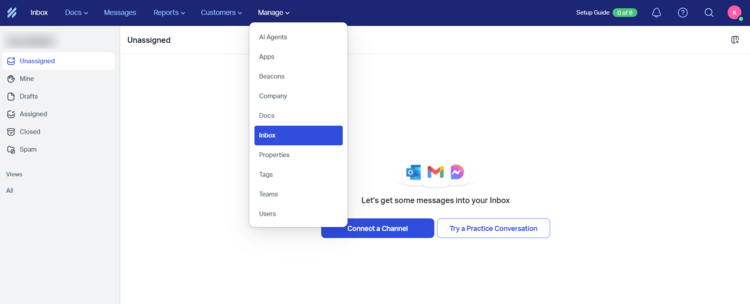
Help Scout is a customer support platform built around a simple idea: support should feel like email, not a ticketing system. It’s designed for teams that want to manage conversations, not workflows, which makes it a very different kind of Sprinklr alternative. Help Scout focuses on shared inbox, knowledge base, and lightweight automation, which makes it much easier to adopt, especially for smaller teams.
What Reddit users say
Recent Reddit discussions highlight Help Scout as a clean, simple alternative to heavier support platforms.
However, pricing changes have been a hot topic. In a recent SaaS thread, a user complained that the shift to usage-based pricing made costs less predictable, especially when volume increases.
What we found in our tests
First of all, the tool felt like Freshdesk or any other customer service platform. If you’re looking to gather customer feedback and reply promptly, this is the perfect solution. What caught our eye is a customizable AI Agent that you set up to automatically respond based on your previous conversations.
And it’s a great help, since you have a unified inbox. But the limitation we experienced is related to the channels you can connect to. So, the tool is great for any business (especially small teams) that focuses on Facebook and Instagram, live chat on their websites, and emails. Basically, you can connect Messenger, Instagram chat, website (chatbot or live chat), and email to one inbox.
But what if you communicate with your target audience through X? Or if YouTube is ranting about your brand? There are no social listening features, so that would be a setback as well. However, for organizing basic support services, it’s an excellent choice.
Key features
- Shared inbox: Manage all customer conversations in one place with an email-like interface.
- Knowledge base (Docs): Create self-service help centers for customers.
- Live chat (Beacon): Embed chat and support widgets directly on your website.
- AI assistance: Draft replies, summarize conversations, and assist agents with responses.
- Workflows and automation: Automate repetitive tasks and organize conversations.
Pricing
The price starts at $30 per user per month (that’s their pricing model), and you have a 15-day free trial.
Pros
- Extremely easy to use and fast to onboard
- Clean, email-like support experience
- AI Assistant for 24/7 support
Cons
- Limited advanced features compared to enterprise tools
- Not designed for complex, omnichannel customer experience setups
- AI Assistant is an add-on
Best for
Small to mid-sized teams that want a simple, human-first customer support tool, without the complexity (or cost structure) of enterprise platforms like Sprinklr.
Zoho: Best for Budget-Friendly All-in-One Social Media Management
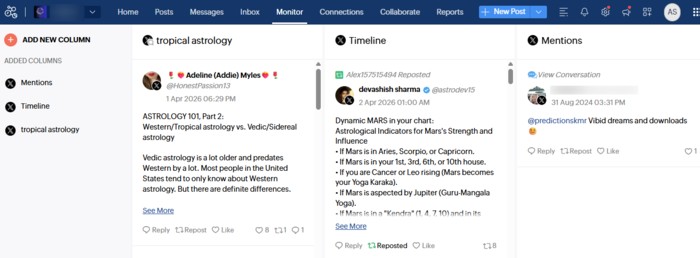
Zoho Social is a social media management tool designed for teams that want solid functionality at a much lower price point than tools like Sprinklr. It covers publishing, engagement, monitoring, and reporting, but its real strength comes from how well it fits into the Zoho ecosystem (CRM, Desk, Campaigns, etc.). Compared to Sprinklr, it’s much simpler and much more practical for smaller teams.
What Reddit users say
Reddit users often describe Zoho Social as a “good enough for most things” tool, especially for small businesses and teams already using Zoho products. Overall, great for simple tasks and small budgets.
What we found in our tests
We hit a small bump when we first opened Zoho Social. It seems like we have that thing with Zoho, because it’s not the first tool from the Zoho ecosystem we’ve had trouble connecting to. The interface is clean, but connecting accounts wasn’t as smooth as I expected. Once I got through that part, though, things started to flow much better.
What stood out to us was customizable reports and the ability to tailor metrics to what each client actually cares about.
You can bring in team members to create or approve content, which makes collaboration easy. Publishing is straightforward, and I did try out Zia for content creation, but you’ll need your own OpenAI key to use it.
On the downside, if you’re handling multiple clients as an agency, costs can climb quickly. And the monitoring side is pretty basic.
Key features
- Social media scheduling and publishing: Plan and publish content across multiple platforms from one dashboard.
- Unified social inbox: Manage messages, comments, and interactions across channels.
- Analytics and reporting: Track performance and engagement with built-in reports.
- Zia AI assistant: Generates captions, suggests content, and helps with responses (credit-based usage).
- Zoho ecosystem integration: Connects directly with Zoho CRM, Desk, and other tools.
Pricing
Zoho Social is one of the rare tools from the list that offers a free plan, but if you’re a business with one account, the price starts at 15€ per month, and for agencies (with 10 brands) at 230€ a month. All plans have a 15-day free trial.
Pros
- Free plan available
- Strong integration with Zoho ecosystem
- Easy to use
Cons
- Limited advanced analytics and social listening
- Per-user limitations on lower plans (teams get expensive fast)
- AI features are credit-based and limited
Best for
Small businesses and teams already using Zoho that want a simple, affordable social media management tool without the cost and complexity of enterprise platforms like Sprinklr.
Emplifi: Best for Enterprise Brands Managing Multi-Market Social
Emplifi is an enterprise social media marketing cloud that brings publishing, analytics, influencer management, and customer care into one platform. It sits firmly in the $1,000+/month range and is built for mid-sized to large organizations that want to run everything from a single system.
What Reddit users say
There aren’t many recent Reddit threads about Emplifi. The most notable one revolves around changes in their pricing model. In general, though, users describe it as a reliable platform with strong analytics and recommend it, as long as budget isn’t a concern.
What we found in our tests
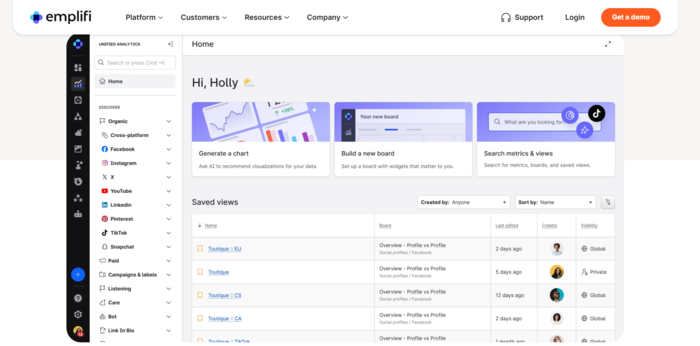
When we first tried Emplifi, it immediately felt familiar… and then it clicked. The interface is quite similar to Sprout Social.
Beyond that, its biggest strength is unified analytics across multiple brands and markets. The reporting is deep, and the influencer management features are among the strongest in this category.
The unlimited-users pricing model is also a big advantage for larger teams. Once you pass the 20-user mark, per-seat tools start to hurt your budget, and Emplifi becomes more reasonable in comparison.
On the downside, the pricing is still high, and what stood out the most is the lack of a self-service trial.
Key features
- Unified Social Marketing Cloud: Combines publishing, analytics, customer care, and commerce in one platform.
- AI-Driven Insights: Highlights trends and content opportunities without digging through raw data.
- Influencer Management: Built-in tools for discovery, outreach, and performance tracking.
- Customer Care Workflows: Manage and resolve social support across teams and channels.
- Unlimited Users: Flat-rate pricing works better for larger teams compared to per-seat tools.
Pricing
Social marketing plans start at $1,249 per month.
Pros
- Strong analytics, especially for multi-brand setups
- Unlimited users on flat-rate plans
- Integrated customer care features
Cons
- No self-service trial (sales process required)
- Learning curve takes time
- Lower tiers have been reduced, with some features moved to higher plans
Best for
Mid-sized to large teams (20+ users) that need unified analytics, customer care, and content workflows in one place, and are ready to go through an enterprise onboarding process.
Not in Your Budget Range?
Mentionlytics offers strong social listening features, it’s great for influencer marketing, and it’s within your budget.
RecurPost: Best for Simple Social Media Content Creation, Scheduling and Publishing
RecurPost is a social media scheduling tool designed for creators, bloggers, small businesses, and agencies that want to recycle high-performing posts automatically instead of constantly filling the content calendar from scratch. Compared to platforms like Sprinklr or Hootsuite, RecurPost feels much lighter and much more focused.
What Reddit users say
RecurPost doesn’t dominate Reddit discussions, but when it comes up, the conversation is usually positive. Users often recommend it as a handy tool for scheduling across multiple platforms. In one thread, multiple users specifically mentioned RecurPost as a practical option for small businesses that want scheduling without enterprise pricing.
What we found in our tests
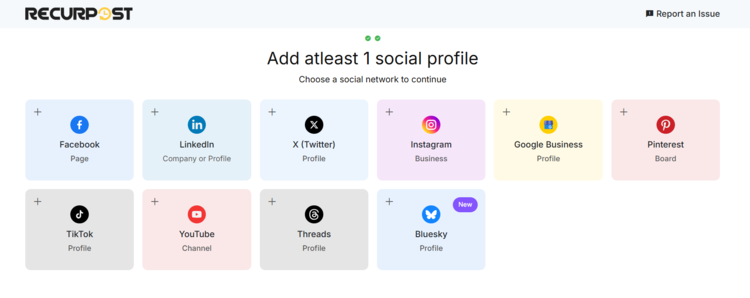
It’s a very easy-to-use and straightforward tool with basic analytics. Don’t expect a space shuttle, because it’s not, but for scheduling and posting across Facebook, Instagram, LinkedIn, Google Business, Pinterest, TikTok, YouTube, Threads, X, and Bluesky, it is an excellent choice.
What we liked most (and we think is very useful) is the First comment option, which lets you automatically publish the first comment as well. They have a useful set for content creation (you can upload it from your CSV, create it with AI, or use templates), and of course, we tried their AI, which is very good.
The only thing we kind of didn’t like (or better put, we found lacking) is that there’s no character count, but they have a notification about limits for a specific social platform. And we couldn’t figure out how to publish the post from the Library. Either it’s just us, or the explanation is not that straightforward.
The typical downsides for almost all scheduling platforms are no social listening and basic analytics.
Key features
- Recurring Post Scheduling: Automatically recycle evergreen content instead of manually reposting it.
- Content Libraries: Organize posts into categories and recurring queues.
- Multi-Platform Publishing: Schedule content across Facebook, Instagram, LinkedIn, X, Pinterest, and more.
- AI Features: Includes caption assistance, scheduling optimization, content calendar, and AI-powered content tools in higher plans.
- Approval Workflows: Agency plans include collaboration and approval systems for teams and clients.
Pricing
The Starter plan starts at $9 a month, and allows two profiles and 10 daily posts. RecurPost also has a 14-day free trial.
Pros
- Excellent for recycling evergreen content
- Much more affordable than enterprise tools
- Simple interface and easy setup
Cons
- Analytics and monitoring are fairly basic
- Limited advanced collaboration features
- Less suitable for large multi-team environments
Best for
Creators, bloggers, agencies, and small businesses that want an affordable way to keep evergreen content circulating without constantly rebuilding their content calendar.
Brandwatch: Best for Enterprise Teams Driven by Data
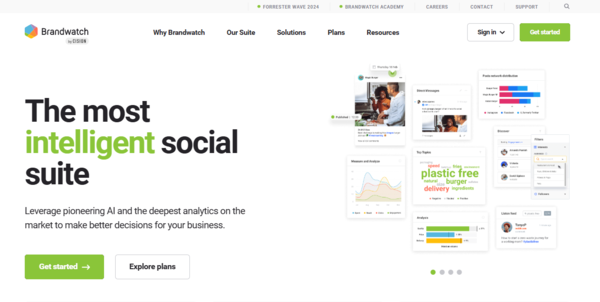
Using Brandwatch feels a bit like stepping into a control room. It’s powerful, detailed, and clearly designed for people comfortable working with complex queries and data. If you enjoy building dashboards and slicing data by emotion, region, or intent, this is where it really shines.
What Reddit users say
On Reddit, the feedback about Brandwatch is pretty consistent: excellent data, steep learning curve, and enterprise-level pricing. On top of that, you need someone on your team truly dedicated to analytics.
You won’t see many complaints about what it can do. The pushback is almost always about the cost, especially for teams that don’t fully use its capabilities.
What we found in our tests
Brandwatch really stands out when it comes to segmentation. Its social listening goes beyond basic sentiment and starts showing how emotions shift, which narratives are gaining traction, and how different audience segments respond to the same topic. That’s incredibly valuable if you’re doing deep analysis, but overkill if you just need a quick overview.
The source coverage is also massive. Thousands of news sources, multiple languages, image and logo recognition, and highly detailed filtering options.
That said, this isn’t a tool you casually check once in a while. Without someone dedicated to working in it, you’ll probably only use a fraction of what it offers.
Key features
- Comprehensive Source Coverage: Tracks mentions across social media, news, blogs, and forums in multiple languages.
- AI-Driven Segmentation: Groups mentions by emotion, intent, and topic for deeper insights.
- Custom Dashboards: Build tailored views for different teams, markets, or campaigns.
- Image & Logo Detection: Identifies your brand in visual content, even without tags.
- Advanced Boolean Search: Fine-tune queries with a high level of precision.
Pricing
Brandwatch doesn’t publish pricing. From user feedback and available sources, entry-level plans are often estimated at around $800/month, but real costs vary depending on setup and scale. So if that exceeds your budget, some Brandwatch alternative might be a better option.
Pros
- Very deep data and advanced filtering
- Strong AI-driven segmentation
- Widely used by enterprise brands
Cons
- Steep learning curve
- Pricing increases with seats and bundles
- Too complex for smaller teams
Best for
Enterprise brands with a dedicated insights or consumer intelligence team. Without someone actively working on the platform, it’s easy to underuse it.
Not Every Team Needs a Dedicated Analyst
Mentionlytics makes every member of your team understand your social media data. Easy, fast, and no PhD required to make sense of social listening.
Hootsuite: Best for All-in-One Social Media Management
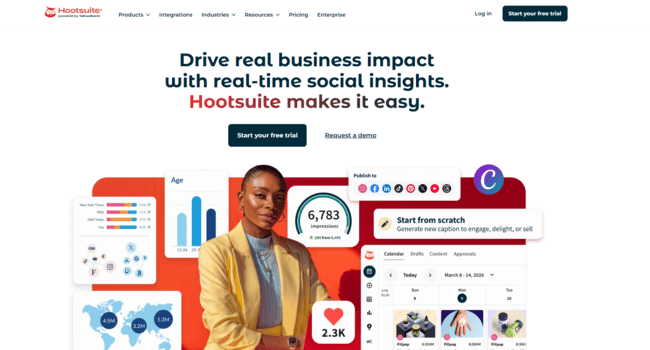
Hootsuite is one of the veterans of social media management platforms. It’s built to centralize everything in one place: scheduling, engagement, analytics, ads, and now social listening through the acquisition of Talkwalker. If your goal is to run most of your social media operations from a single dashboard and your budget allows, Hootsuite will probably be the first tool that comes to mind.
What Reddit users say
Hootsuite appears constantly in Reddit discussions, usually alongside Sprout Social and Buffer. Most users acknowledge that it’s powerful and can manage multiple accounts, teams, and reporting workflows.
That said, enthusiasm is a different story.
Pricing is the most common complaint, especially after recent plan changes. And lately, the ICE controversy has also made its way into discussions around the platform.
What we found in our tests
The first thing that stood out is that Hootsuite feels less like a scheduling tool and more like a social media operations hub. It’s complex, and for a moment it felt as if we’re going to need the whole month to conquer its interface.
For publishing across multiple platforms, managing conversations, monitoring performance, and running campaigns without jumping between tools, it’s great. But getting comfortable with everything takes time.
As I mentioned, the interface isn’t the most intuitive, and there’s definitely a learning curve. It works best when a team fully commits to using it as part of their workflow instead of just opening it occasionally to schedule posts.
Pricing is another thing worth mentioning. Once you start adding users and social channels, costs increase quickly, making it less appealing for larger teams or agencies managing many accounts. So if you’re on a strict budget, you might consider some Hootsuite alternatives.
Key features
- Multi-Platform Scheduling: Publish and schedule content across major social platforms.
- Unified Social Inbox: Manage messages, comments, and engagement from one dashboard.
- Analytics and Reporting: Track performance, engagement, and campaign results.
- Team Collaboration: Assign roles, approvals, and workflows across teams.
- OwlyWriter AI: Generate captions, content ideas, and post variations with AI assistance.
Pricing
Hootsuite plans start at around $99 per user/month (billed annually), with higher tiers unlocking advanced analytics, collaboration, and listening features. It also offers a 30-day free trial.
Pros
- Strong all-in-one social media management
- Scales well for teams and multiple accounts
- Good analytics and integrations
Cons
- Expensive compared to many competitors
- Interface can feel dated and overwhelming
- Advanced features locked behind higher tiers
Best for
Teams that want one platform to manage publishing, engagement, reporting, and collaboration, and are willing to pay for an all-in-one setup.
Zendesk: Best for Support and Ticketing Workflows
Zendesk is one of those platforms that almost everybody eventually tests at some point. It started as a helpdesk tool, but over the years, it evolved into a full customer service ecosystem with ticketing, live chat, AI agents, voice, knowledge bases, and social messaging all packed into one platform. Compared to Sprinklr, Zendesk is much more focused on customer support operations than social media management.
What Reddit users say
Reddit users usually describe Zendesk as the “safe enterprise choice.” It comes up constantly in discussions comparing customer support platforms, especially against Freshdesk and Sprinklr.
In one recent thread comparing Zendesk and Sprinklr, users described Zendesk as the stronger option for traditional support and ticketing workflows, while Sprinklr was seen as broader but more complex.
Pricing also comes up a lot. Users repeatedly mention that Zendesk starts reasonably enough, but costs climb quickly once you add advanced AI, automation, or larger teams.
What we found in our tests
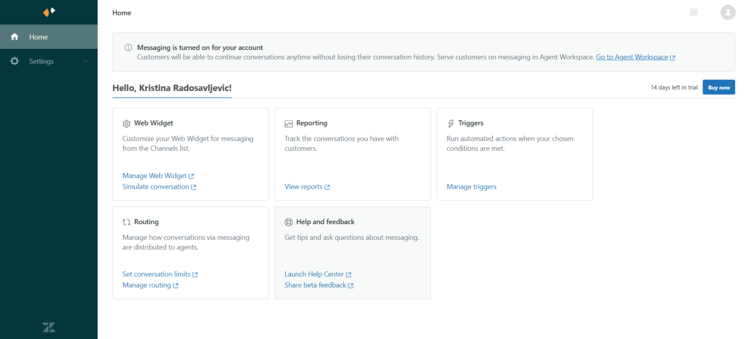
The first thing that stood out (and you can’t miss it) is the AI agent. Once you open your account, you’re going to be prompted to build yourself an AI agent. And you don’t have to code anything — just insert the URL of your website, and it will search the web on its own. And if you don’t trust the process, you can feed it yourself with documentation and information.
Now, why would you have this? And what good can it do for you? The AI agent can reply to your messages on Facebook, Instagram, and X. Excellent feature for all customer support or customer success teams. Yes, it’s an AI you need to control, but from what I’ve tested, it gives surprisingly accurate answers.
Now the downside: no scheduling and publishing features. No social listening as well. So basically, it’s a great tool for messaging across channels, but if you need more, you’ll have to move on to some other tool or combine them.
Key features
- Omnichannel Support: Manage email, chat, voice, social, and messaging support from one platform.
- Advanced Ticketing System: Automate routing, prioritization, SLAs, and workflows across teams.
- AI Agents and Copilot: AI-powered replies, summaries, routing, and automation tools.
- Knowledge Base & Self-Service: Build help centers and AI-powered customer support resources.
- Analytics and Reporting: Deep reporting and performance tracking for support teams.
Pricing
Zendesk pricing starts at a relatively reasonable $25 per agent per month and then escalates quickly depending on the features.
Pros
- Excellent ticketing and support workflows
- Strong automation and AI capabilities
- Scales well for larger support teams
Cons
- Pricing becomes expensive very quickly
- Requires onboarding and dedicated setup time
- Can feel overwhelming for smaller teams
Best for
Mid-sized and enterprise support teams that need scalable customer service workflows, advanced automation, and omnichannel support, and have the budget to grow into it.
Napoleon Cat: Best for Auto-Moderated Social Media Management
NapoleonCat is a social media management tool focused on moderation, customer engagement, and automation. While most tools fight over scheduling and analytics, NapoleonCat’s strongest card is helping teams handle large volumes of comments, messages, and repetitive interactions.
What Reddit users say
NapoleonCat comes up surprisingly often in Reddit discussions about social media moderation tools, especially among agencies and eCommerce brands that manage high levels of engagement. Users often praise auto-moderation, comment management, and Instagram and Facebook workflows.
What we found in our tests
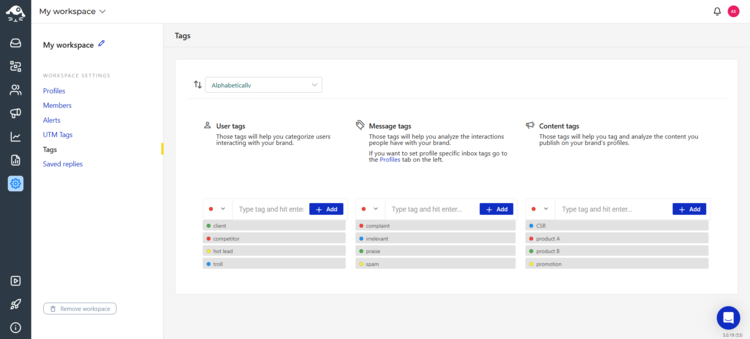
We have to say that this tool surprised us. It’s not similar to anything we’ve tried before. Its mixture of features, from publishing to competitor tracking and reporting, is not something we expected from this tool. And on top of that, it lets you auto-moderate most tasks (like automatically hiding hate comments), which is a time-saver for social media managers.
Now, on the flip side, its social media platform coverage is not as extensive as you might expect, and you need to have an account connected to NapoleonCat on the platform where you want to track your competitor. And since the sources are limited (Facebook, Instagram, Google My Business, YouTube, LinkedIn, TikTok, Google Play Store, Apple App Store, and partially X — because it’s limited only to publishing), competitor analysis is also limited.
Key features
- Auto-Moderation: Automatically hide, delete, assign, or reply to comments and messages.
- Social Inbox: Manage comments, reviews, and DMs from multiple platforms in one place.
- Publishing & Scheduling: Schedule content across Facebook, Instagram, LinkedIn, TikTok, and X.
- Customer Care Workflows: Assign conversations to team members and manage approvals.
- Analytics & Reporting: Track engagement, response rates, and social performance.
Pricing
The starting plan starts at $89 per month for two users and five accounts. But you don’t have Social Inbox in this plan. And they offer a 14-day free trial.
Pros
- Excellent moderation and auto-reply tools
- Saves a lot of manual community management time
- Easy-to-use inbox and workflows
Cons
- Analytics are fairly basic compared to enterprise tools
- Costs increase as profiles and users grow
- Not designed for deep social listening or consumer intelligence
Best for
Agencies, eCommerce brands, and support-heavy social teams that deal with high engagement volume and want to automate moderation without jumping into full enterprise platforms like Sprinklr.
Freshdesk: Best for Ticketing System for Small Businesses
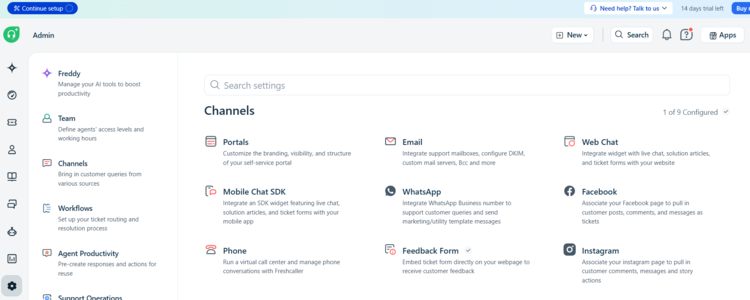
Freshdesk is one of the most common alternatives people consider when Zendesk or Sprinklr starts feeling too expensive, too heavy, or too enterprise-focused for what they actually need. It’s a customer support platform focused on ticketing, automation, live chat, and omnichannel support, but with a much simpler learning curve.
What Reddit users say
Freshdesk comes up constantly in Reddit discussions comparing support platforms, especially against Zendesk. Overall, it’s easy to use, cheaper, and needs less onboarding. In one recent SaaS discussion, users described Freshdesk as “solid for the money” if you mainly need clean ticketing and support workflows. But some users report major setbacks with WooCommerce integration.
What we found in our tests
The interface is clean, ticketing is straightforward, and you don’t need a full implementation project just to start answering customer messages. The automation is also surprisingly good for the price. Routing, SLAs, canned responses, ticket prioritization… most teams will find everything they realistically need.
Now, since we tried a lot of tools, we have to say this one didn’t sit right for us. There’s something confusing about their UX, and we had to spend too much time figuring out how to set up the features we wanted to try, or to find the Workflow Library… (but that’s on us). So I guess you need to be pretty familiar with customer service tools to use Freshdesk smoothly.
Key features
- Omnichannel Ticketing: Manage email, chat, phone, social, and messaging support from one dashboard.
- Automation & SLA Management: Automate routing, prioritization, escalations, and repetitive workflows.
- AI Agents: You can build your own customer service agent just by using templates, based on the industry.
- Knowledge Base and Self-Service: Create help centers and customer self-service portals.
- Team Collaboration: Internal notes, assignments, approvals, and shared ownership for tickets.
Pricing
The price starts at $35 per agent and per month, and they offer a 14-day free trial.
Pros
- Strong value for the price
- Good automation without enterprise complexity
- AI agents available
Cons
- Advanced features locked behind higher tiers
- Can feel limiting for very complex enterprise workflows
- Analytics and customization are not advanced
Best for
Small to mid-sized support teams that want strong ticketing, automation, and omnichannel support.
HubSpot: Best for CRM-Centric Customer Experience
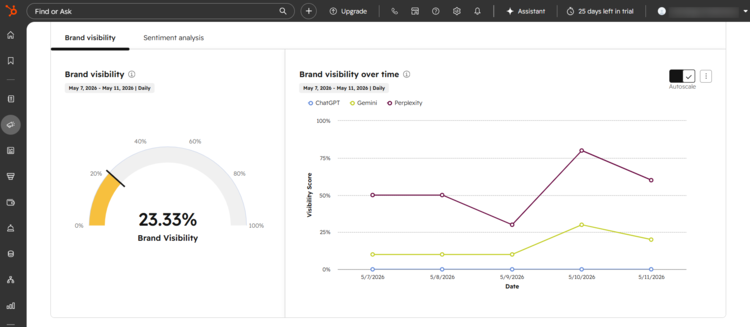
HubSpot is what happens when a CRM slowly absorbs half your marketing and support stack. What started as a marketing automation platform evolved into a full ecosystem with CRM, customer support, live chat, ticketing, automation, content tools, analytics, and AI layered across everything. Compared to Sprinklr, HubSpot feels much more business-centric than social-centric.
What Reddit users say
Reddit users usually describe HubSpot as a tool with excellent CRM integration and strong automation.
Now we can’t dismiss the negative side as well. In one recent Reddit thread, users specifically mentioned frustration with how bloated HubSpot became over time and how pricing escalates once you start layering additional hubs, users, and automation.
What we found in our tests
You can’t say anything about HubSpot unless you have used it for at least 2 months and created at least 1 workflow. So, you already know where this review is going. It’s complex, and it takes time to get to know all its features. And we can’t stress enough how important it is to set it right at the beginning.
But the great news is that they recently introduced an AI helper (Breeze AI) that solves at least half the problems you might have had when setting up the account. It leads you through, and everything can be done in minutes (what, on average, took ages before). We know some of Reddit users didn’t like it much, but we did, and we would give it 11 out of 10.
Now, if set up right, this is a super helpful tool because it connects your marketing and sales, so everything is basically one system, and now AI appears across support, content, automation, and reporting.
HubSpot looks affordable at the entry level, but please note that you can scale quickly and that pricing is based on seats, so make sure you have a small team.
Key features
- CRM-Centric Customer Platform: Connects marketing, sales, and support data in one ecosystem.
- Service Hub & Ticketing: Manage support tickets, chats, inboxes, and workflows across channels.
- Breeze AI: AI-powered automation, summaries, content generation, and support assistance.
- Marketing, Sales, Support, Automation: Email workflows, lead nurturing, forms, pipelines, and automation tools.
- Analytics & Reporting: Custom dashboards across marketing, sales, and customer support.
Pricing
HubSpot pricing depends on which hub (or combination of hubs) you’re using. For example, Marketing, Content, and Service Hub have free accounts, while the CMR Hub starts at €45 per seat per month.
Pros
- Excellent UX and onboarding experience
- Strong CRM + support + marketing integration
- Powerful automation and AI ecosystem
Cons
- Pricing escalates quickly as you scale
- Many advanced features require higher tiers
- Ecosystem can become expensive to leave once deeply integrated
Best for
Growing businesses and mid-market teams that want marketing, sales, and customer support tightly connected in one ecosystem, and are comfortable growing deeper into the HubSpot universe over time.
Try the Best Budget-Friendly Alternative to Sprinklr for Free
If you’re one of the companies that bought Sprinklr and ended up using only 15% of the tool, you’re not alone. The flashy dashboards and onboarding calls can put a rosy glow on things at first, but then… six months later, your team mostly schedules posts, checks mentions, exports reports, and the invoices keep coming.
Start with the tool that has everything your team actually uses, not what it might use if it were 10 times bigger.
With Mentionlytics, you get AI-powered social listening, sentiment analysis, anomaly detection, influencer tracking, competitor analytics, customizable dashboards, real-time alerts, and basic publishing. Try the transparent and budget-friendly alternative that your team will use every day.
FAQ
What are some cheap Sprinklr alternatives?
Some of the more budget-friendly alternatives to Sprinklr include Zoho Social, Freshdesk, RecurPost, Mentionlytics, and NapoleonCat. These tools don’t try to replicate the entire Sprinklr ecosystem, but they cover the features most teams actually use.
Who are Sprinklr’s competitors?
Sprinklr competes with platforms like Brandwatch, Hootsuite, Sprout Social, Emplifi, Zendesk, HubSpot, and Mentionlytics, depending on whether the focus is social listening, customer experience, support, or publishing.
What are some cost-effective alternatives to Sprinklr for social media management?
If your main focus is publishing, engagement, and analytics, tools like Hootsuite, Zoho Social, and RecurPost tend to offer better value for money than Sprinklr, especially for small and mid-sized teams.
Can you recommend a Sprinklr alternative that’s more focused on comment moderation?
Yes, NapoleonCat is probably one of the strongest alternatives if your priority is moderation and engagement workflows. Its auto-moderation tools, comment automation, and unified inbox are specifically designed for teams handling large volumes of comments and messages.
What are the best Sprinklr alternatives for social media management?
The best Sprinklr alternatives for social media management depend on what you actually need. If you want publishing and workflow management: Hootsuite or Sprout Social. If you want moderation and engagement automation: NapoleonCat. If you want affordable scheduling for evergreen content: RecurPost. If you want CRM integration: HubSpot or Zoho Social. If you want enterprise-level listening without enterprise pricing: Mentionlytics. The “best” option is usually the one your team will actually use consistently, not the one with the longest feature list.

