Here’s something about AI prompt tracking that got me thinking. Is it just me, or does it seem like everyone has forgotten about the importance of reputation and jumped straight into the sales pitch?
Yes, AI recommendations and sales are tightly connected, but I have a feeling that through the simplification of the process of how LLMs decide which brand to recommend and which one to skip, we forgot that reputation will always be the side of the coin that can make or break your business deal at the end of the day, whether it’s your online or LLM reputation.
So, the punch line is that AI prompt tracking shouldn’t focus only on commercial prompts. You need to look beyond that, because when you see how LLMs describe your brand, you’ll get a clearer picture of why sales isn’t that great. You will know exactly what segments you need to improve.
But you can’t get it through a “What’s the best project management tool?” prompt. You can see the results of your reputation through that answer, but not the cause. And sometimes, that cause isn’t your SEO guy, but the product, price, safety, shipping, or some random small thing your product development team never noticed.
In this article, we’ll go through this together, starting with what marketers can measure with prompt tracking in generative AI, why most frameworks assume people are shopping, examples of reputation prompt types that are probably missing from your monitoring process, and how to start your prompt tracking and AI answers checking with Mentionlytics.
Table of Contents
- What Marketers Measure with Prompt Tracking in Generative AI Today
- Why Do Most Prompt Tracking Frameworks Assume People Are Shopping?
- 5 Reputation Prompt Types Missing From Your AI Prompt Monitoring Process
- How LLM Prompt Monitoring Counts Bad News as Visibility
- How to Track AI Prompts by Reading Answers And Not Just Scores
- What an AI Prompt Tracker Needs to Show for Brand Reputation Protection
- Start Tracking AI Prompts to Protect Your Brand Reputation with Mentionlytics
- FAQ
What Marketers Measure with Prompt Tracking in Generative AI Today
AI prompt tracking is the continuous monitoring of a specific set of prompts throughout LLMs and AI search engines, measuring how often, in which LLMs, and in which prompts your brand appears in the answers. You can do it manually (for a lower volume of prompts or for one specific LLM, only ChatGPT, for example) or through an AI visibility tool. The prompt set focuses on the questions your target audience might ask.
As you can see, this definition differs from the classic dev definition of LLM prompt tracking because it focuses more on the marketers’ and generative engine optimization (GEO) purpose. If you ask a developer to explain prompt tracking, they’ll probably give you the backend version of the same story: tracking prompt versions, token cost, specific parameters (such as temperature), and latency.
So, what do marketers measure when they conduct AI prompt tracking? The list isn’t as long as you might think. You can track:
- Whether AI recommends your brand for relevant products, services, or use cases.
- Whether specific LLMs recommend your brand.
- What sources AI uses for building its list of recommendations.
- If LLMs use your content as citations.
- Which prompts your brand shows up in the answers.
- How prominently and accurately your brand is presented.
- Which competitors appear instead.
- What sentiment or context surrounds the AI-generated mention.
- Which sources influence the answer for a specific prompt.
- What are the dominant domains LLMs rely on when providing the answers.
- How these results change over time.
Keyword Tracking vs Prompt Tracking
Though it might look as if these two processes have the same main goal, a.k.a. how well your content or your brand is visible for a specific keyword, phrase, or question, prompt and keyword tracking differ in length and style, search intent, insights, ranking environment, metrics, and how the ranking system works.
| Keyword tracking (SEO) | Prompt tracking (AI visibility) | |
| What you track | One word or a short search term, such as “best AI visibility tool” | A conversational question, such as “what AI visibility tool is best for agencies with multiple clients” |
| What you analyze | Search results and your website’s ranking | AI answers, brand recommendations, descriptions, cited sources, and different LLMs |
| Typical metrics | Ranking position and changes (rank tracking) | Brand mention rate, share of voice, citation rate, average position in answers |
| Competitive insights | Which of your competitors and their websites rank above you for the specific keyword | What brands appear instead of yours, how the LLMs describe them, how often LLMs use their content as a source, what other competitors show up in the answers for a specific query |
| The final goal | Your webpage ranks in a high position on search engines for relevant keywords | Your brand appears constantly, accurately, and in relevant recommendations |
Why Do Most Prompt Tracking Frameworks Assume People Are Shopping?
Here we come to the point where most brands take the shortcut, measuring and tracking only recommendation prompts, which users with high shopping intent run. But the truth is that people don’t use LLMs only when they’re shopping. People also use Gemini, AI Mode, or any other AI model in every other phase of the customer journey.
Why do we lean towards recommendation prompts? Probably because of the statistics that hit us in the face at the very beginning of the AI search era, showing us that high-intent buyers come from LLMs, or that recommendations have an 18% conversion rate. Or simply because we inherited traditional SEO patterns where keyword research is mostly organized around commercial intent, and the vendors writing them mostly sell to B2B SaaS and ecommerce.
That’s true, but somehow we forgot that not all of ChatGPT’s 2.5 billion prompts a day are that direct or shopping-focused. Sometimes several informational prompts build up the buying intent.
In fact, in September 2025, the US National Bureau of Economic Research published a research paper on how people use ChatGPT, and the stats might make you rethink your prompt-tracking strategy:
- Inquiries about products or services available to purchase were 2.1%.
- Requests for factual information were 18.3%.
- Guidance on how to do something was 8.5%.
- Explanations and help understanding subjects were 10.2%.
Now, when we look at these stats, we can conclude that only 2.1% use prompts like “What is the best laptop for writing under $1000“, but we mustn’t forget that these 18.3%, 8.5%, and 10.2% of informational and instructional prompts also impact buying decisions.
So the most valuable insights from LLM visibility tracking come when you group prompts by intent:
- Informational: Users want to understand a topic or problem, e.g., “What’s the difference between dry and dehydrated skin?”
- Comparative: They’re weighing different options, e.g., “How does CeraVe’s moisturizing cream compare with La Roche-Posay’s?”
- Instructional: They need guidance on completing a task, e.g., “How do I introduce retinol into my skincare routine?”
- Brand-specific: They’re researching a particular brand’s products, reputation, or suitability, e.g., “Is The Ordinary’s niacinamide serum suitable for sensitive skin?”
- Transactional: They’re ready to take action, e.g., “Where can I buy CeraVe moisturizing cream in London?”
And every category is one step in the purchase journey: problem, exploration, comparison, validation, selection, and they all affect the final phase.
Let’s take, for example, an airline company. If you put safety first, no matter how often Google AI Overviews or Gemini recommends one airline company, you won’t follow the recommendation if the prompt about safety doesn’t confirm that the same brand is on the list. And that’s the power of informational prompts.
5 Reputation Prompt Types Missing From Your AI Prompt Monitoring Process
Five reputation prompts can help you find out (first-hand) what LLMs say about your brand, which might affect the purchase intent of your potential buyers.
Risk and legitimacy prompts
In the pre-LLM era, these prompts were a forum question. They cover safety concerns, trust, and whether the brand is legit or gives a fraud vibe. You want to know what LLMs answer to these types of questions, because they might be a deal-breaker for your next sale.
Tracking search queries like “Is XX safe to use”, “Is XY a scam”, “Has YY ever been fined?”, “Was XYZ brand involved in XX incident” across AI platforms can signal if something about your brand is presented the wrong way to the audience.
Depending on the specific query and industry, sources for these types of prompts can vary from news headlines, forums, groups, review platforms, corporate websites, blogs, and databases.
But the biggest threat here comes from outdated content: a forum discussion from two years ago where the problem might have been solved, but the AI platform pulls it and presents it as a current problem.
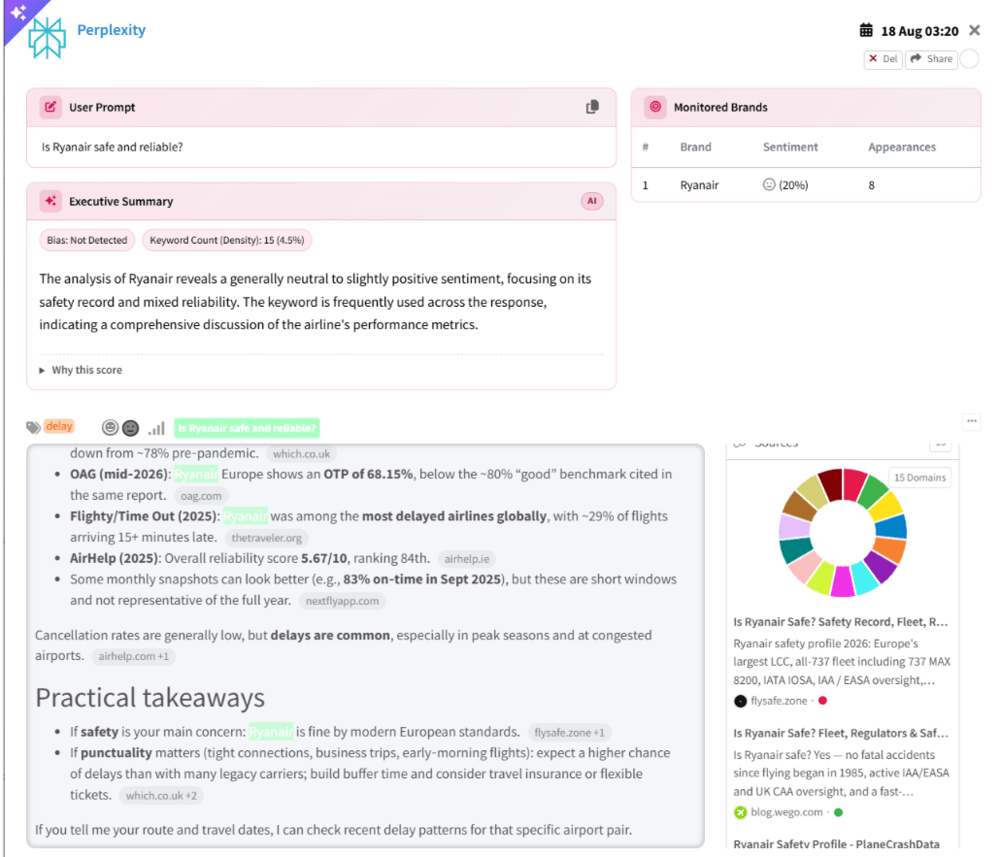
For example, I track Ryanair through Mentionlytics, and there are two prompts related to safety:
- “Is Ryanair safe and reliable?“, where all platforms describe it as a safe option with neutral and slightly positive sentiment in 99% of the answers. Perplexity describes it as very safe, with no fatal incidents, following all European safety standards, but points out that it’s one of the most delayed airlines worldwide (based on the 2025 flight tracking platform, Flighty, analysis).
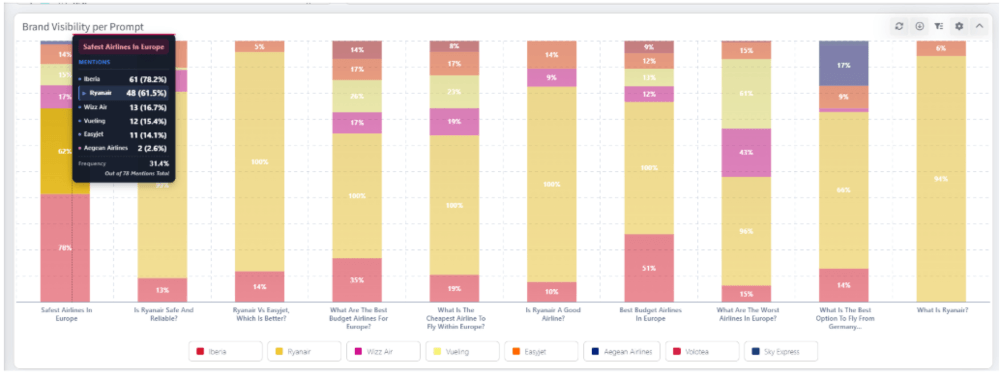
- But when you check the second safety prompt, “Safest airlines in Europe”, Ryanair shows up on the list only in almost 62% of the answers.
Eligibility and entitlement prompts
These kinds of queries are typically run by existing customers, clients, or buyers who want a refund or compensation, and they check AI responses to see whether they are eligible.
For answering prompts like “Am I owed compensation from (brand)?”, “Does (brand) cover (situation)?”, “What are my rights if (brand) cancels?”, “Can I get a refund from (brand)?” or similar, AI platforms will check consumer rights sites, legal blogs, help forums, and often not your own documentation and help center.
These prompts should be on your list because if AI gives customers incorrect information about your policies or their rights, your support team may receive more questions and complaints. When declined, customers will continue to complain online about that, and you can end up with a serious reputation crisis. It is especially important in industries like banking or insurance, where these mistakes could also create legal or regulatory risks.
Ownership and factual prompts
Prompts like “Who owns (brand)?”, “Is (brand) still in business?“, “Where is (brand) headquartered?”, “Is (brand) the same company as (other brand)?” people typically use when they want to check the legal side of the business, or they want to see who stands behind the brand.
AI answers are typically sourced from Wikipedia, Crunchbase, TechCrunch, news, and company registries, and these are the prompts where stale data is most common and easiest to fix.
Incidental example prompts
These are prompts where your brand appears as an illustration rather than an option. For example, someone asks, “Which airlines are criticized for extra fees?”. If you’re an airline company and you already know through listening to social media conversations that customers are complaining about it online, that would be an incidental prompt I would include.
Or, for example, if your company previously disclosed and resolved a data breach, you might want to track the “examples of companies that had a data breach” prompt to discover whether AI accurately describes what happened and when, or makes an old incident sound like a current security problem.
When answering these prompts, AI platforms may draw on news articles, industry reports, case studies, forums, and reviews. But answers can also rely on information learned during training, so you won’t always have a citation to investigate.
Employer and workplace prompts
How you treat employees can influence whether people want to buy from you, work with you, or recommend you. If AI repeatedly describes your company as a toxic workplace or an employer with unfair practices, those claims can undermine your public commitments to fairness and responsibility.
Customers don’t have to apply for a job to care about how you treat the people doing it, because from their point of view, if you treat your employees as replaceable, that attitude might just reflect to customers.
So, if you want to see how AI describes your working environment and company culture, especially if you have a B2B brand, track prompts like: “Is (brand) a good place to work?”, “Did (brand) have layoffs?”, “What do employees say about (brand)?”
These answers are sourced almost entirely from Glassdoor, Reddit, Blind, and news.
Not Sure Which Prompts to Track?
Mentionlytics can help you with that. Just choose the type of prompt, and our AI prompt generator will do the rest.
How LLM Prompt Monitoring Counts Bad News as Visibility
AI visibility scores count only if AI mentions your brand. It will not tell you the context in which your brand appeared. That might mislead you into thinking your brand is thriving.
Even some of the most popular metrics, such as mention rate or AI share of voice, indicate only how frequently your brand appears in LLM answers compared to your competitive environment. And it’s a good start. You have a first glance at your brand’s visibility in AI search.
But without context, the prompt “Which airlines have the most customer complaints?” can give you a higher visibility score, even though it’s basically pushing potential customers away.
So, here’s how it looks in practice.
You track 20 prompts. Your brand shows up in eight answers. That’s a 40% mention rate, and it looks good. Then you read the answers… and find out that five of the appearances are positive recommendations, but three connect your brand with unresolved complaints about refunds.
Realistically, yes, your overall mention rate remains at 40%, but only 5 of the 20 answers actually recommend you. That means your recommendation rate is only 25%. And the other three are your reputation pain points. In these cases, you’ll get the most accurate results if you group purchase-related prompts and track them separately from other prompt groups.
Because blended results can increase your AI search visibility score, which looks good on paper, but in reality it just adds noise and gives you false hope that everything is just fine.
Why sentiment doesn’t tell the whole story
Since tracking prompts in generative AI has become a hot topic, many AI visibility tools include sentiment analysis to help you distinguish between mentions that are doing you a favor and those with criticism. And that is actually very good news.
But the catch is that even with sentiment on, without reading the answer, you might never find out why there are no leads coming from LLMs and what’s going on.
Here’s why: Let’s say an answer starts with “Company X (yours) received a regulatory fine in 2024.” And yes, it’s neutral; it’s a fact. But if the prompt was “Which companies have violated consumer protection rules?” and your company shows up in the answer, that’s automatically bad news for you. It’s no longer neutral; it’s scaring your potential customers.
That’s why you need to dive deep. Analyze your visibility score and check the prompt, the answer, the claim’s accuracy, and the sentiment. It’s not the same when your brand is recommended, mentioned as a possible risk, or used as an example of suspicious business moves.
How to Track AI Prompts by Reading Answers And Not Just Scores
Scores allow you to identify changes. But answers give you the right context and help you interpret AI visibility for specific prompts the right way. It can tell you a story no number ever could.
Pull the full answer text for every appearance
Begin with the full answer, and include the prompt with it, then state what role your brand played:
- Recommended: AI recommends your brand in the answer.
- Listed as option: Your brand is included in the list of alternatives without any clear endorsement.
- Referenced as an example: AI uses your company to show what a practice, event, or trend looks like.
- Named in a cautionary context: Your brand is displayed together with warnings, complaints, or possible risks.
And don’t be surprised if one answer falls into several categories. For example, AI might recommend your product while warning about your customer support; in this case, keep both labels rather than letting the recommendation diminish the warning.
Check factual accuracy
This is the second step: checking whether the claims are accurate. Does AI give up-to-date information in the answers, or does it promote a service that you have discontinued six months ago? Or does it mix you up with another similar company, or keep mentioning the incident you resolved a year ago as an ongoing issue?
These are all very possible scenarios, and you have to know that accuracy has nothing to do with sentiment or context. You can have false claims within a positive recommendation, while a negative answer can be completely accurate.
Go through your documentation, official records, and all other evidence you can find and write down the exact statement that requires correction together with the evidence that supports it.
Log which source the answer cited
For every claim that is in question, note the URL used as a source, and then verify whether the source actually backs it up. A citation does not guarantee that the AI search platform has interpreted the page correctly.
Once you check all the URLs, you’ll know what to do:
- If those are URLs from your website, check them out, edit the content, fill the content gaps, and replace outdated information.
- If those are third-party URLs and they contain inaccurate information, you can reach out and ask for correction.
But don’t be surprised if sometimes you encounter these situations:
- The article cited by AI will be accurate, but AI will interpret it incorrectly.
- The answer does not include a citation even if the LLM used it.
- LLM used its trained material and pulled the answer from it.
In these dead-end cases, there’s not much you can do. The only thing you can do is to mark the prompt and the answer and wait for another update.
Make this part of your monthly brand reputation watch
Even if you use an AI prompt monitoring tool with automated tracking, set aside one hour each month to review the unedited answers to protect your brand reputation. For a small number of prompts, this might be enough to review collected AI visibility data. Bigger projects will require more time or a selected sample.
Start by reviewing new cautionary references, factual errors, and answers that changed significantly from the previous month. Compare what sources were used back then and what new URLs appeared.
For this kind of analysis, you need access to the answers that lie behind the scores. Mentionlytics has the original AI answer for each tracked run, alongside sentiment for each answer and the list of citations. You can see what each AI model actually said and review the sources it cited.
Make a simple record of the prompt, the platform, the date, the brand’s role, the accuracy problem, the source cited, and the next step. When you repeat this process month after month, you can tell whether it was a one-time mistake or a repeated association, and whether your corrections have an effect or not.
Got Tired of Manual Prompt Tracking?
Mentionlytics can run the prompts for you, display the answers for each, and analyze the data.
What an AI Prompt Tracker Needs to Show for Brand Reputation Protection
Before choosing a prompt tracker, check whether it gives you enough detail to investigate a reputation issue, because AI visibility measurements can be misleading without context. You will need to check if the AI visibility tool has:
- Full answer storage.
You need the complete text from each run to understand how your brand appeared and revisit claims after an answer changes. - Sentiment for each answer, linked to its prompt.
An overall positive score can hide a negative answer to a critical question like “Is this company trustworthy?” - Citation and source visibility.
Seeing the cited sources for the specific prompt and LLM helps you determine whether a correction belongs on your website, on a third-party page, or in feedback to the AI platform. - Separate results for each AI platform.
One platform may recommend your brand while another repeats an outdated allegation, and a blended score can dim that difference. - Country selection.
Consumer rights, available services, and news coverage vary by market, and answers will vary depending on the prompter’s location, so your tracking should reflect where your audience is. - Adjustable tracking frequency.
During an incident, you need to check answers more frequently to see whether new developments or corrections are appearing. - Prompt grouping or tagging.
Keep reputation prompts separate from general recommendation prompts so a rise in cautionary mentions doesn’t look like a marketing win.
Mentionlytics covers all of the requirements, as it:
- Tracks six AI engines separately (ChatGPT, Perplexity, Google AI Mode, Google Overviews, Gemini, and Copilot)
- Supports country selection
- Allows you up to four runs daily
- Stores answers
- Gives you per-answer sentiment
- Shows you citations for each answer
- Allows you to group your prompts
With this system, AI prompt performance tracking enables you to examine the answers behind your visibility metrics and investigate differences across platforms and markets.
Pro Tip: Test LLM Prompts Before You Commit to Monitoring Them
Before choosing your set of reputation prompts for AI visibility tracking, try each candidate prompt a few times (not the same day) manually through LLMs. Use incognito mode to reduce personalization. And check results after a few days of repeated prompting.
With unbranded prompts such as “Which airlines are criticized for extra fees?“, make sure your brand actually appears and that the answers indicate a relevant reputation issue.
If the answer is just a generic disclaimer, you might want to choose a new prompt. Identifying prompts correctly and focusing on those that give you useful insights will save your budget.
Start Tracking AI Prompts to Protect Your Brand Reputation with Mentionlytics
We have some good news and some bad news. The bad news is that you have another field to watch for reputation risks (hint: AI), and the good news is that you can do that through prompt tracking.
Building prompt groups with Mentionlytics will let you access LLMs’ answers, analyze each one, and compare them with the previous period. You will know exactly what answers a human-like query from a specific market gets, and which sources back them up.
Use your 14-day free trial to test Mentionlytics and see how generative AI prompt tracking can help you protect your brand reputation.
FAQ
What does “prompt” mean in simple words?
A prompt is a question that a user would ask Google’s AI Mode, Gemini, Perplexity, or any other AI model, just like it did before in traditional search; only this time it’s more conversational. It can cover information, recommendations, comparisons, or instructions on how to use a product.
What is the most popular AI prompt generator?
There’s no one universal AI prompt generator. People use dedicated tools like PromptBase or PromptPerfect, but they also use LLMs like Claude or ChatGPT to find the most adequate prompts for their brand visibility. And if you don’t want to use these options, you can opt for an AI visibility tool with prompt suggestions, like Mentionlytics.
How to create a good LLM prompt?
A good LLM prompt gives you data you can analyze. Start by choosing the main goal (what you want to find out). Then use social listening to identify the issues that already exist online. When creating prompts, use the same wording your audience uses, because they’ll repeat it in their LLM search. Make sure your prompts target a specific use case (the more descriptive you are, the better). And finally, don’t forget that prompts should be in the open-question format to get more data from the answer. Make a list and try your prompts manually before you start tracking it with the tool.