


So, your brand uses the Bluesky social platform, and you tried to pull the native Bluesky report to see the engagement and how you’re doing there. What you didn’t expect was to see a CAR (Content Addressable aRchive) file… How do you even extract data for Bluesky reporting from it without a developer by your side?
If you ever managed to open it, you would find out that the CAR file contains fragmented data from your posts and profile details. Not quite how you imagined reporting would look. The whole procedure is super frustrating and, at times, feels like a “Mission Impossible”.
But hey, you can skip the nag by using a social listening tool! And if you’re using Mentionlytics, it might just be the easiest thing you do all week.
In this article, I’ll walk you through the process of pulling reports for the Bluesky social network without complications, extensions, file conversions, or tech headaches.
Table of Contents
What is a Bluesky Report?
A Bluesky social report provides useful insights into your brand’s performance, audience, hot topics, posts, followers, engagement, competitors, and mentions.
It gives you a clear picture of how your brand is perceived and how you do compared to your competitors.
Since the Bluesky social channel doesn’t offer built-in analytics (aside from a CAR file, which you need an extension to open, some dev skills, and even then, it’s limited and lacks features like competitor analysis), a third-party report fills that gap by pulling insights from your posts, interactions, and public mentions.
With a social listening tool like Mentionlytics, you can go beyond simple metrics and actually understand who’s talking about you, what they’re saying, and how your content resonates in the Bluesky ecosystem.
How to Create a Bluesky Report with Mentionlytics
So, let me give you a quick tour on how to use Mentionlytics for Bluesky reporting.
Step 1: Set up Keywords to Monitor
Everything starts with setting up the keywords you want to monitor using a social listening tool. Make sure to include all the keywords you’re interested in. It could be:
- Your brand name (including variations and common misspellings)
- Your product name (to track how users talk about your product)
- Your competitor names (for competitive analysis)
- The industry terms (to stay on top of trending topics and discussions)
The setup is pretty straightforward, especially if you already know which competitors, topics, or hashtags you want to track.
Step 2: Gather Bluesky Mentions
Mentionlytics taps into every mention of your brand on multiple sources, including Bluesky, Facebook, Instagram, TikTok, Threads, Telegram, and many others.
Whether you’re tagged or not, Mentionlytics will catch it. It continuously scans social media and the web to find every mention of your brand, displaying them all neatly on a user-friendly dashboard.
Not tagged? No problem!
Mentionlytics tracks your mentions even if you’re not tagged; On Bluesky and beyond.
Step 3: Generate Your Bluesky Report
It looks great on the dashboard, doesn’t it? So great that you’ll probably want to pull it out and share it with your team (because what’s the point of insights if you can’t brag a little?).
Getting a report with all your Bluesky mentions is simple, and it is just a few clicks away. You can do it in two ways in Mentionlytics:
- Standard reports + filtering
- Custom report
1. Standard Reports + Filtering
This is the quickest route, and you can do it at no cost with your free trial!
You can generate a Bluesky-only report using Mentionlytics’ ready-made report templates and filtering options.
- Go to Reports in the left-side menu.
- Select Bluesky as the source within the dashboard.
- Done! Your report is ready!
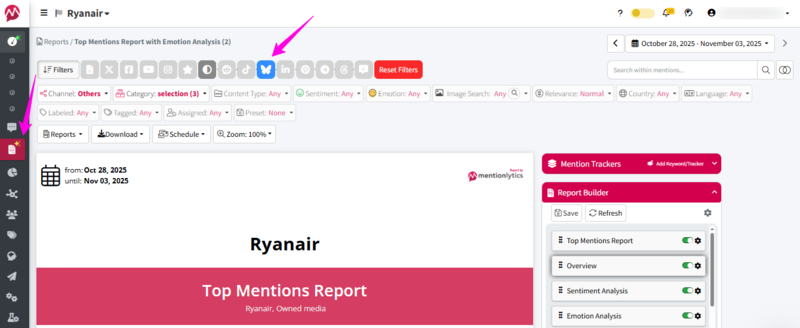
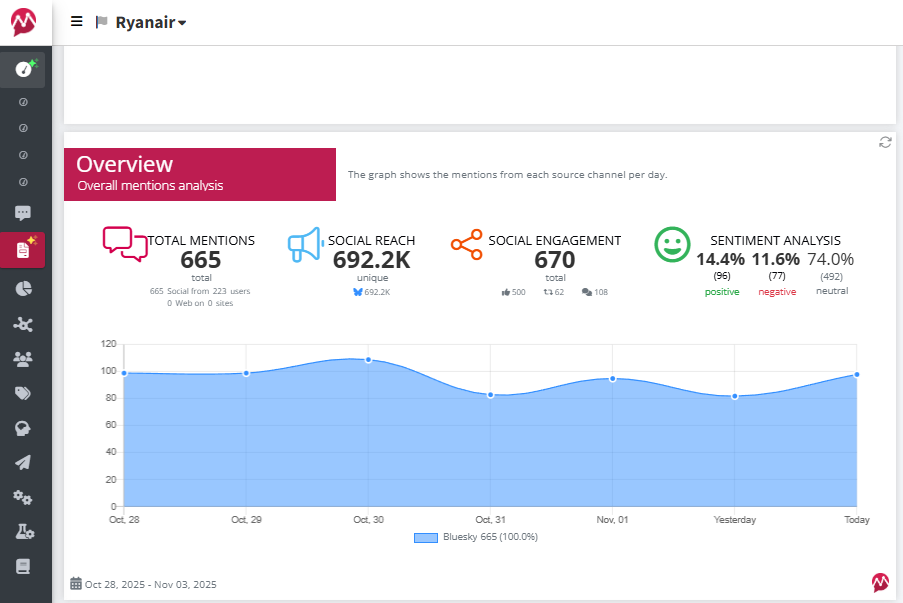
You can see the Overview, Sentiment and Emotion analysis, Share of Voice, and Top Mentions report. Read along to find all the insights you can gain from each analysis in the next section.
If, however, you’d like more control over layout or want to highlight specific sections first, then the Custom Report option is your best friend.
2. Custom Reports
Custom reports give you full creative freedom to design your report exactly the way you want, from layout to emphasis on the metrics that matter most.
It all starts by clicking the “Create New” button within the Reports drop-down menu on the left side of your Reports page.
Once you click on it, the Report Builder will open, and you will be able to create a highly customized report.
Add blocks, set your filters (under Channels and Categories), and choose Bluesky as your source.
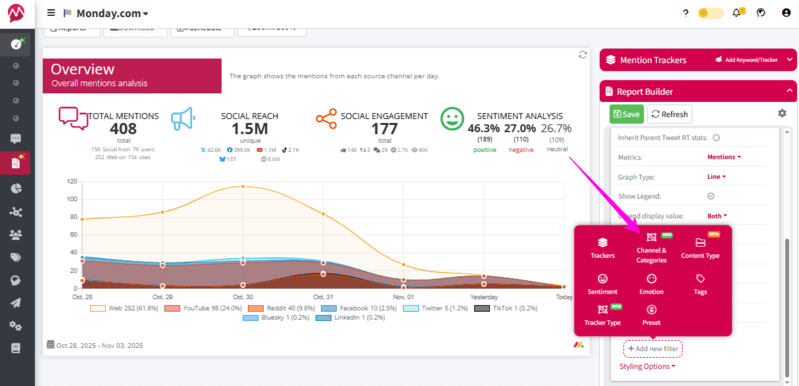
Note: When you select Channels and Categories, Mentionlytics will tick all sources by default. Make sure to uncheck everything except Bluesky.
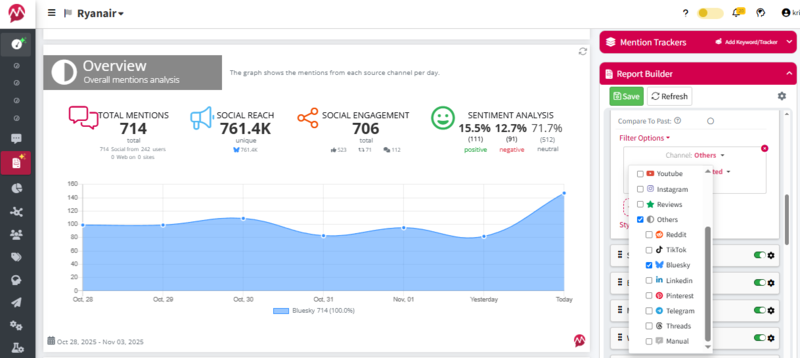
Once you’re happy with the setup, hit Save Template, and voilà, your custom Bluesky report will be ready with one click next time.
And if you ever need to tweak it or create a new version (say, a multi-channel or competitor-focused report), you can easily do that anytime.
Step 4: Analyze Insights
Now, what insights can you include in your Bluesky report? Basically, everything you see on your dashboard can appear in your report, but let’s start with the essentials.
1. Overview
The Overview gives you the big picture of your brand’s presence on Bluesky. Here, you’ll find answers to questions like:
- How many users mentioned your brand on Bluesky?
- What was the social reach of those mentions?
- How much engagement did they receive?
- What’s the social sentiment breakdown (positive, negative, or neutral)?
You’ll get both numbers and charts (for those of us who prefer data we can actually see).
2. Sentiment Analysis with 96% Accuracy
Your report highlights whether people are talking about your brand in a positive, neutral, or negative way.
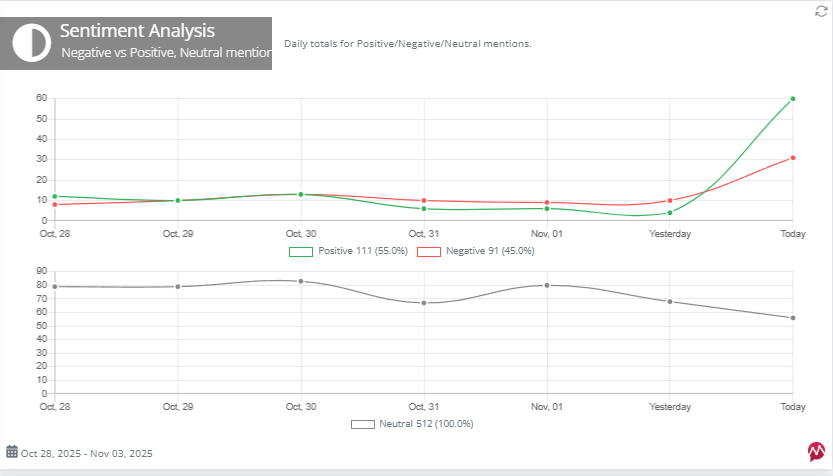
This section displays a sentiment trend graph that shows shifts over time.
If you spot a spike in negative mentions or sudden changes, that’s your cue to dig deeper and find out what caused it.
3. Emotion Analysis
Emotion Analysis takes things a step further by identifying the subtle emotional tones that sentiment alone can’t catch.
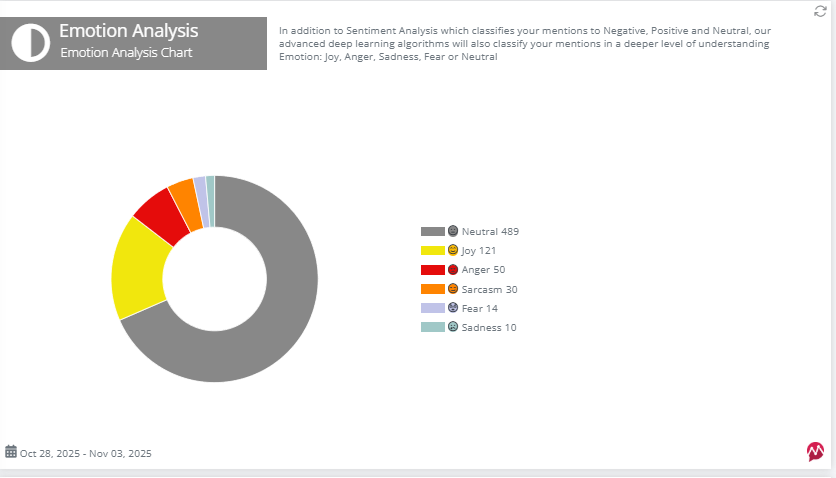
For example, in the previous screenshot, we can see that the sentiment is mostly positive, especially on the last day. However, in the Emotion Analysis chart, you will see that most mentions on Bluesky were neutral, meaning the audience could swing either way depending on your next move.
4. Media Share
Want to see where your brand’s getting the most attention? The Media Share slide compares your Bluesky presence with other platforms.
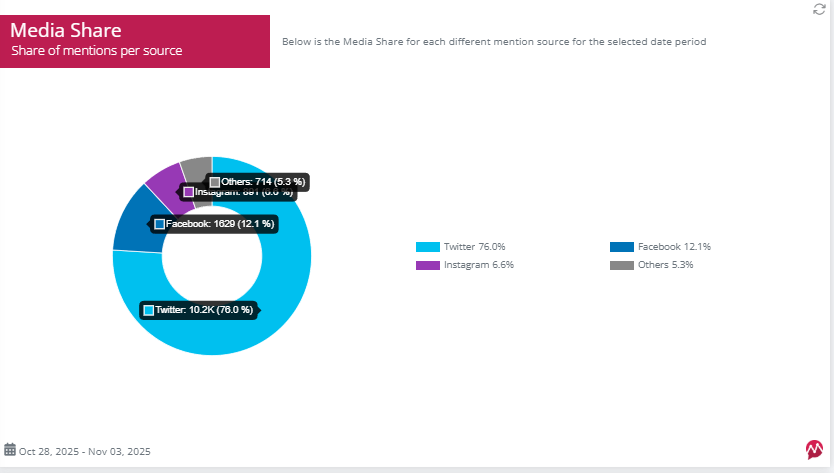
To view this comparison, refresh your filters to include all social networks for a full overview.
Note: Your Bluesky presence may appear under “Others” in this chart.
5. Word Cloud
The Word Cloud visual shows which words are most often associated with your brand during the selected period.
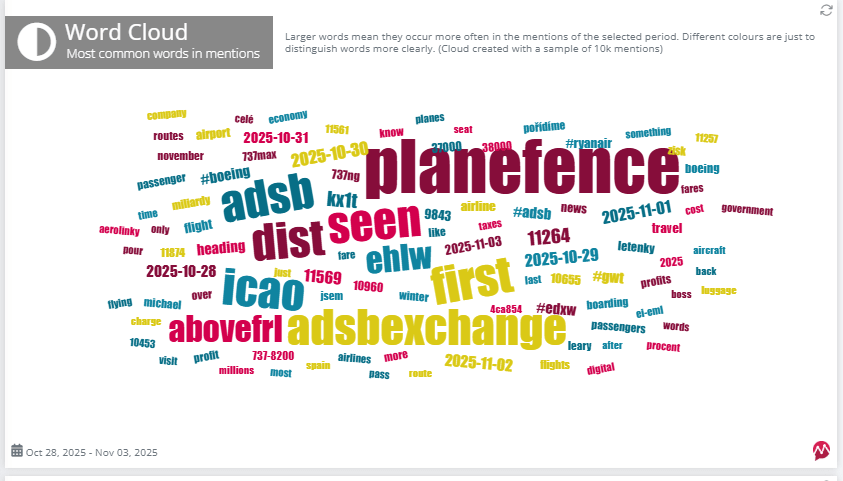
It’s interesting to look at, and it can also inspire your next hashtag strategy or content ideas.
8. Top Mentioners
Here you’ll find the top 6 Bluesky users who mentioned your brand most frequently.
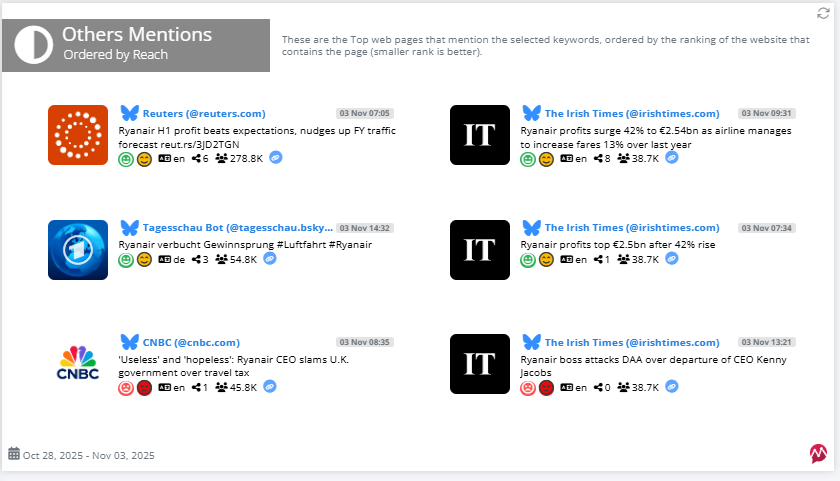
You can see each post’s reach, number of shares, and its sentiment and emotion. Perfect for identifying your most engaged fans, or for spotting potential PR collaborations.
Step 5: Share with Your Team or Clients
Once you’re satisfied with how your report looks, it’s time to share it.
Simply click the Download button at the top of your report and choose Export as PDF.
You can download and send it anytime, for any time frame, to your team, your manager, or your clients. Instant data, no complicated exports.
Check Bluesky For Mentions and Opportunities!
Just a few inputs, a few clicks, and Mentionlytics will find them all for you; No credit card, no commitments, no stress.
3 Tips for Better Bluesky Reporting
You’ve seen how the basic reporting works, but if you want to go the extra mile, here are three tips on what you should do.
1. Include Competitive or Benchmarking Context
Your report might already look impressive, but without benchmarking against competitors, it’s only half the story.
Sure, your Bluesky report might show 3K+ mentions and a reach of over a million, but what if your competitors are pulling 6K mentions and three times the reach? You wouldn’t know unless you added some competitive context.
That’s why Mentionlytics includes a Competitive Analysis Dashboard, where you can track and compare your competitors’ performance across social networks, including Bluesky.
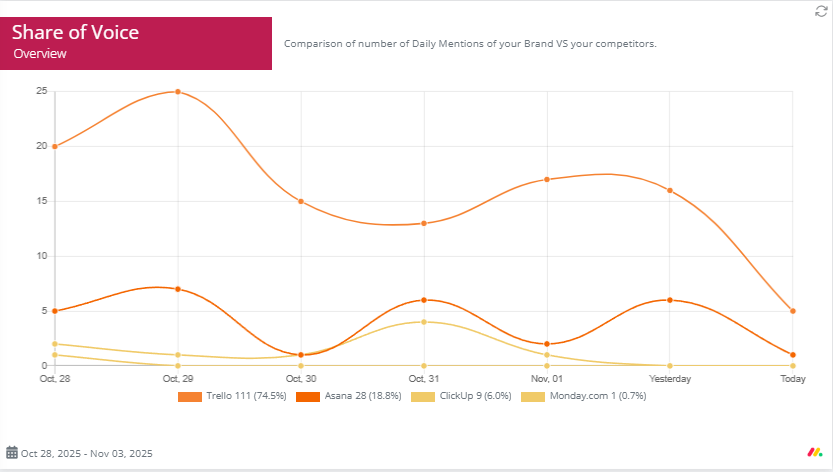
But you don’t need to put everything in the report. The good old Share of Voice will do. It will show you whether you’re winning the Bluesky battle or need to level up your game.
2. Incorporate Network Analysis
Bluesky is all about conversations, and knowing who’s leading them can give you a serious advantage.
In your Mentionlytics report, the Top Mentioners section already points out where to focus or who to contact by showing the most active users talking about your brand. These are the voices shaping discussions and influencing how others see you on Bluesky.
But why stop there? Keep an eye on industry-related keywords too. Tracking trending topics helps you spot emerging conversations before they go mainstream and join in while your competitors are still catching up.
With Mentionlytics, you can easily monitor both:
- Top Mentioners to identify key people driving the talk.
- Industry keywords to stay ahead of trends and find collaboration opportunities.
That combo gives you a full picture of your Bluesky ecosystem: who’s talking, what they’re saying, and where the buzz is heading next.
3. End with Recommendations
A report isn’t really complete without a conclusion, or better yet, a plan of action.
If you want your Bluesky report to stand out (and actually drive results), finish it with 3–5 practical recommendations based on your insights. Think of it as turning analytics into strategy.
Here are a few ideas to include:
- Suggested topics for your next posts to boost engagement.
- New hashtags that frequently appear in your mentions (perfect for expanding reach).
- An action plan for negative sentiment, whether it’s responding to feedback, clarifying information, or adjusting messaging.
- Content timing tips: if you notice certain days or hours drive more mentions.
- Potential collaborators spotted through your Top Mentioners list.
By ending with clear next steps, you add extra value to your report and show that these numbers can drive growth and support smart decision-making.
Generate a Bluesky Report for Free
No need to think twice: it’s easy, instant, and you don’t need to be a tech wizard to do it.
Bluesky reports with Mentionlytics are practically child’s play. And the best part? You get 14 days completely free, no credit card, no strings attached, no “till death do us part” kind of commitment.
So go ahead, create your first Bluesky report and see how effortless social listening can be.
FAQ
How does reporting work on Bluesky?
Bluesky doesn’t offer native analytics; only a CAR file export of your posts and profile data is available. That’s why most brands use social listening tools like Mentionlytics to automatically track mentions, engagement, sentiment, and audience trends.
Can social listening tools track Bluesky conversations automatically?
Yes! Those social listening tools that use Bluesky as a source can automatically track conversations. For example, Mentionlytics continuously scans Bluesky for brand mentions, even if you’re not tagged.
Can I benchmark against competitors on Bluesky?
On Bluesky, on its own, you can’t benchmark against competitors, but you can with a social listening tool. For example, Mentionlytics includes a Competitive Analysis Dashboard that lets you compare your Bluesky performance to your competitors by mentions, reach, sentiment, and Share of Voice.
What should a Bluesky section in my social report include?
A good Bluesky report should cover:
- Your Overview
- Sentiment and Emotion Analysis
- Top Mentioners
- Keyword Cloud
- Media Share
- Share of Voice
And a few actionable tips based on the insights. That gives you the full picture, what people say, how they feel, and how you stack up.
Are Bluesky reports public?
Bluesky CAR reports are not public. Though all Bluesky data is public, the process of reporting is not. So, the answer is no!

