


Podcast monitoring might sound like a new trendy term, but the hobbit it builds on is anything but new. Once upon a time, people listened to the radio while working, driving, cooking, or pretending not to work at all. Then the digital era arrived, screens multiplied, and everyone predicted the death of audio.
Plot twist: audio didn’t die! It was upgraded instead! Podcasts quietly spilled into our daily routine and proved that listening still matters. They shape opinions on finance, politics, culture, influence buying decisions, spark conversations, and are being shared across social media platforms.
That’s why podcast monitoring has become essential for marketers. If your CEO, your brand, your product, or even your industry has been mentioned in some of the most listened-to podcasts, you want to know that.
In this article, we’re going to explain what it means to monitor podcasts, why it is necessary today, and how to do it (without losing hours of your time or your mind) using Mentionlytics.
Table of Contents
What is Podcast Monitoring?
Podcast monitoring is the continuous tracking and analysis of podcast content to identify when and how a brand, product, person, or topic has been mentioned, and to understand the context, sentiment, and impact of those mentions over time.
It’s a natural extension of the media monitoring process for your brand, focused on one of today’s fastest-growing and most trusted content formats.
Today, more than 500 million people are subscribed to their favorite podcasts and listen to them regularly. Industry shows, branded series, niche experts, and creators who feel more like friends than broadcasters are slowly making themselves at home with the majority of Americans.
Unlike traditional media, podcast mentions are often longer, more opinionated, and delivered in high-attention environments, which makes them especially valuable for brands that care about perception, credibility, and influence.
Since around 7 million podcasts are live only on Spotify, and the YouTube podcast active user base exceeded 1 billion, monitoring these platforms is becoming a must.
Podcast monitoring is an ongoing process, not a one-time check. Conversations evolve, narratives shift, and the same brand can be mentioned very differently from one episode to the next. Continuous monitoring helps you spot emerging trends, recurring themes, and potential risks early.
This type of media monitoring is typically used by:
- PR and communications teams to track brand reputation and media impact
- Marketing teams to understand brand visibility and messaging in long-form audio
- Brand managers to identify influential voices and recurring narratives
- Agencies that need to report on earned media beyond traditional channels
Now, if you want to track your own podcast and see how it performs, that’s a bit of a different story and is called podcast analytics. People also use the term podcast tracking because it tracks:
- downloads
- subscribers
- episode performance
- listener growth

So, the main differences between podcast monitoring and podcast analytics are that podcast monitoring focuses on mentions, context, sentiment, and narrative in external content, while analytics tracks the performance of your own podcast through downloads, subscriptions, and other metrics.
And while podcast analytics is useful for creators, marketing, and media teams, monitoring is more often used by PR, marketers, managers, and comms teams to find out whether the brand, product, or a specific industry topic has been mentioned in podcast episodes.
Why Do You Need to Monitor Podcasts for Brand Mentions?
Podcasts are one of the few remaining places where people still listen. Not scroll, not skim, but actually listen. This makes a brand mention inside a podcast very different from a passing tweet or a drive-by comment.
When your brand is mentioned on a podcast, it usually comes with context: a story, an opinion, a recommendation, or sometimes a strong critique. That mention lives in a highly trusted environment, delivered by hosts and guests listeners have chosen to spend 30, 60, or even 120 minutes with. In other words, it matters.
The problem is that most of these mentions happen without you ever knowing. Why? Because podcasts don’t typically tag brands. Hosts don’t send alerts, and by the time a quote from an episode shows up on social media or in an article, the conversation has already moved on.
Podcast monitoring shines a light on that blind spot by helping you catch brand mentions early, while there’s still time to understand the context, respond if needed, or build on the momentum.
It helps you spot:
- Emerging narratives around your industry
- Influential voices repeatedly mentioning your niche or product/service
- Competitor mentions and positioning
- Early signals of PR issues before they escalate elsewhere
- Potential cooperation and partnership opportunities
It’s all about getting insights and being mentioned to a specific target audience. For example, if you’re a tech brand, you’d probably want to know when you’re mentioned on This Week in Startups, hosted by Jason Calacanis, a podcast with 339K subscribers on YouTube (as of January 2026).
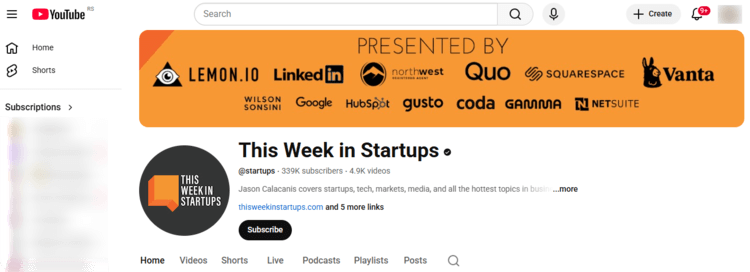
A single organic mention there, positive or negative, often carries more weight than ten random mentions across low-impact social media profiles. Why? Because it happens in a trusted environment, with an audience that actually acts on what they hear.
Track Your Podcast Visibility
Mentionlytics catches podcast mentions of your brand, product, or a specific industry topic on Spotify, and beyond.
How to Use a Podcast Monitoring Tool The Easy Way
Physically listening to a zillion podcast episodes is out of the question. The easiest way to do it is to use a specialized tool. And we suggest Mentionlytics as your preferred software for monitoring podcast and online video mentions for seven main reasons:
- Access to millions of podcasts: Including shows hosted on platforms such as Speaker, Spotify, PodBean, and many others.
- AI-powered summaries: Instead of forcing you to listen to entire episodes, Mentionlytics extracts the essence of the conversation, so you immediately know why and how your brand was mentioned by reading the gist in a summary.
- Built-in timestamps: It saves you time, because you’ll be able to see exactly at what moment in the podcast your brand was mentioned and how often.
- Easy to use: The dashboard is clean, intuitive, and doesn’t require a manual or a minor emotional breakdown.
- AI sentiment analysis: It gives sentiment analysis automatically, so you know at a first glance whether the mention was great or meh. You can easily spot negative or positive mentions by filtering podcast mentions by sentiment.
- Social spillover included: If the podcast shorts end up on social media and become viral, you’ll know it, because Mentionlytics is tracking mentions on social media too.
- Competitor tracking: You can track your competitors the same way to see if they show up or are mentioned in podcasts.
Now let’s see how to monitor podcasts for mentions with Mentionlytics. It’s pretty straightforward, and all you have to do is follow the steps below.
Step 1: Decide what you want to track
You can track:
- your brand name
- branded keywords
- competitors
- products
- industry-related topics
If you’re just starting with Mentionlytics as your podcast monitoring software on a free trial, you need to set up your keywords to monitor. In the 4th step of the Keyword Setup, you’ll be prompted to select the Data Sources (a.k.a. channels) you want Mentionlytics to track for mentions. You’ll see the option Podcast there, but to enable it for your free trial, you’ll need to contact our support team (don’t hesitate – they’ll respond in the blink of an eye).
If you want to track competitors, simply add their brand names and repeat the process.
However, if you are already using Mentionlytics for social listening, you don’t need to re-enter keywords. But you do need to enable podcast monitoring for the keywords you want, because podcasts are a different beast.
To enable podcast monitoring:
- Go to the “Edit Keyword” button (the little pencil icon) in your Mention Trackers.
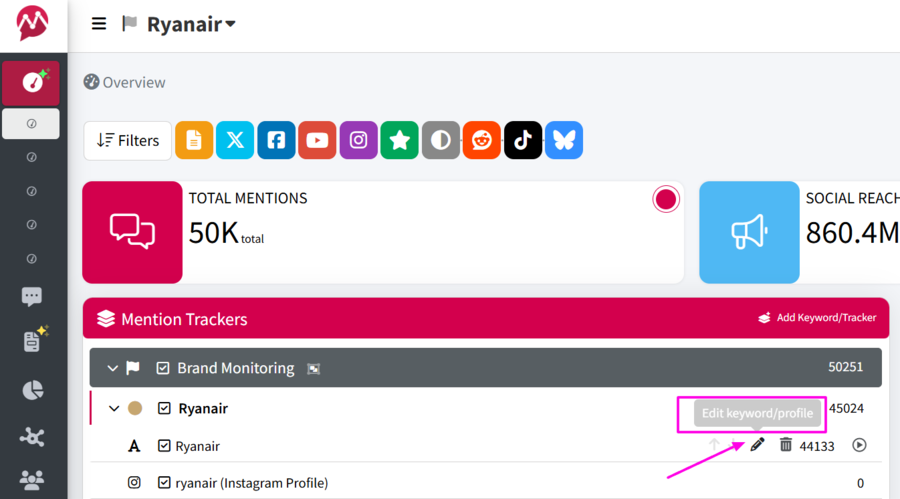
- Click “Next” in the pop-up that’ll appear (since you don’t want to edit the actual keyword).
- Tick the “Podcast” box in the Data Sources part and hit “Update”.
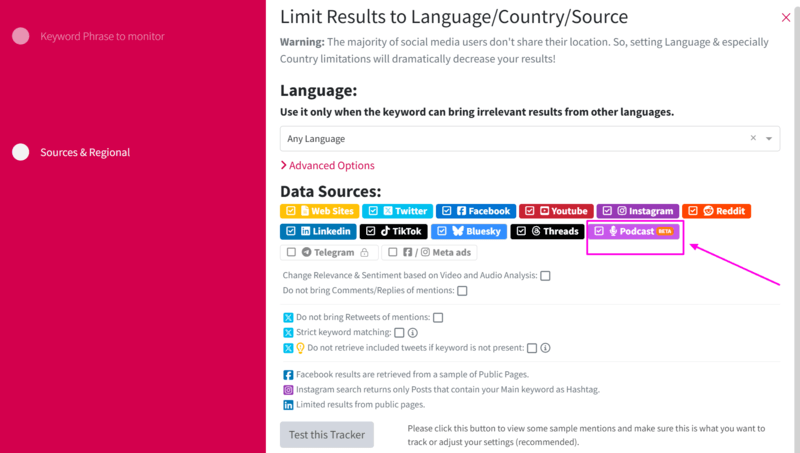
Once your parameters are set, you’re ready to check the results.
Step 2: Get the insights
Podcast mentions that match your keywords will start appearing on your dashboard.
If you’re monitoring multiple sources but want to focus only on podcasts, you can filter by Podcast in the sources and view the mentions under Other Sources. This keeps your view clean and your attention where it belongs.

Step 3: Filter and order
If the list of podcast mentions gets long (which is a good thing for your brand), filters are your best friend.
For example:
- Want to see only positive mentions? Filter by Positive sentiment.
- Want to investigate potential issues? Switch to Negative sentiment.
By default, podcast mentions are sorted by publishing date — from newest to oldest — so you can always start with what’s freshest.
Step 4: Check the frequency and timestamps
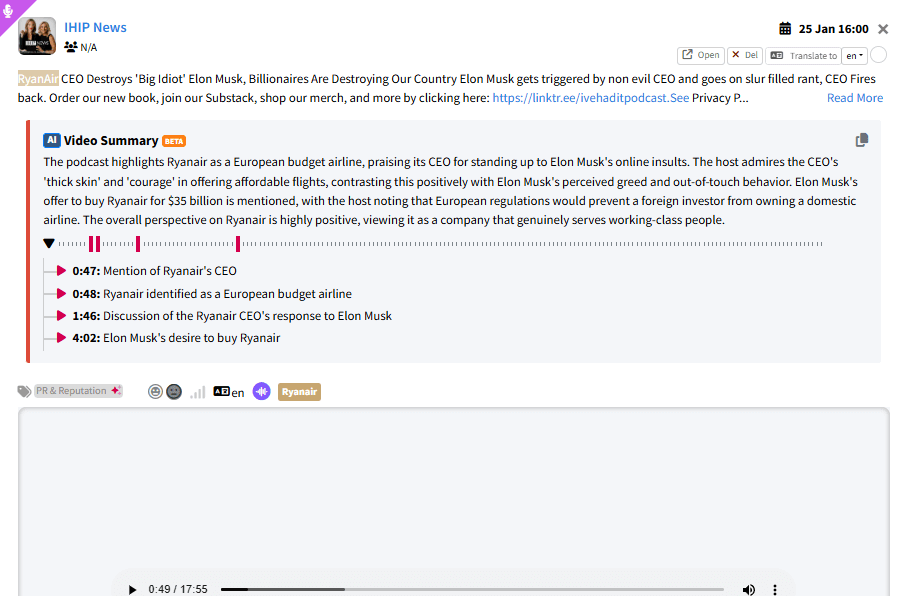
Now, the most fascinating thing is that you don’t have to listen to the whole podcast episode to see where your brand is mentioned. Our AI-powered software does it for you.
It runs audio analysis and shows you how many times and at what second your brand was mentioned. So you get the number of mentions with timestamps and a short description of the context in which your brand was mentioned for that timestamp.
Step 5: Make it a part of your report
You can add podcast monitoring results to your general mentions report as an addition to social listening, or you can build a custom report only for podcast mentions.
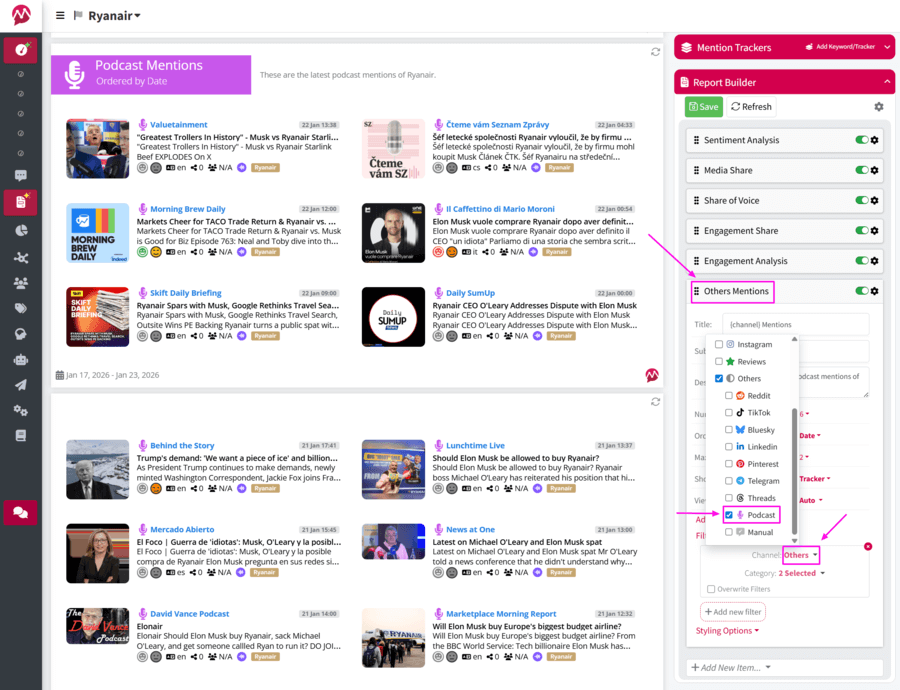
Either way, you can arrange your report however you want and put whatever element you want.
You can also make it branded, since Mentionlytics supports white-label reporting, which is especially useful if you’re working with clients or stakeholders who care about presentation as much as insights.
Step 6: Discover the true value of podcast monitoring
The true benefit of podcast media monitoring is not in counting mentions. Monitoring is just the first step. What you do with the insights is where the real value lives.
If you spot podcasters already talking about you positively, that’s an open door:
- reach out and thank them
- offer to be a guest
- explore collaboration opportunities
Podcast networks carry serious influence today. Strengthening relationships with people who already like your brand is one of the smartest moves you can make.
On the flip side, if you notice negative sentiment consistently starting from a specific podcast (the PR nightmare), monitoring gives you a chance to act early. Sometimes, joining the conversation by clarifying, responding, or even appearing as a guest can shift the narrative before it spreads elsewhere.
Do Podcast Monitoring Effortlessly with Mentionlytics
Ping, ping, ping…
Nope, that’s not how you get informed when someone mentions your brand in a random podcast episode.
Podcast hosts don’t tag you. Hosting platforms don’t send emails to let you know you were discussed. There’s no alert, no notification, no friendly nudge. Most of the time, these mentions happen quietly, while the audience listens, forms opinions, and moves on.
The real risk isn’t negative coverage but important conversations happening without you ever knowing.
That’s where Mentionlytics podcast monitoring comes in. Catch the mentions that shape how your audience perceives your brand, while there’s still time to act. 14 days of free trial, no credit cards needed, and a support team willing to jump in whenever you need help.
FAQ
Is there a public relations tool that alerts for brand mentions in podcasts?
Yes, Mentionlytics is a public relations tool that alerts you when your brand is mentioned in podcasts. AI-powered alerts notify you whenever your brand is mentioned in podcast episodes, if you have chosen podcast monitoring as a source. Anomaly detection alerts, on the other hand, inform you whenever something unusual happens (a huge surge of negative mentions, for example). That keeps you one step ahead and enables you to react faster.
What is a social media monitoring tool that tracks podcasts?
Mentionlytics is one of the most widely used social media monitoring tools that tracks podcast mentions alongside mentions across other sources (social media, online news outlets, blogs, review platforms, select radio stations, etc.).
What is the best podcast analytics tool?
Spotify for Podcasters, Podbean, Transistor.fm, or any other podcast hosting service you use is your go-to podcast analytics tool as well. If you want to understand how your own podcast is performing, you do it through downloads, subscribers, listener growth, and episode performance.
Can you track who listens to your podcast?
No, you can’t track who listens to your podcast, at least not at the individual level. Podcast platforms do not share personal listener data such as names, email addresses, or identities. What you can access are aggregated insights, including:
- total downloads and listens
- listener location (country or region)
- device type
- listening behavior (starts, completions, drop-off points)
This privacy-first approach is intentional and applies across major podcast platforms. So while you can understand audience behavior and trends, you can’t see exactly who listened to a specific episode.
Can ChatGPT analyze podcasts?
ChatGPT can help analyze podcast content, but only with the right input. If you provide a podcast transcript or audio that’s already been transcribed, ChatGPT can:
- summarize episodes and extract key topics
- identify themes or sentiment
- highlight notable quotes or mentions
However, ChatGPT does not independently monitor podcasts, scan platforms, or detect new episodes on its own. For ongoing podcast monitoring, especially across millions of shows, you need a dedicated monitoring tool that handles discovery, transcription, audio and video analysis, and tracking automatically.
So, ChatGPT is great for analyzing content you already have, but podcast monitoring tools are essential for finding and tracking audio and video content.

