


Though both terms might sound the same to social media beginners, impressions and reach are indeed quite different. If you compare reach vs impressions, you’ll see that reach represents the number of people who saw your post, and impressions represent the number of times the post was displayed.
But why does it matter? Here you’ll discover what both terms mean for different social channels and how you can improve them!
Table of Contents
Reach vs Impressions: What’s the real difference?
The difference between impressions and reach lies in the number of people who saw your post. Though both reach and impressions are metrics most often used interchangeably on social media platforms, it’s important to know the difference so your KPIs are achievable.
As we mentioned, the main difference is in the number of unique individuals who saw your post.
So, if your reach is 500, that means 500 individuals saw your post. However, if your impressions are 500, it means your post was displayed 500 times, but not necessarily to different individuals.
Think of reach as “how many people saw your ad/post”, while impressions are “how many times it appeared on screens” — even if the same person saw it multiple times.
What is Reach?
Reach refers to the total number of unique users who have seen your content. It helps you understand how many different people your message is actually getting in front of.
If you want to know what’s behind the calculation of your reach, you need to consider whether your post was organic, paid, or viral.
- Organic reach is the number of unique people who see your content without paid promotion. Whether your post will have a higher or lower organic reach, depends on multiple factors (likes, shares, comments, timing, frequency, algorithm’s preferences, etc.)
- Paid reach is the number of unique users who see a promoted (sponsored) post. Calculating paid reach is a bit different and can be based on ad spending, targeting, and bidding strategy. But whatever approach you take, one thing is for sure: a bigger budget and better targeting results in higher reach.
- Viral reach – the dream of every marketer! It’s the number of people who saw your post because others shared or engaged with it.
Reach is one of the most popular social media metrics, but some social networks (such as X or YouTube organic) don’t show it. What should you do in that case?
How to Calculate Reach When It’s Missing as a Metric?
You can get an estimated reach by dividing the good old engagement and engagement rate.
But Why Bother?
Mentionlytics does it automatically for you in the blink of an eye.
What are Impressions?
Impressions on social media refer to the total number of times your content appears on someone’s screen. Unlike reach, which measures unique users, impressions count every time your post is displayed — whether it’s seen by the same person multiple times or different users.
Important Note: Impressions Are Not Views!
Before you get comfortable, just a heads up.
- Impressions are the total number of times your content is displayed on a screen (whether or not the user interacts).
- Views are the number of times users actively watch a video (sometimes with a minimum duration required).
Think of impressions as opportunities to be seen rather than actual views. A user might scroll past your post without engaging, but it still counts as an impression.
Just like reach, impressions can come from different sources:
- Organic Impressions – These are impressions generated without paid promotion. Every time your post appears on a user’s feed, timeline, or explore page, it counts as an impression — whether they interact with it or not.
- Paid Impressions – If you’re running ads, every time your promoted content is displayed to a user, it counts as a paid impression. Paid impressions depend on your budget, audience targeting, and ad bidding strategy.
- Viral Impressions – When users share your content and it appears in other people’s feeds, that counts as a viral impression. More shares = more impressions.
How to Calculate Impressions
If you don’t see the impression metrics on the native analytics, you can calculate it by using this formula:
Advertisements, on the other hand, don’t have that problem, because of Cost Per Thousand Impression (CPM).
What is more important?
Now, that’s a rhetorical question. And the answer? It depends on another question — ”What do you want to achieve?”
Depending on your goal, one will matter more than the other.
- If you want to expand brand awareness, reach is more important. You want more unique people to see your content. And it’s mostly the case when you want to promote new products, introduce a brand, or grow an audience.
- While if your goal is engagement, retention, or conversion, impressions are your go-to metric.
Impressions vs Reach on Different Channels
Different channels have different metrics, which is important to consider when creating your social media strategy. Let’s find out where and how to track reach and impressions across different channels.

Facebook: Reach vs. Impressions – Now Replaced With Views
Remember the days when Facebook had impressions as a metric? Well, in November 2024, Facebook issued a public release that it will gradually change metrics to align with Instagram and have one Business Suite metric for both platforms.
Since Instagram reels have become a format that draws the most attention and users’ engagement, no wonder they are switching to Views as the primary metric. And yes, reach is still there on your Facebook Business Suite.
So, on Facebook what used to be reach and impressions, now are reach and views. These two are fundamental metrics that help you understand how your content is performing:
- Reach: This metric indicates the number of unique users who have seen your content. Each user is counted only once, regardless of how many times they’ve viewed the content.
- Views: While impressions were used to show the total number of times your content has been displayed on users’ screens, views include multiple views by the same user, so if one person sees your post three times, it counts as three views.
Where to Find It:
You can access reach and views metrics very easily, both for organic posts and ads, regardless of the format of your content. For organic posts you can find them in Meta Business Suite, and for Facebook ads, you can get both metrics easily from Facebook Ads Manager.
You can access data on reach and views through Insights:
1. Facebook profile: Go to Insights
- Navigate to your Facebook Page.
- Click on the “Insights” tab. It will automatically display reach and views for your profile page.
- Open Meta Business Suite.
- Find Insights on the left side menu and click it.
- Scroll to find the Content tab, and click on it.

2. Meta Business Suite:
- Access the “Insights” section.
- Go to the “Content” tab to see performance metrics for each post, including reach, likes, reactions, comments, and shares.
- If you don’t see views there, click on the columns icon, and you will see the popup where you choose views to be displayed.
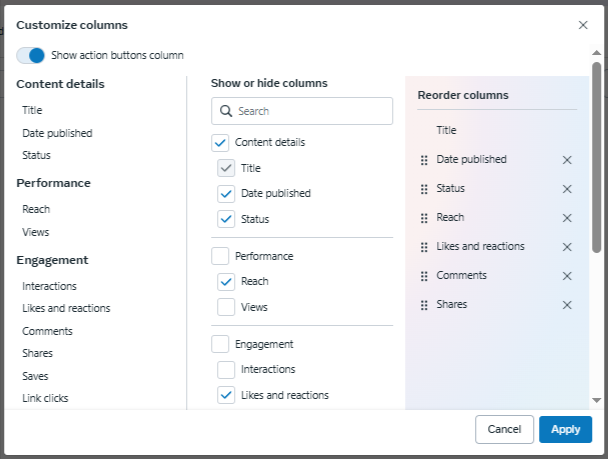
When it comes to paid advertisement, use Facebook Ads Manager, which provides all the metrics you need.
Instagram: Reach vs. Impressions (a.k.a. Views)
On Instagram, reach shows the number of unique accounts that viewed your post, while impressions are no longer in the picture. In August 2024, they were replaced by views which represent the total number of times the post was viewed. Stories and reels tend to have higher views per reach due to replays.
Where to Find it
If you have a private account, you won’t find views or reach when looking at your account.
If you switch to a business or creator account, your metrics change. You will see views, watch time, interactions, and profile activity.
Instagram analytics may seem confusing, but since Instagram and Facebook are both under Meta’s umbrella, all the information you’re looking for is in Meta Business Suite.
When using it, the procedure is the same as for Facebook views:
- Open Meta Business Suite.
- Find Insights on the left side menu and click it.
- Scroll to find the Content tab, and click on it.
On LinkedIn, reach and impressions work slightly differently compared to other social platforms. Instead of using the term “reach,” LinkedIn provides a metric called “Members Reached,” which functions similarly — it represents the number of unique users who saw your content.
Impressions, on the other hand, count every time your post appears in someone’s feed, even if the same person saw it multiple times.

For organic content, LinkedIn Analytics tracks both Members Reached and Impressions under the Content section.
If you’re running paid campaigns, the LinkedIn Campaign Manager will provide deeper insights into how many unique users saw your ad (reach) and how often it was displayed (impressions).
But LinkedIn doesn’t stop surprising us. You can now see comment impressions that show the author’s direct impact on their community.
X (Twitter)
Twitter, or X, once offered free access to detailed post analytics, including impressions, but now limits most of these insights to paid users.
Previously, impressions referred to the total number of times a tweet was displayed — whether on a user’s timeline, in search results, or as part of a reply thread. However, reach is not available as a metric, meaning there’s no way to track the number of unique users who saw a post organically.
Impressions are still available through X Ads Manager for paid ads. If you’re using the free version of X, your best bet is tracking engagement metrics like likes, shares, and replies to figure out how far your content is spreading.
TikTok
Unlike other platforms that emphasize reach and impressions, TikTok prioritizes engagement-driven metrics. If you’re looking for organic reach, you won’t find a dedicated metric for it.
Instead, TikTok’s analytics provide insights like Views, Average Watch Time, Overall Watch Time, and Completion Rate — all of which help measure how well your content is performing.
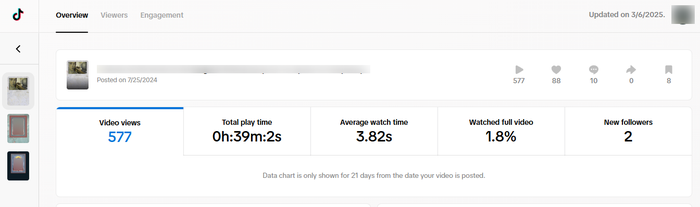
To access these insights, you need to:
- Tap the three dots on a post.
- Go to “Creative Tools”.
- Select “Analytics”.
This will show how many people watched your video, how long they stayed, and how many completed it. These engagement rates can serve as an indirect measure of how widely your content is being seen.
For paid TikTok ads, you’ll have access to both reach and impressions inside TikTok Ads Manager, making it easier to track how many unique users saw your ad and how many times it was served across the platform.
YouTube
YouTube measures impressions and reach differently from traditional social platforms, focusing on how video thumbnails appear across the platform.
Perhaps because YouTube focuses not on your videos but on the audience’s reaction according to its content creation strategy guide.
Impressions on YouTube refer to the number of times a video thumbnail is displayed to users in search results, suggested videos, or their homepage. However, an impression does not mean someone clicked on the video — it only means they had the opportunity to see it.
If you want to track actual video engagement, YouTube provides Unique Viewers, which acts as a reach equivalent by measuring how many individual users watched your video.
This is where things get interesting — a video can have millions of impressions but a low click-through rate (CTR) if the thumbnail isn’t compelling enough to attract views. That’s why you need a good marketing strategy for YouTube.
For YouTube Ads, Google Ads Manager provides even deeper insights, including paid reach and impressions, allowing advertisers to see how many unique users their video reached and how often it was displayed as an ad.
Bluesky
As a relatively new social platform, Bluesky doesn’t provide detailed reach or impression metrics — at least, not yet. Bluesky It currently only tracks engagement metrics like reposts, comments, and likes.
We Track It, So You Don’t Have to Guess
Just because Bluesky doesn’t show reach doesn’t mean you can’t track it. Mentionlytics does it for you!
This means that if you’re trying to measure how many people actually see your posts, there’s no built-in reach or impressions metric available. Instead, you can only estimate visibility based on how many people interact with your content.
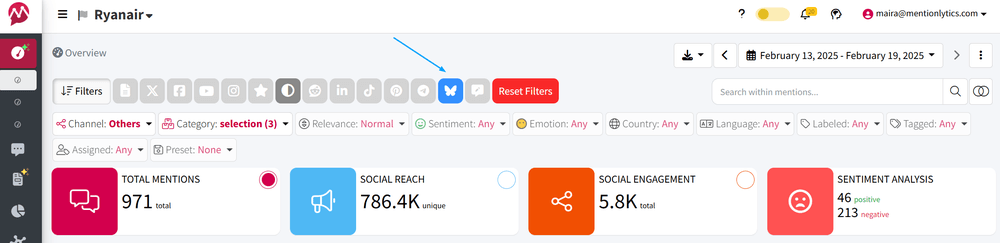
Bluesky may introduce analytics tools similar to Twitter/X, but until then, your content strategy relies heavily on user engagement.
On Pinterest, the closest equivalent to reach is “Total Audience” which counts the number of unique users who have seen or engaged with your pin.
Meanwhile, impressions reflect how many times a pin has appeared in users’ home feeds, search results, or boards — regardless of whether the same person sees it multiple times.
For organic pins, you can track Total Audience and Impressions within Pinterest Analytics. If you’re running Pinterest Ads, these same metrics will be available inside Pinterest Ads Manager, helping you determine whether your paid promotions are effectively increasing visibility.
Beyond Reach & Impressions: Engagement
While reach and impressions tell you how far your content is traveling, engagement tells you whether people actually care. A high number of impressions means your content is being displayed, but if no one interacts with it, does it really matter?
So the right question should be impressions vs reach vs engagement, which one is the most important social media metric?
Social media engagement includes likes, comments, shares, saves, and clicks, and these actions feed social media algorithms, boosting both reach and impressions. The more people interact with your content, the more it gets pushed to new audiences.
For marketers like yourself, engagement is a key indicator of content success and key metrics in social media. High engagement means your content resonates with your audience, while low engagement suggests it might be time to adjust your strategy.
3 Effective Ways to Increase Your Impressions & Reach
Now that we’ve covered what these metrics mean, let’s talk about how to actually grow them. Here are three tried-and-true methods to boost your reach and impressions across any platform.
1. Use Trending but Relevant Hashtags
Hashtags are one of the easiest ways to expand your reach, but using random trending hashtags won’t get you anywhere. Instead, relevant trending hashtags ensure your content appears in the right searches and gets in front of interested users.
The problem? Trends move fast. By the time you jump on one, it might already be old news.
That’s where social listening tools come in — they help you track which hashtags are trending in your industry right now so you can use them before they peak.
Platforms like TikTok and X (Twitter) thrive on hashtags, and knowing which ones to use is a game-changer for boosting impressions.
2. Interact with Your Audience
Social media isn’t a one-way broadcast — if you’re just posting and not engaging with your audience, you’re leaving reach and impressions on the table.
Answering comments, replying to DMs, and jumping into conversations in your niche can get your profile seen by more people. The more active you are, the more platforms push your content into feeds.
See, for example, what Spotify did below.
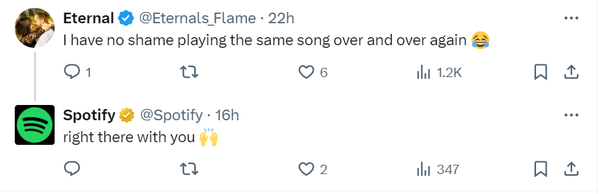
Source: X (Twitter)
So, next time someone comments on your post, don’t ignore them. Reply, ask a follow-up question, and keep the conversation going. You’ll be surprised how much that small interaction can boost your content’s visibility.
3. Track What’s Working and Repeat
Not all content performs the same. Some posts will take off, while others flop — but the key to increasing reach and impressions is knowing why.
Social listening tools help you analyze what’s working, so you can double down on the content that gets results.
For example:
- If carousel posts on LinkedIn are driving higher engagement, make more of them.
- If certain TikTok trends are pushing your videos into “For You” feeds, jump on them early.
- If a specific type of X post gets tons of impressions, repeat that format.
Social media isn’t about guessing — it’s about tracking, learning, and improving.
Measure Reach, Impressions & Engagement Without Confusion
One of the biggest challenges in social media marketing is measuring metrics consistently across platforms. Facebook calls it reach, LinkedIn calls it members reached, and YouTube focuses on unique viewers — it’s a mess.
That’s where Mentionlytics comes in. Instead of manually pulling data from different platforms and trying to make sense of it all, with Mentionlytics you can track reach, impressions, and engagement in one place.
This means consistent data across platforms, easier comparisons to see what’s working and what’s not, and better decisions for your social media strategy.
Try Mentionlytics for free and get a glimpse of your brand’s real impact across platforms.
Why play the guessing game when you can play the winning one?
FAQs
Which is Better: Reach or Impressions?
Neither is better — it depends on your goal. If you want to grow brand awareness, focus on reach. If you want to increase content exposure, focus on impressions.
Are Impressions Better Than Views?
Not necessarily. Impressions mean your content appeared on a screen, while views mean someone actually watched or engaged with it. If you’re measuring video performance, views are a more meaningful metric.
What is a Good Number of Impressions on a LinkedIn Post?
It depends on your network size and engagement. For smaller accounts, 10x your follower count in impressions is great. For larger accounts, look for a high engagement-to-impressions ratio.
Should Impressions be More than Reach?
Yes. Impressions are always higher than reach because a single user can see a post multiple times. If reach is close to impressions, it means people aren’t seeing your content repeatedly.
Is Reach a Vanity Metric?
Not really. Reach tells you how many people saw your content, but on its own, it doesn’t measure success. To get the full picture, combine it with engagement and conversions.

