


Well, B2B marketing is always special, and LinkedIn is the social media platform known as the most helpful for finding prospects for this type of business. If we know that there are 1.2 billion LinkedIn users, you may want to tune in and listen to what they have to say about your brand. But how does social listening on LinkedIn function? Is it even possible, or is it just a myth?
Social media management for business-to-business is always tricky because not all platforms are suitable for it. LinkedIn and Facebook still hold the position as the most desirable and effective for brand awareness and lead generation.
To determine the success of your LinkedIn strategy, you need to listen to what others say about your brand, relevant topics, and industry trends. But do you have to do it on foot?
Not really. Here we’ll explain how you can do social listening on LinkedIn properly using its native features and a dedicated tool.
Table of Contents
Can You Do Social Listening on LinkedIn?
When it comes to social listening, LinkedIn is unique in so many ways. Unlike other social media channels, such as Facebook and X, which have loose rules about scraping data, LinkedIn is pretty restrictive.
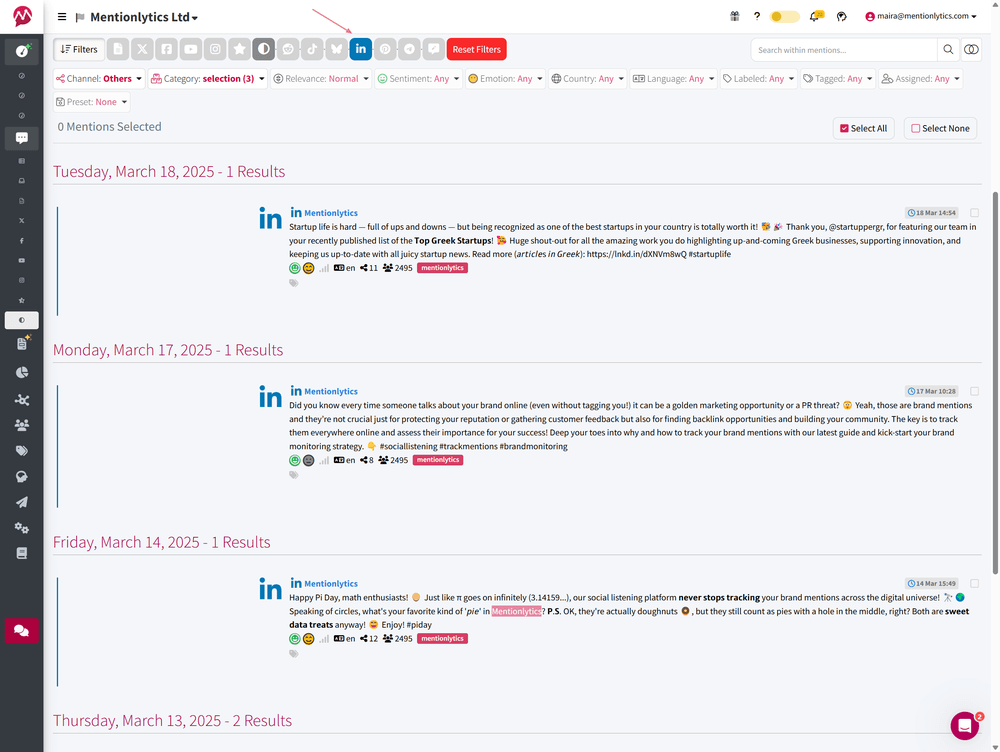
It is not the most open platform for social listening due to its strict API policies and restrictions on third-party tools’ access to data for non-authorized accounts. If you authorize your profile in a social listening tool, it will work as an integration, and fetch your data.
See for example our LinkedIn posts collected by Mentionlytics in the screenshot below.
But don’t let this scare you because there are some ways and workarounds you can use to track conversations around your brand on LinkedIn.
So, the answer to this question is YES. You can monitor LinkedIn conversations about your brand. The data might not be as extensive as on other platforms, but at least you won’t be blind there.
The key is knowing where to look and which tools to use. While you may not get the full range of insights that other platforms provide, LinkedIn still offers valuable ways to track conversations and industry trends.
How to Do Social Listening on LinkedIn
There are two ways. You can either do that natively, using LinkedIn features, or you can use social listening tools.

With Native Features
LinkedIn’s built-in tools allow you to track brand mentions, competitor activity, and industry discussions — but with some limitations.
Since LinkedIn prioritizes user privacy, most conversations won’t be accessible unless they are public or you’re directly mentioned.
Still, you can extract meaningful insights to guide your social media strategy by systematically using LinkedIn’s Mentions Tab, Competitor Analytics, and Manual Search.
If you have a business account, you’ll have to check daily the following tabs.
Mentions Tab
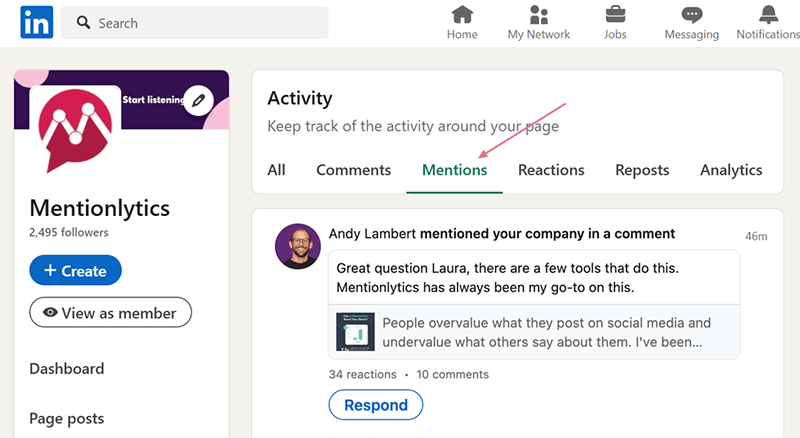
- Go to Activity on the left side menu.
- Check the Mentions Tab. It will display all recent mentions of your business page (brand).
The downside of this method is that you can see the mention only if a person (or a business) tagged you.
Competitors Tab
- Go to Analytics on the left side menu.
- Check the Competitors Tab.
- When you click on it, a popup will appear on your screen.
- Insert the competitors you want to track and compare.

You can add up to 9 competitors. - Once you do that, click the Continue button, and the page with competition analytics will appear.

Then, you’ll be able to:
- Set the time frame (up to a year) to see how competitors are doing compared to you.
- See how your posts and engagement rate compare to those of your competitors.
- Compare the number of new followers.
- See the number of LinkedIn posts of your competitors.
- Check total engagement metrics.
- See the trending original posts created by your competitors in the last month.
Manual Search: The Hidden Gem of LinkedIn Listening
Beyond tracking mentions and competitors, LinkedIn’s search function can help you uncover industry trends and thought leadership discussions.
By applying the right filters, you can track specific people, companies, industries, and even content types — ensuring you only see the most relevant conversations.
- Insert the hashtag or a keyword you want to track in the Search bar.
- Select Posts as what you want to be displayed.
- Click on the All Filters button, and select the filtering options.
Mastering LinkedIn’s Search Filters
LinkedIn’s search function allows you to refine your results using multiple filters, making it easier to track conversations, trends, and industry insights.
To get the most relevant results, click on the All Filters button after entering your keyword or hashtag in the search bar.

Here’s how each filter for Posts works:
- Sort by (Top Match or Latest)
- Top Match: LinkedIn prioritizes posts with the most engagement and relevance based on your network and activity.
- Latest: Displays posts in chronological order, helping you track real-time discussions.
- Date Posted (24 hours, last week, last month)
- Filter posts based on time frame. Use 24 hours for trending topics, last week for ongoing discussions, and last month for broader industry trends.
- Content Type (Videos, Images, Job Posts, Live Videos, Documents, Collaborative Articles)
- Select the type of content you want to track. For example, if you want to see presentations and reports, choose Documents, or select Live Videos to find recorded events and webinars.
- From Members (Track a Specific Person’s Posts)
- Use this filter to monitor industry leaders, competitors, or key influencers and see what they’re posting about a particular topic.
- From Company (Track Posts from a Specific Company Page)
- Keep an eye on competitors, partners, or industry brands to see their updates, announcements, and thought leadership content.
- Posted By (1st Connection, Me, People You Follow)
- Refine results based on your network. Choose 1st connection to see content from people you’re directly connected with or the People You Follow to track posts from influencers without being connected.
- Mentioning Member (See If a Person Is Mentioned in Posts)
- This is useful if you want to track discussions about a specific individual, such as your CEO, a competitor, or a thought leader in your industry.
- Author Industry (Find Posts from People in a Specific Industry)
- Use this to narrow your search to finance, eCommerce, marketing, tech, or any other industry, ensuring that the content you find is relevant to your field.
- Author Company (Identify Key Representatives from a Specific Company)
- Track posts from employees of a particular company, such as competitors, industry leaders, or potential business partners.
- Author Keywords (Track Job Titles Related to Your Topic)
- This helps you find content from professionals with specific expertise, such as “SEO Expert,” “Content Marketer,” or “Product Manager.”
If you want to change the filters, you can repeat the process or click the Reset button (just beside the All Filter button), which will remove all filters you previously entered.
With Third-party Tools
You’re probably wondering, “Aren’t third-party tools restricted from LinkedIn?” They are — but not entirely. Social listening tools can help you track your posts, comment sections, and even the sentiment of these comments.
But here’s where the real value comes in:
Social listening isn’t just about tracking mentions. It’s about analyzing them. And while LinkedIn’s native features allow you to monitor discussions, they don’t offer deeper insights such as sentiment analysis, extensive performance dashboards, or automated reports.
That’s where third-party tools fill the gap.
Even though LinkedIn restricts certain data, authorized accounts with tools like Mentiontionlytics can still aggregate publicly available information and help you make sense of it.
So, all the mentions you’re tracking manually can be gathered automatically without extra work. That means, instead of just seeing the conversations, you can actually understand their impact.
Let’s break down what it means in practice.
With social listening tools on LinkedIn, you can:
- Track publicly available brand mentions.
- Monitor competitors’ publicly available data.
- Analyze the sentiment of comments and posts.
- Cover multiple social platforms from one dashboard.
- Set up automated reports and auto-generated insights.
While LinkedIn’s native features give you access to valuable data, they lack deep analysis and automation. Combining them with a dedicated social listening tool ensures a more efficient approach. It allows you to track conversations, analyze sentiment, and streamline reporting for better decision-making.
The advantage of listening tools is that if you manage multiple brand pages or have a presence across several platforms, instead of switching between them, you can view all your analytics in one unified dashboard.
Make LinkedIn Data Work for You
Why struggle with scattered insights when you can have all your social media data in one place? Take a smarter approach to analytics and refine your strategy with Mentionlytics comprehensive reports.
2 Reasons to Use a Social Listening Tool on LinkedIn
Social listening tools are there to simplify your life and business, and here are the two most important reasons for utilizing tools for LinkedIn social listening.
1. To Simplify Your Reporting
Having all mentions of your brand in one single dashboard takes your reporting to another level of simplicity.
No calculations, no jumping around the social media platforms, and no struggling with different metrics. Just a few simple clicks and your reports are ready.
The best thing is that social media listening tools, like Mentionlytics, do that automatically, without any manual work required.
You have the initial setup to do, and after that the software is doing its job, and you pull the reports whenever you need.
2. To Benchmark Your Performance Across Other Social Platforms
But it’s not just about how your post performance is on LinkedIn. With a social listening tool, you can easily compare how the same post (i.e. the same topic) is performing on different platforms.
You can determine which format performs better on one social media platform and which one does not and adjust your strategy accordingly.
Social media managers would appreciate that to finetune their posts by platform and create more resonating content. Understanding which posts resonate with your target audience on each platform is key to refining your social media strategy.
LinkedIn, in particular, operates differently from other social networks — it’s a professional space where engagement is driven by thought leadership, industry insights, and value-driven content.
By analyzing audience response on LinkedIn, you can fine-tune your messaging, optimize content formats, and ensure your brand stays relevant in industry conversations.
How Do I Monitor Keywords on LinkedIn?
Unfortunately, no tool can help you with that. The only way is to do that on foot. There’s no social listening tool on LinkedIn that can track hashtags and relevant keywords as you would on any other platform.
LinkedIn has strict regulations, and there’s no way to band them around and use third-party tools for that.
So, what’s left is the native way, with the LinkedIn search bar and filters. That’s the only way to fetch recent results from posts, pages, articles, videos (from recent), for a specific keyword or hashtag.
Try Social Listening for LinkedIn At No Cost
If your social listening strategy prioritizes LinkedIn but you also have to manage Facebook and X (Twitter), for example, don’t let the LinkedIn restrictions put you down.
Yes, you’ll have to do more the manual way, but that doesn’t stop you from turning at least your reports into breezes, collecting all your brand mentions in one place.
Why waste time jumping between platforms when you can track brand mentions, industry trends, and competitor insights — all in one place? Streamline your social listening strategy with Mentionlytics and get actionable insights effortlessly.
Full steam ahead!


