Are you struggling to explain confusing KPIs to demonstrate all the work you’ve been doing on social media every week? Sounds like you need a social media dashboard.
A social media marketing dashboard helps you present the results of your efforts and make it comprehensive to other teams in your company, from the executives to the sales folks down the hall.
It’s the ultimate reporting tool that can answer business-critical questions like:
- Is our brand scoring well in brand awareness?
- How happy are our customers?
- What are our competitors doing better than us?
Now, forget about spreadsheets. To get a meaningful response to these — and a hundred more — questions all you need are some intelligent dashboards and reliable data.
Read along as here you’ll learn how to build social media dashboards for different objectives and discover useful templates and tools to streamline your social media reporting.
Table of Contents
Disclaimer: The information below is accurate as of today 21/8/2023.
What is a Social Media Dashboard?
A social media dashboard is a hub or platform that provides a comprehensive overview of your brand’s social media metrics and their impact on key business areas.
Basically, its primary purpose is to simplify the process of monitoring, analyzing, and presenting social media data. You can use such a tool to track your social media results, analyze them to extract insights for your performance and illustrate the effectiveness of social media for the whole business.
In addition, you can build various dashboards for different business goals. These goals will define the contents of the dashboard, the metrics you’ll have to include, and the people you’ll share it with.
One thing to remember is that social media dashboards are ever-evolving. Unlike spreadsheets that need a lot of manual work, these dashboards keep up with social media channels automatically. That way, you can feel safe that your data is up-to-date.
To get familiar with what we’re talking about, keep reading as we dive deeper into social media dashboard templates in the section below.
5 Templates for Social Media Dashboards
For starters, there’s an abundance of dashboard ideas that are only limited by your imagination. The key here is to begin with the objective you want to create the dashboard for. For example, audience growth dashboard, social engagement dashboard, and so on.
Every dashboard is different in contents but their philosophy remains the same: a central tool with visualized KPIs that showcase whether your brand met or not the objective and why.
So, below you’ll find a social media dashboard template example for some essential marketing goals.
1. Social Media Monitoring Dashboard
A common reason why social marketers, like you, need a dashboard is for social media monitoring — to keep all their KPIs in one place.
A social media metrics dashboard is truly multipurpose. You can scan your social mentions at a glance and catch up with your social performance in terms of reach, engagement, and mentions’ sentiment.
Objective: Reputation management, publicity monitoring, campaign reporting, and more
Metrics: Number of total mentions, social reach, social engagement, sentiment analysis
Useful to: Marketing, PR, and Social Media teams
To be honest, most social media dashboards are social monitoring dashboards at their core. Nonetheless, their objectives can be various and so are the metrics.
2. Competitor Overview Dashboard
You can gain valuable insights into what your competitors are doing by monitoring their social media presence.
A competitor overview dashboard will become your most valuable tool, as it shows you what is working for the other players in your league and you can actively compare your performance to theirs.
Objective: Competitor analysis
Metrics: Engagement analysis, sentiment analysis, media share, total mentions ordered by engagement
Useful to: Marketing team and Executive Board

3. Brand Awareness Dashboard
A brand awareness dashboard is a must-have social media analytics dashboard to prove the impact of your campaigns and PR efforts across your company.
It can help you determine your audience growth, your reach increase, your reputation expansion, and all other key brand awareness metrics.
Objective: Measuring brand awareness
Metrics: Total mentions, social reach, Share of Voice, mentions’ geographical distribution, audience growth
Useful to: Marketing team, PR team, and Executive Board
4. Lead-Generation Dashboard
On the other hand, when creating social media dashboards you shouldn’t skip the sales-supportive goals of marketing. After all, 64% of marketers agree that generating demand to acquire new customers is among the top priorities in B2B marketing this year.
That’s where a lead-generation dashboard comes in.
You can build such a dashboard to quantify how your social media marketing strategy is feeding the sales funnel. Also, this dashboard will be a place for team collaboration between marketing and sales, to stay aligned and help each other.
Objective: Lead Generation
Metrics: Requests through social mentions, direct messages, link clicks
Useful to: Marketing and Sales teams
5. Social Customer Care Dashboard
Social media platforms are the place where you should offer the best customer support.
So, a social customer care dashboard can help your marketing and customer success team stay aligned with requests, opportunities, praises, or complaints.
Objective: Quality customer care
Metrics: Requests through social mentions, direct messages, sentiment analysis
Useful to: Marketing and Customer Success teams
So, these are pretty much the standard social media dashboards every business should have. But how can you create them?
Well, we’ve got you covered below.
How to Create a Social Media Dashboard?
Truth being said, it’s easy to create a social media dashboard if you have the right tools at hand.
Here, we’ll show you how to do it with a social media tool, like Mentionlytics. As an example, we’ll create a social media monitoring dashboard.
Step #1: Set Up Your Account
First, you have to create a free account in Mentionlytics and add all the keywords you want to monitor on social media. These keywords can be anything, from your brand name to your branded and campaign hashtags.
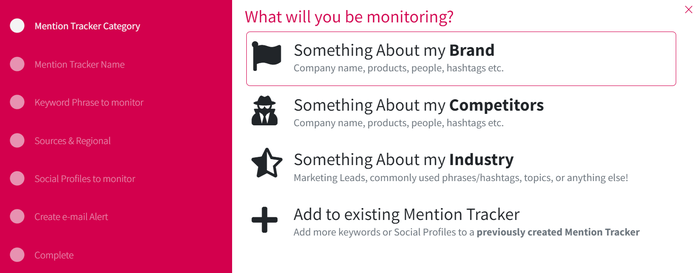
Within seconds, the platform will start to bring back all social media and web mentions of the given keywords and generate results inside the default dashboards: Overview, Performance, and Synopsis, which you can access from the left menu bar.

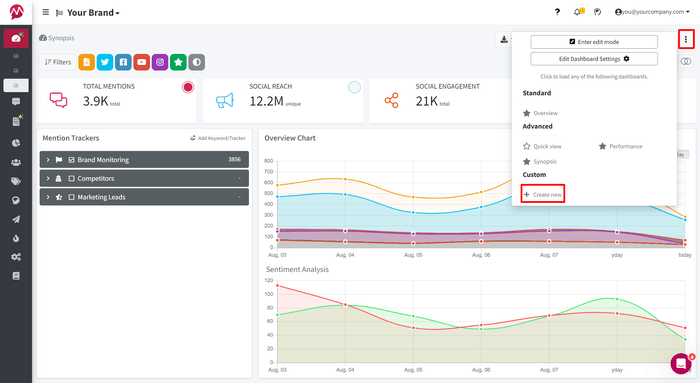
Step #2: Create a Customizable Dashboard
Then, to build your own dashboard, specifically tailored to your needs, you can tap the three dots at the top right corner of your dashboard. Navigate to the bottom of the pop-up window to find the “Create new” option.
Step #3: Choose the Components of Your Dashboard
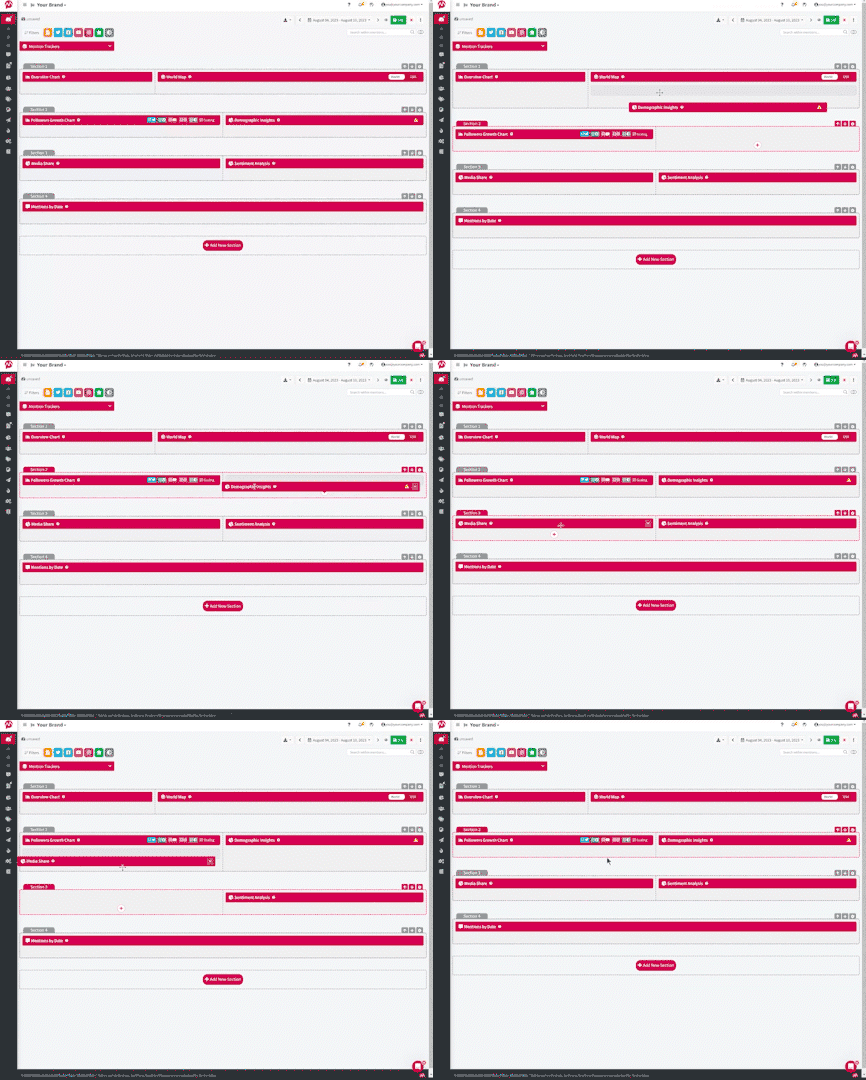
Now, you’ll see a blank dashboard, where you can add various blocks of content just by clicking the plus button.
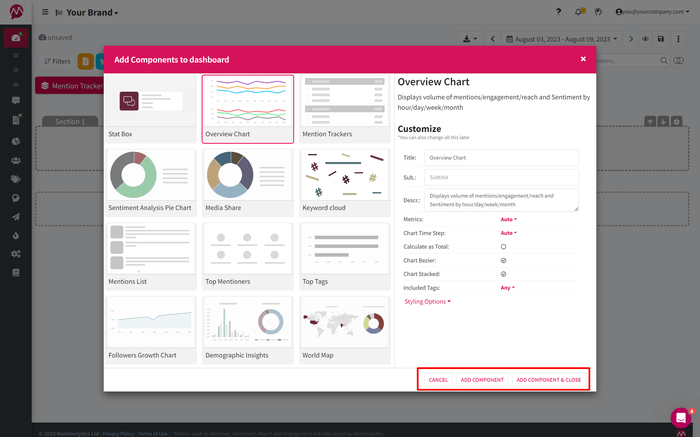
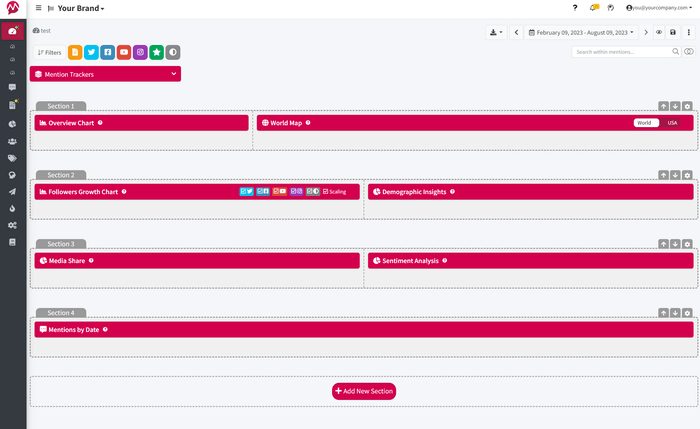
For a complete social media monitoring dashboard, we suggest you go with this:
Step #4: Preview and Adjust
After you’ve added all the content boxes in your dashboard, click on the “Preview” button next to “Save” and evaluate the result. Does this dashboard give you the whole picture of your social media presence at a glance?
If not, continue editing and add more analytics and graphs. Or rearrange your existing components to be more organized.
Step #5: Save and Go
That’s it! Now you can save your dashboard and use it to keep track of your brand’s social media presence and share it with your team.
Pro Tip: You can use it as a template for your other dashboards as well just by creating a duplicate of it.

Must-have Features for Social Media Dashboards
Truth is, there are some basic features that you should be looking for when choosing the social media monitoring tool that you’ll build your dashboards into.
Let’s see the most important ones.
Customizable Alerts
Receiving notifications about a surge of social mentions can be life-saving because that’s how you can detect a brand crisis triggered by negative social media posts.
But being notified about everything that happens on social media regarding your brand? Well, it’s not that helpful. It can be distracting and tiring.
That’s why make sure the tool you’ll pick offers customizable alerts. You should be able to define when and why it must send you an email. Say NO to some random default alert settings that will spam your email address forever.
Unified Interface
A social media reporting dashboard should be a centralized hub with a unified, comprehensive view of all the key metrics you want. That way, you won’t have to switch tabs or swipe to make comparisons.
Choose a tool that provides a user-friendly and all-in-one interface for all your dashboard’s charts, tables, and analyses.
Quality Analytics and Reporting
We can’t stress this point enough. The quality of your dashboards’ data and analytics is above all.
Only that way you’ll be sure you get the whole picture of your social media performance and that you work with a reliable business intelligence dashboard.
Except for your dashboard, the tool you choose should incorporate a rich report builder. That’s how you can generate customized media monitoring reports, social engagement reports, social mentions reports, and more.
Team Collaboration Features
Practically, a social media dashboard is the “meeting point” where members from various teams come together to contribute and monitor the results of their joint efforts.
That’s why, your tool should make team collab effortless and efficient. For example, in Mentionlytics you can leverage the advanced filters to assign different tasks to different colleagues in your collaborative dashboards.
Also, you can sort results based on the assignee’s name and create tags to improve your work traffic.
Post Scheduling
It’s quite common for most social media dashboards to be built inside platforms that offer social listening or post scheduling features as well.
This is truly convenient for social media managers, like you, to automate not only your social media reporting but also the posting process.
So, understanding the best time to post on social media can greatly influence the engagement rate of your content. By leveraging insights on optimal posting times, you can ensure your content reaches the maximum number of followers.
Read more: 10 best tools to auto-share posts on social media
Now that you know all the handy features your dashboard should have, let’s introduce you to the best tools you can use. Scroll down!
10 Best Social Media Dashboards
Tool #1: Mentionlytics
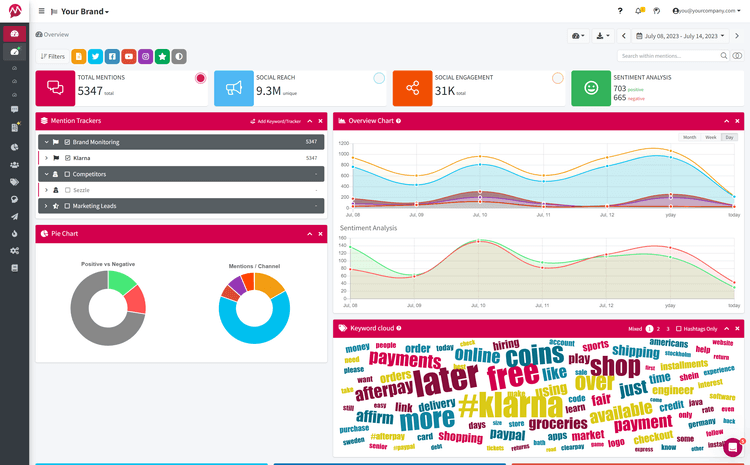
Mentionlytics is a comprehensive social media monitoring solution that can consolidate all the social media dashboards you need into a single platform.
Through this tool, you can effectively monitor your social media and web mentions which will fuel your social media dashboards with reliable data and actionable insights. Its user-friendly, fully customizable analytics dashboards visualize your social media data to help you perform comparisons and evaluate your performance at a glance.
Also, it offers customizable alerts, to get you notified only for what you truly care about and, of course, a handy report builder to craft reports tailored to your specific requirements. Additionally, it has a mobile app to access on-the-go and it can be seamlessly integrated with Slack to ensure prompt notifications and better team collaboration.
Mentionlytics stands out as a great option to help you create the social media dashboard you need to demonstrate your social media success.
Pricing: Starts at $69/month
P.S. You can have a 14-day free trial — no credit card required!
Tool #2: Hootsuite

Hootsuite offers users a robust toolkit to amplify their social media presence. As a social media management dashboard, it empowers users to effortlessly schedule and analyze their social media content, with its user-friendly interface, real-time monitoring, and comprehensive analytics. Plus, you can leverage Hootsuite’s integration with Mentionlytics to perform in-depth social listening for your brand and enrich your social media dashboards!
Pricing: Starts at $99/month
Tool #3: Hubspot

Hubspot is a well-known CRM platform aiming to help businesses thrive. Its marketing hub is equipped with social media reporting capabilities to help users ditch native analytics and build their social media dashboards inside its platform. Hubspot is easy to use, has a lot of useful integrations with other handy apps, and simplifies cross-team collaborations.
Pricing: Starts at $20/month
Tool #4: MavSocial

MavSocial is a social media management tool that helps brands schedule posts and keep track of their social media performance. Its users can create custom reports that deliver actionable data from one single platform. Also, MavSocial offers social ad features and content curation options.
Pricing: Starts at $78/month
Tool #5: Sprout Social

Sprout Social is an all-in-one social listening tool that helps brands turn social data into insights. Users can manage their campaigns and have useful analytics for their brand’s social media accounts. Furthermore, it’s great for scheduling posts and content management.
Pricing: Starts at $249/month
Tool #6: AgoraPulse

AgoraPulse is a social media tool that assists brands in planning and publishing social content, finding influencers, and monitoring social networks. This platform is easy to use and ensures reliable analytics. It offers collaboration features and content management capabilities as well.
Pricing: You can start for free with limited access.
Bonus: Read about the best alternatives to Agorapulse.
Tool #7: Buffer

Buffer is an alternative social media tool that helps brands build their online presence organically. This tool enables users to organize, collaborate, and publish social media content. Also, they can analyze metrics, create reports, and ensure better social media performance from a single dashboard.
Pricing: You can start for free with limited access.
Read More: Read about Top 13 Buffer Alternatives to Elevate Your Social Media Strategy
Tool #8: Later

Later is another social media management tool that helps marketers organize and analyze the social media presence of their brands. It comes with a social media scheduler that saves time. Also, this tool focuses on UGC campaigns, as it helps with finding the right content for every brand. Users choose this app for driving traffic, tracking sales, and measuring analytics.
Pricing: Starts at $40/month
Tool #9: Tailwind

Tailwind combines social media and email marketing in a single tool. It’s a good option for social media management and growing brand online communities, as it offers reporting capabilities and social analytics in one place.
Pricing: You can start for free with limited access.
Tool #10: Loomly

Last, Loomly is a social media management platform that helps marketing teams grow their brands online with its analytics tool. With Loomly, users can collaborate, post, and measure their social media results all from one platform.
Pricing: Starts at $35/month
Start Building Your Free Social Media Dashboard
Are you looking forward to creating your own social media dashboard? Stop searching and start building!
The good news is you can do it for free with Mentionlytics. Give it a try now!