
The Facebook search engine is an essential feature of the platform because it can help you find valuable posts and discover brands and people. Whether you’re looking for old friends or doing market research, it’s got what you need.
In this article, we’ll help you navigate the complexities of Facebook’s search capabilities, dive into the essence of the Facebook search engine, explore its benefits, and provide effective tips to search smarter and find exactly what you’re looking for.
Table of Contents
- What is Facebook Search Engine?
- How does Facebook Search Engine work?
- What can you find using Facebook Search Engine?
- How to do an Advanced Facebook Search?
- What Are The Benefits of Using Facebook Search Engines?
- Tips for Using Facebook Search Engine Effectively
- How to Optimize Your Facebook Content for Search?
- Try Facebook Search Engine for Free
- FAQs
What is Facebook Search Engine?
The Facebook search engine is the built-in tool that indexes all the information you can find on Facebook. This can mean discovering people, posts, pages, or literally anything within this social media platform. At its core, it’s the tool you use to find friends, interests, and information.
With more than 3 billion monthly active users worldwide, Facebook is still in the lead among all social media platforms. This vast audience also makes it an unparalleled platform for Facebook marketing, allowing businesses to target and engage with their ideal customers effectively.
But here’s the kicker: it’s not just about searching within Facebook. Think of it as one of those versatile social media search engines that go beyond the platform’s borders. When you’re looking for a long-lost friend or curious about what’s trending in your favorite niche, the Facebook search function helps you unravel it all.
In essence, a Facebook search engine is your trusty sidekick for social networking, making connections, and staying updated.
How Does Facebook Search Engine Work?
In general, the Facebook search engine relies on algorithms that continuously scan and index massive volumes of data generated on the network. In fact, more than 300 million photos get uploaded per day on Facebook and every minute there are 510,000 comments posted and 293,000 statuses updated.
When you input a query into the free Facebook search bar, the platform’s algorithms spring into action. They analyze your search terms, your connections, and the content shared by users. These algorithms then sift through the extensive database, identifying profiles, posts, pages, and groups that match your query.
However, the real magic of the Facebook search engine lies in its ability to personalize results. It takes into account your social network – friends, friends of friends, and so on. This ensures that your search results are relevant to your connections and interests.
But it’s not just about keywords. When ranking results, a Facebook search engine also considers engagement metrics, such as likes, comments, and shares. This means that popular and engaging content gets a boost in visibility.
What Can You Find Using Facebook Search Engine?
When you start using the search function, you’ll notice some filter options. These advanced search filters serve as your navigation tools, allowing you to pinpoint exactly what you’re looking for.
So, what can you find using a Facebook search engine? Let’s take a quick look at each filter:
- All: Your default setting, showing results across all categories, offering a panoramic view of Facebook’s wealth of content.
- Posts: A gateway to conversations, news, and trending topics, these filters help surface the posts you look for.
- People: This filter helps you find the person you’re looking for. Find friends, acquaintances, or potential new connections within Facebook’s vast network.
- Reels: Dive into a video wonderland.
- Marketplace: For your shopping needs, you can search on Facebook Marketplace, where you can find various products and services.
- Pages: Discover official pages of brands, businesses, and organizations, ensuring you stay informed and connected.
- Groups: Join communities of like-minded individuals by using this filter, connecting with people who share your interests.
- Events: Stay updated on upcoming concerts, conferences, or local gatherings. This filter helps you find events matching your interests and location.
How to do an Advanced Facebook Search?
Facebook advanced searches are not that easy to do. For marketing purposes (e.g., discovering mentions or competitor analysis) you’ll need Facebook advanced search features that go beyond the platform.
For example, you can use Mentionlytics to track your brand and competitors on Facebook and avoid searching altogether.
Below we explain how you can do an advanced Facebook search within Mentionlytics, to discover precisely what you’re looking for.
Search Facebook for Names
A Facebook advanced search conducted by a social media analytics tool, such as Mentionlytics, help you get better results without scrolling and digging.
Once you’ve set up your account, you get to choose your keywords – brand and product names, competitor names, industry topics, etc. Filter your results and take a look at your brand’s top mentioners on Facebook. You can do the same with your rivals’ mentioners. Of course, it is a lot easier for you to get results if you sync your business accounts.
By the end, you’ll have a long list of other brand names that can be used as marketing leads or even collaborations!
Search Facebook Posts
Mentionlytics’ Facebook finder helps you find old posts in no time.
To do that, take a look at the Mentions report and filter by Facebook in Channels. You can order your posts by time, engagement, and reach.
Check the overall sentiment, discover which countries talk more about your industry, and find trending Facebook hashtags.
Search Facebook Groups
With Mentionlytics, you can also monitor Facebook groups! The process is really straightforward. However, this option is available only for public groups.
There’s also the option to monitor private groups you happen to be the administrator of.
Search Facebook for Whatever You’re Looking For
…without the hustle! Posts, groups, brands, just set up your keywords and begin searching today.
What Are The Benefits of Using Facebook Search Engines?
External Facebook search engines have many advantages, including robust capabilities like hashtag tracking.
Explore below the benefits they provide users with, from enhancing social connections to facilitating efficient content discovery.
Targeted Business Insights
This wealth of company data empowers organizations to make data-driven decisions, refine their strategies, and stay ahead of the competition. Facebook search engines provide valuable analytics for businesses, based on brand sentiment, competitor analysis, and viral trend identification.
Personalized Search Experience
Users can fine-tune their searches and use filters to pinpoint exactly what they’re looking for. By tailoring search results to their unique needs and preferences, users can extract maximum value from the platform.
This ensures that every search yields highly relevant and useful information, without consuming the searcher’s time and energy.
Integrated Platform Search
Beyond Facebook’s borders, external Facebook search engines extend their reach to encompass other prominent social networks, like Instagram and TikTok.
This integrated approach allows users to conduct searches across multiple platforms seamlessly. Whether you’re tracking brand mentions or exploring trends, the ability to access a broader digital landscape streamlines your research.
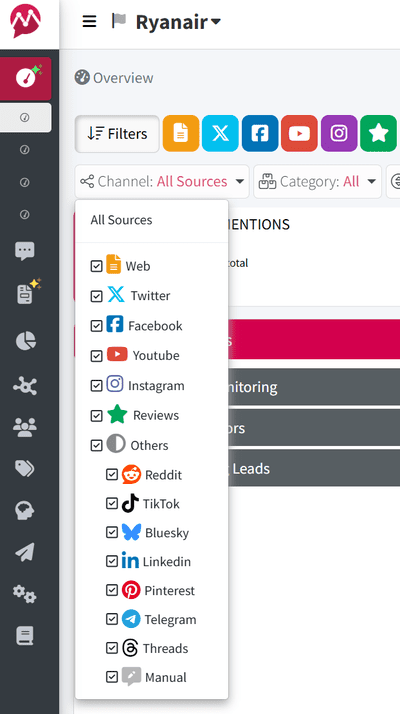
This way, a Facebook search engine helps you stay well-informed across various social channels in an oversaturated digital landscape.
Efficient Content Discovery
Is there a business out there that doesn’t need user-generated content? UGC marketing is a pivotal strategy for many businesses, and Facebook search engines excel in this domain. They offer efficient content discovery features that enable companies to uncover and leverage user-generated content for organic advertising purposes.
From authentic customer testimonials to engaging personal visuals, businesses get to harness the power of UGC marketing effortlessly and effectively.
3 Tips for Using Facebook Search Engine Effectively
Here are three simple tips to unlock the full potential of advanced Facebook search engines.
Use filters to narrow down your search results
Mentionlytics offers users a variety of filters, like channel, sentiment, country, etc. You can even create filter combos to get better results.
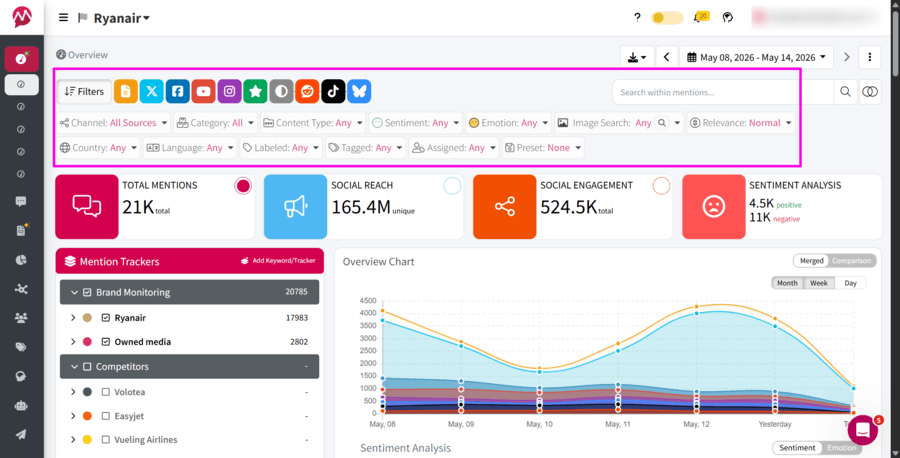
For instance, you can combine channel and sentiment filters, to detect a negative mention crisis in your Facebook business page.
Moreover, you can utilize Boolean search to combine keywords and modifiers, refining your search results to the most relevant content. For example, you can add search operators like AND, OR, and NOT to give the search software a clear idea of what you’re looking for.
Save your favorite searches for quick access
Make the most of these Facebook search engines by saving your go-to searches.
This feature enables quick and easy access to your preferred search parameters. Whether it’s tracking social media trends or Facebook mentions, Mentionlytics allows you to create your own preset and save your searches.
This advanced approach helps you pinpoint specific filters, channels, and timeframes, saving you time and effort.
Follow relevant pages and groups
A good Facebook search engine allows you to stay connected with your niche by following relevant Facebook content. Find industry-relevant pages and groups, by searching for top posts based on your Marketing Leads keywords.
Mentionlytics simplifies this process, allowing you to track updates, discussions, and trending topics within your chosen communities.
By actively engaging with these pages and groups, you can nurture valuable connections and stay informed about news and trends.
How to Optimize Your Facebook Content for Search?
In this section, we explain how to enhance the discoverability of your content through effective Facebook business page optimization techniques.
Use relevant keywords throughout your content
Elevate your content’s visibility with strategic keyword integration, vital for effective keyword monitoring.
Infuse your posts, comments, and descriptions with keywords aligned with user search habits. This practice improves the likelihood of your content appearing in search results, amplifying its reach.
Create clear and concise titles and descriptions
Clarity is key when crafting titles and descriptions. Ensure they accurately depict your content’s essence, optimizing for both user experience and Facebook search engine ranking.
This precision attracts the right audience, by making your content accessible, comprehensible, and eye-catching.
Use internal links to related content
Elevate content visibility through well-placed internal links. These links offer valuable navigation within your Facebook page, guiding users to explore more content.
Facebook search engines also appreciate structured websites with pertinent internal links, which can potentially bolster your content’s ranking in search results.
Try Facebook Search Engine for Free
Mentionlytics, like all Facebook search engines, opens up a world of possibilities, from enhanced social connections to targeted business insights.
Ready to unlock the full potential of Facebook search engines? Try Mentionlytics for free and find exactly what you’re looking for.
FAQs
Is there a search engine for Facebook?
Yes, Facebook has a built-in search engine accessible via the search bar at the top of the app or website. It lets you find posts, people, pages, groups, and marketplace listings. However, it only indexes public content and content within your network but not the broader web.
Can I browse Facebook without an account?
You can view some public Facebook pages and profiles without an account by visiting their direct URLs. However, browsing the News Feed, searching for content, joining groups, or seeing most posts requires logging in. Facebook intentionally limits the guest experience to encourage sign-ups.
Can you tell if someone keeps looking at your Facebook profile?
No, Facebook does not provide any feature or notification that reveals who has viewed your profile or how often, like LinkedIn. Any third-party app or browser extension claiming to show profile visitors is unreliable and potentially a scam. This applies to both personal profiles and public pages.