

Some might say hashtags don’t matter anymore, but the truth is that Instagram, Facebook, YouTube, TikTok, X, Pinterest, and Bluesky… still use hashtags, not as the primary way of getting massive reach, but for algorithm categorization, which, you have to admit, today, is perhaps even more important. I’ve seen hashtag tracking evolve far beyond simply counting how many times people use a hashtag on Instagram.
Today, I use hashtag analytics tools to track hashtag performance across every major social media platform, discover trending hashtags, monitor user-generated content, measure sentiment, and understand how audiences react to marketing campaigns in real time.
In this article, I tested some of the best hashtag tracking tools and hashtag analytics tools available in 2026, including platforms built for Instagram hashtag tracking, TikTok hashtag analytics, Facebook hashtag tracking, LinkedIn hashtag analytics, and even newer networks like Bluesky. We don’t talk about things we don’t know, or about tools we haven’t tried.
So here you’ll find the 7 best hashtag tracking tools you can rely on in 2026. I’ve tested them, identified where they excel and where they fall short, and reviewed them so you don’t have to go through the process from scratch.
Table of Contents
- What’s the Difference Between Hashtag Tracking and Hashtag Analytics?
- Quick-Look Comparison: Best Hashtag Tracking and Analytics Tools According to My Test
- My Test: 7 Hashtag Analytics Tools to Track Hashtags Across Social Media
- What to Look for in a Hashtag Tracking Tool
- How to Track Hashtags Across Social Media
- How to Track Trending Hashtags
- Try the Best Hashtag Tracker for Free Now
- FAQ
What’s the Difference Between Hashtag Tracking and Hashtag Analytics?
I think it’s important to understand the difference between hashtag tracking and hashtag analytics because hashtag tracking tells you where a hashtag is being used, while hashtag analytics tells you whether it’s actually helping your campaign succeed. A hashtag tracker collects conversations around a specific hashtag, while hashtag analytics turns that hashtag data into actionable insights.
Hashtag analytics tools can measure hashtag engagement and hashtag reach, perform sentiment analysis, identify trending hashtags, showcase audience behavior, and track hashtag performance across multiple social media platforms.
This distinction matters because I’ve noticed many marketers searching for “free hashtag analytics” or “best free hashtag tracking tools” are actually looking for two separate capabilities: monitoring hashtags in real time and understanding what those hashtags achieved performance-wise.
| Hashtag Tracking | Hashtag Analytics | |
| Meaning | Collecting posts and mentions that include a hashtag | Analyzing performance, reach, engagement, sentiment, sources, and trends |
| Examples | Monitoring every public post using #ProductLaunch | Seeing that #ProductLaunch generated 2,400 mentions, 1.2M reach, and mostly positive sentiment |
| Best used for | Campaign monitoring, event tracking, trend discovery, and UGC collection | Reporting, optimization, competitive analysis, and crisis detection |
The important thing is that hashtag tracking without analytics gives you a pile of posts. Hashtag analytics without reliable tracking gives you pretty charts built on shaky data. You need both.
Quick-Look Comparison: Best Hashtag Tracking and Analytics Tools According to My Test
| Tool | Free Trial | Hashtag Tracking Platforms | Analytics Depth | Dedicated Hashtag/Keyword Feature | Pricing |
| Mentionlytics | 14 days | Instagram, Facebook, X, TikTok, YouTube, LinkedIn, Reddit, Bluesky, Threads | Advanced | Keyword/hashtag trackers, top keywords with filters, keyword cloud with filters, Marketing Leads trackers, SIA hashtag suggestions and analytics, social listening | Starts at $69/month |
| RiteTag | 7 days | Instagram, Facebook, LinkedIn, X | Basic | Hashtag suggestions, sets, instant hashtag recommendations, reports | Hashtag suggestions from $49/year; reports charged separately |
| Determ | 5 days | Instagram, Facebook, X, LinkedIn | Advanced | Keyword monitoring, hashtag tracking, most popular hashtags widget, media monitoring, Boolean search | $99/month |
| Flick | 7 days with a credit card | Primarily Instagram | Moderated | Hashtag analytics, search, collections, performance tracking | Starts at £14/month, but for all features, you need a higher plan from £30 |
| Hootsuite | 30 days with a credit card | Facebook, Instagram, X, TikTok, LinkedIn, Pinterest, YouTube, plus listening sources depending on plan | Advanced | Hashtag generator, keyword streams, trend analysis, auto tagger | Starts at $149/user/month |
| Iconosquare | 14 days | Instagram, Facebook, LinkedIn, TikTok, X, Pinterest, Threads, YouTube | Moderated | Hashtag tracking, feeds, AI generation, saved lists, reporting | 39€/month but hashtag analytics available on higher plans starting at 83€ |
| Sprout Social | 30 days | Facebook, Instagram, X, LinkedIn, TikTok, Pinterest, YouTube, Threads, Bluesky, Reddit, and more depending on plan | Advanced | Hashtag tracking and analytics, tagging and performance reports, social listening, and keyword trend reports | $199 per seat per month, tag analytics available for higher plans starting at $399 per seat per month |
My Test: 7 Hashtag Analytics Tools to Track Hashtags Across All Social Media
I did it again… somehow my inbox is filled with notifications from various tools. But I do all of that to give you the first-hand experience. So, what did I do? First, I’ve checked Reddit to see what hashtag tracking tools users generally recommend and use most. Then I pulled G2 reviews to see if that resonated with Reddit recommendations, and finally, I rolled up my sleeves, signed up for a trial for every tool that offered one, and checked all available features.
Disclaimer: The tool I’m most familiar with is Mentionlytics, because I’ve used it even before I started working here, so no worries, I know both sides of the coin, and you don’t have to worry about me being too subjective (it’s not a part of my personality).
Mentionlytics: Best for cross-platform hashtag tracking with real social listening depth
Mentionlytics is the strongest fit if you want to track hashtags as part of a bigger social listening strategy. The platform combines hashtag analytics, sentiment analysis, real-time alerts, engagement tracking, keyword clouds, and trend monitoring, making it especially useful for branded hashtags, marketing campaigns, events, and social media managers who want to track and analyze conversations beyond a single hashtag.
My honest opinion
Probably the most useful thing about Mentionlytics is that you can turn hashtag data into actionable insights. It interprets trends around the hashtags connected to your brand, generates reports on specific hashtags and campaigns to see which platforms, posts, and creators are driving the conversation.
That makes it much more practical for campaign monitoring, event tracking, reporting, and understanding the bigger picture behind a hashtag’s performance.
What I found in my test
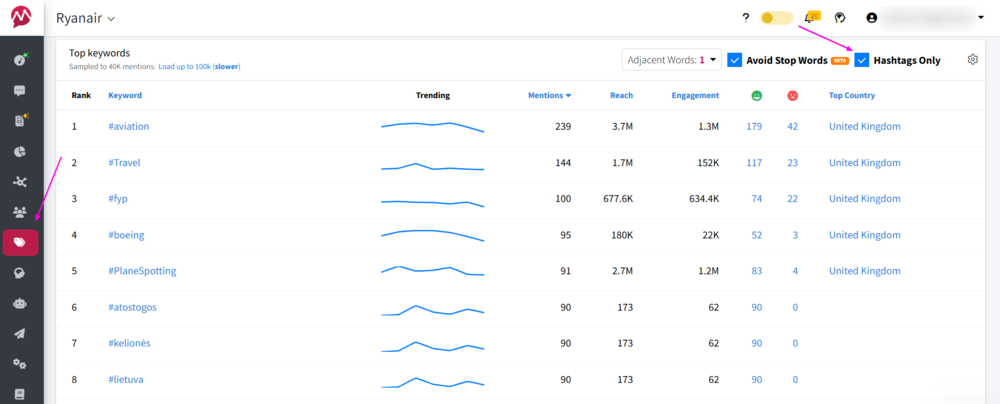
Tracking and analyzing hashtags with Mentionlytics feels easy and gives you a feeling of power. You know exactly what hashtags are strongly connected with your brand, how your campaign is doing, what hashtags are mostly used in which countries, what’s the trend of a specific hashtag, and what sentiment each hashtag has.
You can track hashtags across Instagram, Facebook, TikTok, X, YouTube, and other social media while also analyzing reach, engagement, top keywords, and audience sentiment in real time.
Social Intelligence Advisor (SIA) is here to help you figure out which hashtags are performing best and give you insights into the performance of your posts.
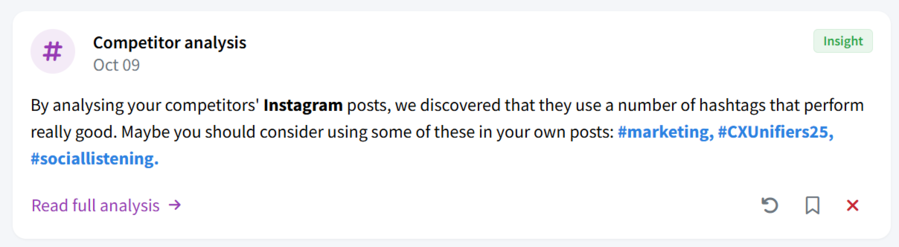
You can easily access hashtag trends through the Top Keywords and Keyword Cloud features. Easy to use and clear as a day. Even if you’re just starting to use Mentionlytics, imagine you can see the number of times a hashtag was used, the trend, reach, engagement, the sentiment around that specific hashtag, and the countries where it’s been used most… in one dashboard.
For me, this broader listening approach is often more valuable than using separate hashtag tracking tools for Instagram, TikTok, LinkedIn, and X (Twitter).
Key features
- Real-time cross-platform hashtag tracking
- AI sentiment analysis with 96% accuracy and social listening
- Engagement and reach analytics
- Keyword and hashtag trend tracking
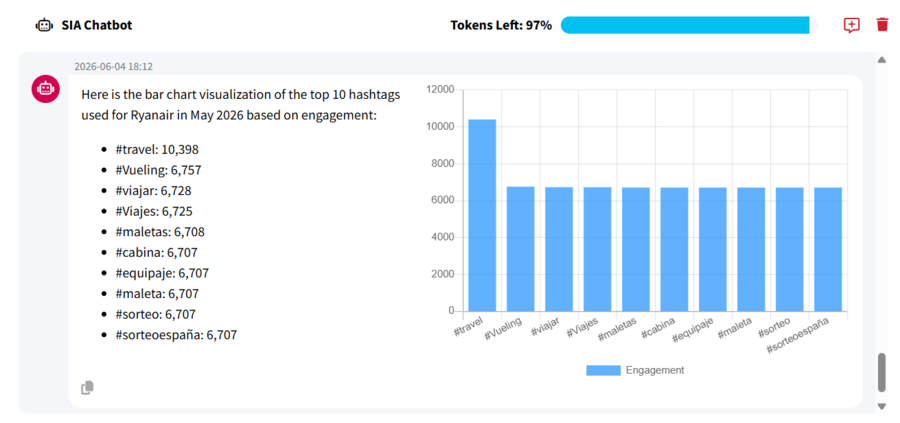
- Actionable tips with SIA Chatbot
Pricing
Mentionlytics offers plans starting at around $69 per month. A free trial is available for 14 days without a credit card needed, and if you check the website regularly, you can catch a time-limited discount.
Pros
- Excellent cross-platform coverage
- Strong sentiment analysis capabilities
- Combines hashtag tracking and analytics with broader social listening
Cons
- Can feel overwhelming for beginners
- Advanced monitoring features may increase pricing
- Limited historical data
Best for
Marketing and PR agencies, and social media marketers who want a complete hashtag monitoring and social listening platform rather than a single-network hashtag tracker.
RiteTag: Best for quick hashtag suggestions and X-focused hashtag reports
RiteTag, developed by RiteKit, is a practical hashtag analytics tool for improving day-to-day content publishing. The platform focuses on helping users discover relevant hashtags, optimize hashtag usage, and improve visibility on LinkedIn, Facebook, Instagram, and X.
My honest opinion
I think RiteTag works best for creators, freelancers, and social media managers who want fast hashtag suggestions directly inside their publishing workflow. Since it integrates with Buffer, it feels especially convenient for teams already scheduling and publishing content there, rather than constantly switching between separate hashtag tracking tools.
What I found in my test
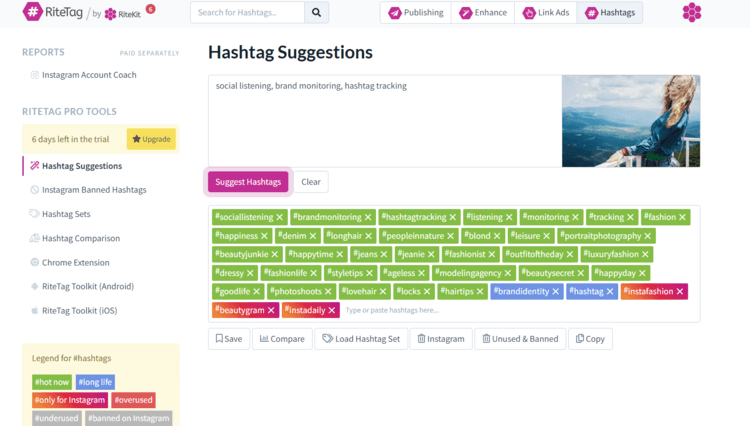
Okay, have to say I was a bit confused at the beginning. Opening a free trial account leads you to the hashtag suggestion page… but what do I do with it? Yes, it gave me relevant keywords, but intuitively, I’m not sure what to do with them. No “save” button or anything indicating where these keywords should go… so I just copied them to a Google doc. I think that’s the moment I realized it’s not quite a tracking tool, rather it analyzes trending hashtags and suggests to you what hashtag you should use.
So, yes… It’s great for that, because you can create a post in the app, and publish it directly on one of the four supported social media (LinkedIn, Facebook, Instagram, and X). It can generate an image if you’re in a hurry, but don’t expect a masterpiece.
Another useful feature is that you can add it to your browser and generate the best hashtags for every post by right-clicking and choosing the RiteTag extension. And these suggestions come in color (green is your go-to, and red is a no-go)
The downside: for a report, you’ll have to pay extra, and I’m not quite sure it covers other social media besides Instagram.
Key features
- Real-time hashtag suggestions
- Publishing feature and Buffer integration
- Hashtag popularity insights
- Caption and image-based hashtag suggestions
- Browser extension
Pricing
RiteTag charges separately for hashtag suggestions and hashtag reports. The price for RiteTag Hashtag Suggestions is $49 per year, and the price for reports depends on the data volume. It offers a 7-day free trial.
Pros
- Fast hashtag discovery workflow
- Extension for browser
- Publishing features
Cons
- Limited social media platforms
- Reports are charged additionally
- Less advanced analytics compared to enterprise tools
Best for
Creators, freelancers, and social media managers looking for a lightweight hashtag suggestion tool connected to their publishing workflow.
Determ: PR-focused media monitoring with hashtag and keyword tracking
Determ combines media monitoring and social listening capabilities with hashtag tracking, making it especially useful for campaigns, events, PR activity, and brand reputation management. Alongside social posts, the platform monitors online media, blogs, forums, news sites, and broader web conversations associated with specific hashtags and keywords.
My honest opinion
I think Determ works best when hashtags are part of a larger conversation instead of being the entire strategy. It does more than show whether a hashtag is popular. The platform helps you understand why people are using it, which stories are gaining traction, and whether the overall conversation is positive, negative, or becoming a PR headache.
What I found in my test
Now, Determ is the tool that sounds familiar to me because instead of giving me lists of trending hashtags to copy into posts, the platform is built more around monitoring conversations and spotting media activity in real time. But, since we’re talking about hashtags here, I’ll focus only on that segment.
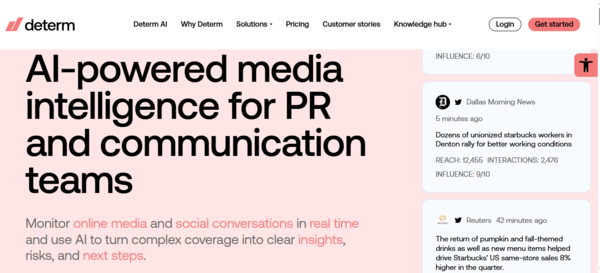
I guess that for those who previously used only simple hashtag tracking tools, the dashboard might feel a bit overwhelming because there is a lot happening at once: mentions, sentiment graphs, spikes in activity, news coverage, influencer mentions, and alerts, all competing for attention. But after spending some time with it, you start to understand why PR teams and agencies seem to like it so much.
The process is actually pretty straightforward once you understand the workflow. You start by creating a search query with the hashtag you want to monitor, and then Determ begins collecting mentions across social media, news sites, blogs, forums, and other online sources in real time. I tested this with a few branded hashtags and event-related tags, and the platform immediately started building a live feed of conversations connected to those hashtags.
You can start with a more general hashtag and, with the Boolean search, narrow it down, or use your branded hashtag to see how often your brand is associated with that general hashtag, which is pretty useful. You can easily generate a report, which is a big plus.
It’s interesting to see where these hashtags are used the most, what platform and what country, what is the sentiment (what the audience is most irritated about that caused negative sentiment), and what influencers used the hashtags the most.
Overall, a great and useful tool, but it comes at a price (of course) and might be a bit challenging for those used to simple hashtag analytics tools.
Key features
- Real-time hashtag monitoring
- Sentiment analysis
- AI-generated conversation summaries
- Trend and spike detection
- Monitoring across news, blogs, forums, and social media
Pricing
Determ pricing starts at 99€ a month, with a 5-day free trial.
Pros
- Strong real-time alert system
- Useful AI summaries, recommendations, and reporting
- Tracks conversations beyond social media
Cons
- Narrative analysis available only in the highest-tier plans
- Can feel broader than necessary for creators
- Learning curve
Best for
PR teams, agencies, brands, and marketers who want hashtag tracking connected with media monitoring, reputation management, and broader social listening workflows.
Flick: Best for Instagram hashtag strategy and content optimization
Flick is one of the most hashtag-specific tools on this list, especially for Instagram. The platform is designed to help creators, influencers, and social media managers improve hashtag strategy, discover relevant hashtags, and optimize content performance directly inside their publishing workflow.
My honest opinion
Flick found its place on the list mostly because it was officially recommended by Meta. I think Flick works best for people focused on Instagram growth who want more guidance on hashtag usage without having to deal with overly technical dashboards. It feels much more creator-friendly than enterprise-focused monitoring tools, and honestly, that simplicity is part of the appeal.
What I found in my test
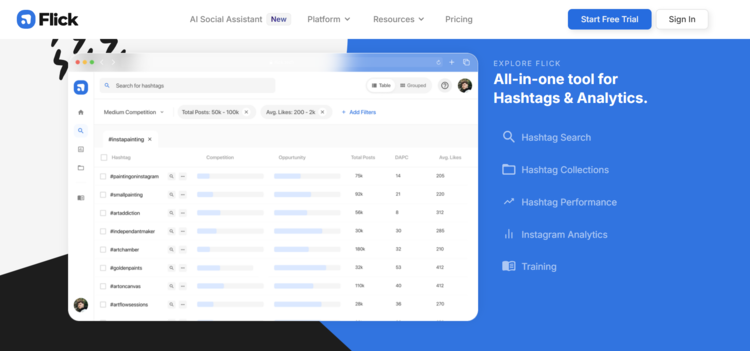
What stood out to me most was how easy it was to build and organize hashtag groups for different types of content. Instead of researching hashtags from scratch every single time, I could save collections for specific topics, campaigns, or audience segments and reuse them quickly while posting.
I also liked the way Flick estimates hashtag competitiveness because it helped me avoid throwing content into completely overcrowded hashtags where posts disappear in approximately seven seconds.
The post-performance insights were also genuinely useful. I could see which hashtags consistently supported reach and engagement over time, instead of blindly copying the same 5 hashtags forever out of habit and emotional attachment. For creators and small brands trying to improve Instagram visibility strategically, that kind of feedback is actually valuable.
I also checked Reddit discussions and was surprised to see a user complain that the posting time suggestions were different from the Instagram analytics, but since that was an older post (from 2024), I figured they had fixed that issue.
My biggest complaints are basically that you have to enter your credit card details during the trial, the fact that it’s focused on Instagram, and oh, the price…
Key features
- Instagram hashtag research
- Hashtag collections and organization
- Instagram post-performance analytics
- AI-powered hashtag suggestions
- Scheduling and content planning tools
Pricing
Flick charges £14 a month for the basic plan, but you have access to all features only with the higher plans starting at £30 a month. It offers a 7-day free trial, with a credit card required.
Pros
- Excellent for Instagram hashtag strategy
- Very beginner-friendly interface
- Useful hashtag organization tools
Cons
- Limited cross-platform hashtag monitoring
- Less useful for broader social listening
- Credit card required for free trial
Best for
Creators, influencers, small businesses, and social media managers focused primarily on Instagram hashtag strategy and content optimization.
Need More Sources?
Mentionlytics covers Facebook, Instagram, Threads + all other popular channels, and you can track YouTube and TikTok in the same dashboard.
Hootsuite: Best for teams that need hashtag analytics alongside social media management
Hootsuite is one of the most established social media management platforms on the market, and that comes with a cost. It combines publishing, scheduling, analytics, engagement, reporting, and monitoring into a single platform.
My honest opinion
I think Hootsuite works especially well for teams that need a hashtag tracking tool integrated with publishing, scheduling, reporting, and social media analytics workflows. But… you need a budget for this tool, because pricing might jump as you add team members. Is it useful? Of course. It’s great, but only if you have the sources to use it and use all the features.
What I found in my test
Sooo yes, I entered the enterprise world of Hootsuite, and the entry was not that easy since they asked me for my credit card details (you know I’m not a fan of that system). That was the first bump. Once I overpassed it, I was pleasantly surprised by how naturally hashtag monitoring fits into Hootsuite’s broader analytics and content management workflow.
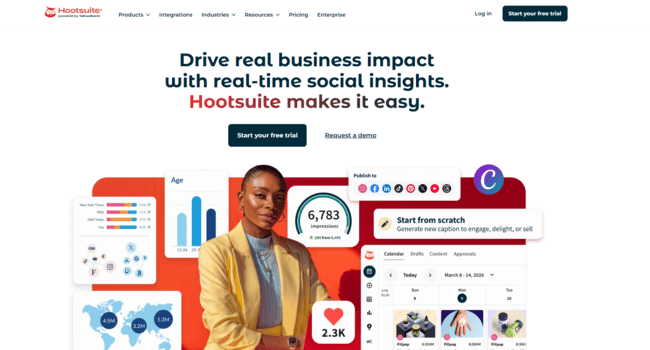
I could compare hashtag performance against overall campaign results, audience engagement, and post performance across multiple social networks. The dashboards make it easy to identify which hashtags are helping extend reach and which ones are not contributing much to engagement.
Scheduling, hashtagging, and reporting under one roof — great thing. You can plan posts, organize hashtag strategies, and track performance from a single platform. Great for large content calendars across multiple channels.
And then… there’s the price. It’s not a tool for everyone. Honestly, I think smaller businesses can’t afford it from the start, and the bigger your team, the higher the price, so I’m not sure how it fits into their budget.
Key features
- Social media scheduling
- Hashtag monitoring
- Cross-platform analytics
- Team collaboration tools
- Reporting dashboards
Pricing
Hootsuite offers tiered pricing plans starting at $149 per month, with $149 per additional team member. So, yes… plan accordingly or opt for a Hootsuite alternative. It offers a 30-day free trial with a credit card required.
Pros
- Strong all-in-one social media management
- Supports multiple social networks
- Useful reporting and scheduling tools
Cons
- Advanced features can become expensive
- Interface may feel complex for smaller teams
- Pricing system and price overall
Best for
Marketing teams and agencies that want hashtag tracking integrated into a broader social media management platform.
Iconosquare: Best for owned-channel analytics with some listening capabilities
Iconosquare is an analytics-first social media management tool. It supports scheduling and analytics across major platforms, including Instagram, Facebook, LinkedIn, TikTok, X, Pinterest, Threads, and YouTube. Simple and easy to use, with not too many features.
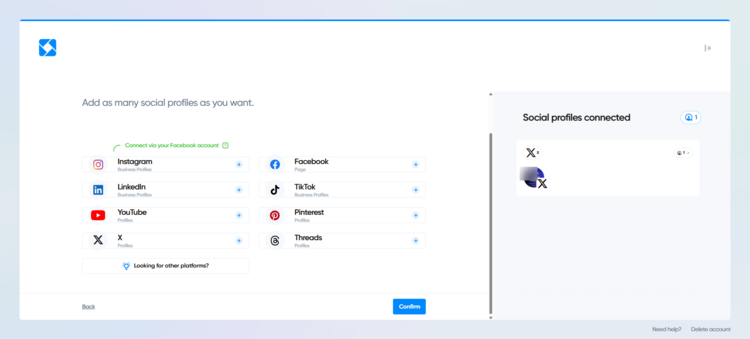
My honest opinion
I think Iconosquare is best suited for marketers who want a simple solution for scheduling and basic analytics. It’s very easy to use, and it has AI help for post ideas (if you feel stuck).
What I found in my test
Hmm… It is simple, but somehow I managed to get stuck at the very beginning with publishing. From my point of view, there should be fewer clicks. The good thing is that it has great tooltips to lead you step by step. Once you learn to navigate, your post is up. I tried the AI hashtag suggestions, but it didn’t work out.
Other than that, the tool is very useful for quick hashtag analytics. You can generate a report only related to that segment, within just a few clicks. Does it offer in-depth analytics? Well, not exactly, but it’s quick and useful for hashtag strategy.
What stood out to me was how easy it was to evaluate hashtag performance alongside overall content performance. Instead of simply seeing how many times a hashtag appeared online, I could analyze which hashtags were associated with higher engagement rates, stronger reach, and better-performing posts.
What’s very interesting is that you can create a campaign to track analytics for posts using specific hashtags.
Key features
- Automated hashtag reporting
- Post-performance analysis
- Competitor benchmarking
- Content scheduling
- Engagement and reach analytics
Pricing
Iconosquare pricing starts at 39€ per month, but the hashtag analytics features I mentioned earlier are available only on higher plans, starting at 83€. They offer a 14-day free trial.
Pros
- Strong hashtag performance reporting
- Easy-to-understand dashboards
- Good agency-friendly workflow
Cons
- Limited social listening capabilities
- Hashtag reports are available only in XLS format
- Buggy AI suggestions for hashtags
Best for
Brands, agencies, and social media managers who want to understand how hashtags impact the performance of their own content.
Sprout Social: Best for enterprise-level hashtag analytics and campaign reporting
Sprout Social combines hashtag tracking, social listening, analytics, reporting, publishing, and audience engagement into a single platform. It approaches hashtag analytics from a broader marketing perspective by directly linking hashtag performance to campaigns, audience engagement, content strategy, and business outcomes.
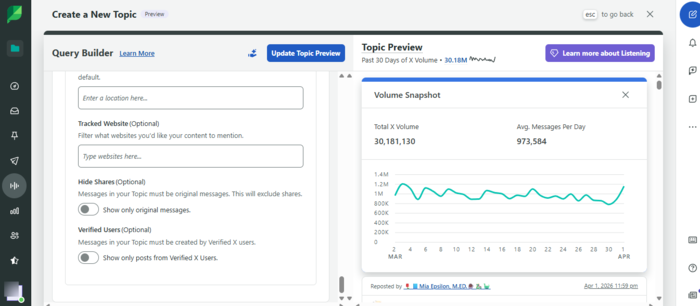
My honest opinion
I think Sprout Social is a great option for brands that need reporting and analytics around hashtags, and not just hashtag discovery. It’s a full social media intelligence platform where hashtags are one part of a much bigger performance picture. And with these kinds of tools, you know that you need a solid budget to cover them.
What I found in my test
I have to admit I’m impressed with Sprout’s analytics ecosystem. Instead of simply showing hashtag mentions or popularity, the platform helps connect hashtag performance to engagement, content reach, campaign results, audience behavior, and broader social media metrics.
While testing, I could compare hashtag performance alongside content performance, campaign reporting, audience engagement, and social listening insights. That makes it much easier to understand whether a hashtag is actually contributing to results or simply generating activity without meaningful impact.
I could also see hashtags most often associated with my brand, hot hashtags I might use, and unique ones I could create and track for performance. Pretty useful, I would say.
Now, the flip side… yes, it’s always the money. If you want all features that are relevant to your social media appearance and tracking hashtags, your budget must extend beyond the basic plans.
Key features
- Hashtag tracking and analytics
- Campaign performance reporting
- Cross-platform social media analytics
- AI-powered insights and trend analysis
- Publishing and scheduling tools
Pricing
Sprout Social offers several pricing tiers based on the number of users and features. And though you have hashtag suggestions with the Standard plan for $199 per seat per month, to get tag reports, you’ll have to jump to the Advanced plan for $399 per seat per month or opt for a Sprout Social alternative. All plans have a 30-day free trial. All plans are billed annually.
Pros
- Excellent reporting and analytics
- Advanced hashtag performance tracking
- Clean and user-friendly interface
Cons
- Expensive with only an annual billing option
- Advanced listening features increase costs
- More complex than lightweight hashtag tools
Best for
Mid-sized brands, agencies, enterprise teams, and social media managers who want hashtag analytics connected with advanced reporting, social listening, audience insights, and overall campaign performance.
Budget Overloaded?
Try Mentionlytics – enterprise-level tool on a budget-friendly basis.
What to Look for in a Hashtag Tracking Tool
When searching for a hashtag tracking tool, you need to know what your business wants to use it for. Is it just hashtag suggestions, or do you need a quick insight about hashtags’ performance, for a specific social media platform, or do you need wide coverage, and so on?
So, here are a few things to pay attention to when choosing the tool.
Cross-platform coverage
A good hashtag-tracking tool should not pretend that your audience lives on a single platform. Campaign conversations spread. Someone discovers your hashtag on TikTok, comments about it on X, discusses it in a LinkedIn post, and then someone screenshots the whole thing and brings it to Reddit because the internet is a recycling plant with Wi-Fi.
That is why cross-platform coverage matters. At a minimum, look for support across the platforms your audience actually uses. For consumer brands, that may mean Instagram, TikTok, Facebook, X, Threads, Reddit, and YouTube. For B2B brands, LinkedIn, X, Reddit, YouTube..
The best monitoring tools also include web sources, news, blogs, forums, and review sites because hashtags do not always stay inside social apps. They appear in other places as web mentions.
Real-time vs. historical data
Real-time tracking helps you react while a campaign is still alive. Historical data helps you understand what happened after the dust settles.
For campaign monitoring, real-time alerts are essential. If your hashtag starts trending on Instagram for the right reasons, you want to amplify it. If it starts trending because something went wrong, you want to know before your CEO sends the classic “Are we aware of this?” Slack message.
Historical data is useful for reporting, benchmarking, and campaign planning. You can compare hashtag performance over time, see seasonal trends, analyze past event campaigns, and understand which hashtags consistently generate quality conversations.
Sentiment analysis capability
Volume alone can lie. A hashtag with 10,000 mentions sounds great until you realize 8,000 people are using it to complain. This is why sentiment analysis matters.
Sentiment analysis helps you understand whether the conversation around a hashtag is positive, negative, or neutral. More advanced tools, such as Mentionlytics, also include emotion analysis, which can show whether people are excited, angry, amused, disappointed, or confused.
Go Beyond Just Positive or Negative
Mentionlytics discovers what true feelings are behind each mention. Act quickly on angry posts and approach your joyful, loyal audience.
For brand campaigns, crisis monitoring, product launches, and influencer collaborations, this context is crucial. You do not just want to know that people are talking. You want to know whether you should celebrate, investigate, or hide behind a very large plant.
Social listening depth
Basic hashtag trackers collect hashtagged posts. Social listening tools understand the wider conversation. This difference matters because people do not always use the exact hashtag you expect. They may use variations, misspellings, competitor hashtags, campaign slogans, product names, or category keywords.
A strong social listening tool lets you track hashtags alongside keywords, brand mentions, competitor names, product terms, and industry phrases. That gives you a fuller view of the conversation and helps you catch important mentions that do not include your official campaign tag.
Free trial availability
Hashtag tracking tools can sound very similar on paper. The real difference shows up when you test them (like I did).
A free trial lets you check data quality, sources, dashboards, alerts, reports, filters, exports, and ease of use before committing. This is especially important because platform access varies. No tool can magically bypass platform restrictions legally, so you need to see what data is actually available for your use case.
Before choosing a tool, test it with a real hashtag from your brand, competitor, campaign, or industry. If the dashboard looks beautiful but the data is thin, trust the data.
Ease of use for social media managers
A hashtag analytics tool should help social media managers move faster, not make them feel like they accidentally enrolled in a data science bootcamp.
Look for clean dashboards, simple filters, exportable reports, clear metrics, and alerts that are easy to set up. Bonus points if the tool explains insights in plain language, not in “enterprise analytics theater.”
The best tool is not always the one with the most features. It is the one your team will actually use when the campaign is live, the client wants an update, and someone just asked for “a quick report” at 4:58 PM.
How to Track Hashtags Across Social Media
In my experience, tracking hashtags across social media platforms usually requires a combination of native platform analytics and third-party hashtag tracking tools.
Because each social network exposes different levels of hashtag data, I typically rely on a social listening or hashtag monitoring tool to centralize hashtag analytics across Instagram, Facebook, X, TikTok, LinkedIn, Threads, Bluesky, blogs, forums, and other online sources.
How to track hashtags on Facebook
Facebook hashtag tracking is possible, but limited. You can manually search for hashtags on Facebook and see some public posts, depending on privacy settings and visibility. However, Facebook does not provide rich native hashtag analytics as marketers might expect on platforms like Instagram or X.
For brands, the best approach is to use a social listening tool that can monitor public Facebook conversations where available, combined with broader keyword tracking. Instead of tracking only #YourCampaign, also track the campaign name, brand name, product name, and common variations.
This is especially important because Facebook users often discuss campaigns without using hashtags at all.
How to track hashtags on Instagram
Instagram hashtag tracking is more structured, but still limited by Meta’s API rules. For business use, tools typically rely on Instagram’s official API access. The Instagram API allows hashtag search and recent media retrieval, but there are limits, including a maximum number of 30 unique hashtags that can be queried within a rolling seven-day period.
In practice, this means you should be selective. Do not try to track 200 top Instagram hashtags just because someone in a brainstorming meeting got enthusiastic.
Choose your core campaign hashtags, branded hashtags, event hashtags, and a small set of industry hashtags. Then use analytics to evaluate reach, engagement, sentiment, top posts, creators, and related keywords.
Can you track hashtags on Instagram Stories?
Instagram Stories are even trickier due to privacy and their temporary nature.
Public hashtag tracking for Stories is very limited compared to feed posts and Reels. Stories are temporary, privacy-sensitive, and not generally available through a broad public Instagram hashtag search in the same way public posts are.
You can analyze your own Story performance through Instagram Insights if you own the account. You can also track mentions, tags, replies, and campaign participation when users tag your account or send content directly. But tracking every public Story that uses a hashtag is not something marketers should expect from compliant tools.
For campaigns, encourage users to tag your brand account in Stories, not only to use the hashtag. That makes the content easier to discover, reshare, and measure.
How to track hashtags on LinkedIn
LinkedIn hashtag tracking is limited compared to platforms like X or Instagram. You can search hashtags manually on LinkedIn and use social media analytics tools to understand how hashtags perform in your own posts. Some tools also support broader LinkedIn monitoring, depending on available integrations and permissions.
But LinkedIn has moved away from hashtags being a major discovery mechanism. In 2026, hashtags may still help categorize content, but they are not the growth lever they once appeared to be.
For LinkedIn, track hashtags together with keywords, company mentions, executive names, event names, and topic phrases. In B2B, the real conversation often happens around terms like “ERP integration,” “social listening,” or “AI search,” not only neat hashtags like #B2BMarketing.
How to track hashtags on X (Twitter)
X is still one of the most hashtag-friendly platforms for tracking public conversations. Using the native search or social listening tools, you can discover trending hashtags on X, and monitor keywords, accounts, engagement, language, location signals, and time-based trends.
X’s API supports recent search and full-archive search depending on access level, which makes it useful for campaign analysis, live events, PR monitoring, and crisis detection.
For brands, X hashtag tracking is especially useful during conferences, product launches, political moments, sports events, TV shows, and breaking news cycles.
The challenge is cost and access. API pricing and access levels have changed over the years, so many brands prefer using established social listening platforms instead of building their own X tracking setup.
Why Building Your Own, When You Have Mentionlytics
You can track your mentions on X in every package, from the lowest to the highest.
How to track hashtags on TikTok
TikTok hashtag tracking matters because hashtags are still closely tied to trends, sounds, challenges, communities, and discovery. However, TikTok data access is not as simple as marketers would like. Some tools can monitor TikTok trending hashtags through official integrations or approved access.
For most brands, TikTok hashtag tracking should focus on campaign hashtags, branded hashtags, challenge hashtags, creator collaborations, and industry trends. The most useful metrics include post volume, engagement, views where available, top videos, creators, sentiment, and related themes.
Also, do not track hashtags in isolation. On TikTok, sounds, creators, formats, and comments often matter as much as the hashtag itself.
How to track hashtags on Bluesky
Bluesky is becoming more interesting for hashtag tracking because its search and AT Protocol ecosystem make public conversation discovery more open than some older platforms.
You can search posts by hashtag directly on Bluesky, and developers can use Bluesky’s API to find matching posts. Or you can simply use a social listening tool like Mentionlytics which has Bluesky as a source.
For brands, Bluesky hashtag tracking is still early compared to X, Instagram, or TikTok. But it is worth watching, especially for tech, media, politics, journalism, developer communities, and niche interest groups.
The smart approach is to monitor hashtags together with keywords and brand mentions, then compare whether Bluesky conversations are meaningful enough for your audience.
How to track hashtags on YouTube
Hashtags on YouTube are primarily used to categorize content and help viewers discover related videos, playlists, and Shorts through hashtag searches and recommendation feeds. Users can click a hashtag directly from a video’s title or description, search for it manually, or explore trending hashtags through YouTube’s discovery features.
The good news is that tracking trending YouTube hashtags is relatively straightforward. You can search for a specific hashtag directly on YouTube to see related videos, but if you want actual analytics, you’ll need a social listening or hashtag analytics tool.
Platforms like Mentionlytics allow you to monitor hashtags alongside keywords, brand names, competitor mentions, and campaign terms, giving you a much broader picture of how a topic is performing across YouTube and other social media platforms.
One important thing to remember: hashtags can help with discoverability, but they are not the primary ranking factor on YouTube. Titles, descriptions, audience retention, engagement, and overall content quality carry much more weight in the algorithm. Think of hashtags as helpful categorization signals rather than a shortcut to viral success.
For best results, track a mix of branded, campaign, and niche-specific hashtags. This will help you understand which topics attract viewers, which hashtags are trending in your YouTube niche, which videos generate engagement, and how your audience interacts with your content over time.
How to track hashtags on Threads
Threads works differently because it uses topic tags rather than traditional hashtag-heavy behavior. Users can add one topic tag per post, and those tags help organize real-time conversations. This means hashtag strategy on Threads is less about stacking multiple tags and more about choosing one relevant topic.
For tracking, brands can use native Threads search, third-party tools where available, and broader social listening platforms as Threads support expands. Since Threads is connected to Meta’s ecosystem, expect data access to depend heavily on official API capabilities and platform rules.
For campaigns, keep tags simple, specific, and easy to remember. If people need a legal briefing to understand your campaign tag, it is not a good tag.
How to Track Trending Hashtags with Mentionlytics
So, let me show you a trick for using Mentionlytics to track trending hashtags. Instead of creating a tracker only for your brand name, you can build a Marketing Leads tracker around your industry and the topics your audience cares about.
One of the biggest mistakes brands make is tracking only their own hashtags. Sure, monitoring your branded hashtag is useful. But if you want to discover what your audience is actually talking about, you need to monitor industry keywords, competitor terms, product-related topics, and broader conversations happening around your niche.
For example, if you’re in the project management software niche, you can add keywords like “project management tool”, “project management software”, “project management solution,” and related hashtags connected to those topics.
Once the tracker starts collecting mentions, Mentionlytics automatically pulls conversations from social media, blogs, news sites, forums, Reddit, and other online sources. From there, you can open your analytics and check the Top Keywords and Keyword Cloud sections to see which hashtags and keywords appear most frequently in those conversations.
This is where things get interesting.
Instead of manually searching platforms one by one, trying to figure out what’s trending this week, you start seeing emerging hashtags, recurring industry topics, and conversation patterns gathered in one place. If a hashtag suddenly starts appearing more often across discussions in your niche, you’ll spot it immediately through your keyword analytics, engagement trends, and mention activity.
Setting this up is simple:
- Go to your Mentionlytics Dashboard, find the Mention Trackers panel, and open the Marketing Leads section.
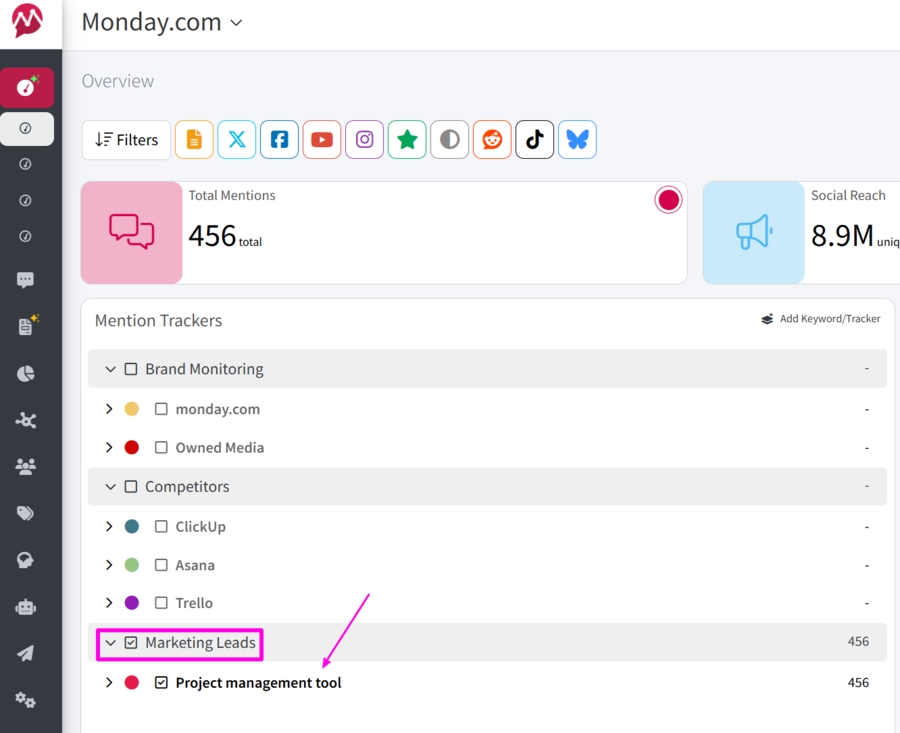
- Add the keywords that might be industry-related keywords, buyer-intent phrases, or product-related terms you want to track. You can also add related variations to capture a wider range of conversations.
- Refine your search using Boolean logic: use AND to require specific combinations or OR to include alternative terms and variations, or exclude some keywords.
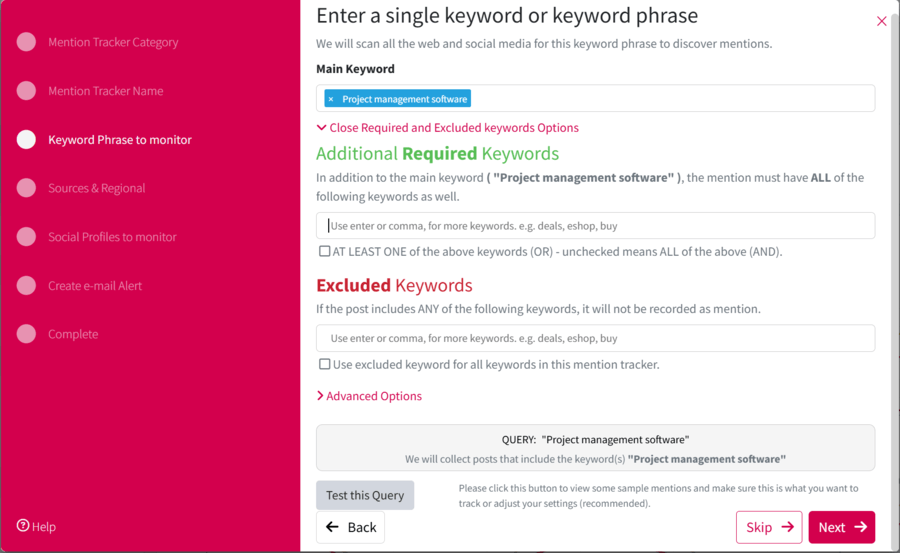
- Apply any advanced filters if needed.
- Save your tracker and let Mentionlytics pull the mentions and start monitoring lead-generating conversations across social media and the web in real time.
From then on, you can see the reach and engagement of each hashtag contained in those industry-related conversations in the Top Keywords features by filtering results only by Marketing Leads trackers and ticking the Hashtags Only box.
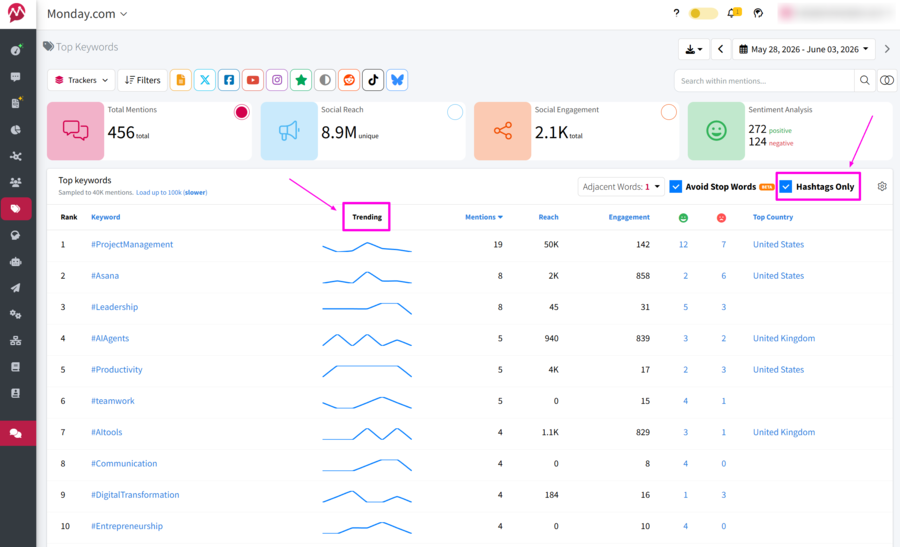
What I particularly like about this approach is that you’re not chasing trending hashtags blindly. You’re discovering trending hashtags inside conversations that are already relevant to your industry, products, and target audience. And you can track the Trending curve to see whether it’s rising or falling.
Which is usually far more valuable than jumping on #NationalSomethingDay and hoping for the best.
Try the Best Hashtag Tracker for Free Now
Hashtags may not be the growth hack they were a decade ago, but they remain one of the easiest ways to track conversations, measure campaign performance, discover user-generated content, monitor industry trends, and understand what your audience actually cares about.
The problem is that those conversations rarely happen on a single platform. A hashtag can start on TikTok, gain momentum on X, appear in LinkedIn discussions, and eventually show up in blog posts, news articles, Reddit threads, and review sites. Looking at one platform in isolation only tells part of the story.
With Mentionlytics, you can track hashtags across social media and the web, monitor reach and engagement, analyze sentiment and emotions, identify top mentioners, uncover related keywords and topics, receive real-time alerts when conversations spike, and generate shareable reports for your team or clients.
Instead of simply counting hashtag mentions, you’ll understand the story behind them.
FAQ
What is hashtag tracking?
Hashtag tracking is the process of monitoring posts, mentions, and conversations that include a specific hashtag. Brands use it to follow campaigns, events, influencer collaborations, contests, social movements, and industry conversations.
What is a free hashtag tracking tool?
Some tools offer limited free hashtag features, such as hashtag suggestions or basic search. RiteTag offers hashtag suggestions with a free trial, and native platform search can help with manual checks. For serious brand monitoring, a free trial of a full social listening tool is usually more useful than a permanently free but limited tool.
What is the best tool for hashtag analysis and tracking?
The best tool for hashtag analysis depends on your goal. Mentionlytics is best for cross-platform hashtag tracking and social listening. Flick is strong for the Instagram hashtag strategy. RiteTag is useful for quick hashtag suggestions. Sprout Social and Hootsuite are strong for larger teams that need full social media management and reporting.
Can you track hashtags on Facebook?
Yes, but Facebook hashtag tracking is limited. You can manually search hashtags and use social listening tools to monitor public conversations where available. However, Facebook does not provide the same rich native hashtag analytics you may find on other platforms.
What is the best hashtag tracking tool for brand monitoring?
Mentionlytics is a strong choice for brand monitoring because it tracks hashtags alongside brand mentions, keywords, competitors, industry terms, sentiment, reach, engagement, and web mentions. That gives brands a fuller picture than just hashtag tracking.
What is the best hashtag analytics tool for brands?
For brands, the best hashtag analytics tool is usually one that combines hashtag tracking with social listening, sentiment analysis, reporting, alerts, and cross-platform coverage. Mentionlytics, Sprout Social, Hootsuite, and Determ are strong options depending on budget and use case.
How do you track hashtags across social media?
To track hashtags across social media, use a social listening or hashtag analytics tool. Add your hashtag as a monitored keyword, choose the platforms and sources you want to track, then analyze volume, reach, engagement, sentiment, top posts, top creators, and related keywords.
Which tools track hashtag effectiveness across Facebook and Twitter?
Mentionlytics, Hootsuite, Sprout Social, and Determ can help track hashtag-related conversations across Facebook and X/Twitter, depending on available data and platform permissions. For Twitter-specific hashtag reports, RiteTag can also be useful.
Can Google Analytics track hashtags?
Google Analytics cannot track social media hashtag usage directly. However, it can track traffic from campaign links if you use UTM parameters. For example, you can use a hashtag in a campaign and include UTM-tagged links in posts to see how much website traffic came from that campaign.
How is a hashtag tracked?
A hashtag is tracked by collecting public posts and mentions that include that hashtag. Hashtag tracking tools usually search platform data, APIs, public sources, and connected accounts, then organize the results into analytics such as mention volume, reach, engagement, sentiment, top sources, and top contributors.
