


If you are looking for Twitter analytics tools in 2026, you are probably running into the same problem I did: X’s own analytics story is now fragmented, more subscription-heavy, and far less generous than the old “just log in and check your numbers” era.
X still offers built-in analytics and ad reporting, but they are all locked behind paid plans, plus Premium tiers that unlock extra features. For many businesses, the native analytics experience is either too limited, too surface-level, or too tied to X’s own pricing model.
That is exactly why I researched Twitter analytics tools available on the market today, to see what they offer and how they fit the budget.
In this article, I’m going to walk you through the top 10 X (Twitter) analytics tools for businesses in 2026, including their key features, pros, and cons, so by the end, you’ll know how they fit into your social media strategy. I’ll also go through the official X analytics to see how much it costs, what data you get from it, and what it can’t track.
Table of Contents
- X (Twitter) Analytics Tools – Comparison Table for 2026
- I Tested 10 Alternative X (Twitter) Analytics Tools & Here’s What You Need to Know
- What Data Can Official X Analytics Track?
- What Data Official X Analytics CAN’T Track
- How to See Your Twitter Analytics for Free?
- Get Advanced X (Twitter) Analytics without Paying Premium
- FAQ
X (Twitter) Analytics Tools – Comparison Table for 2026
The table below summarizes the ten platforms I researched for core X use cases: native X Analytics replacement value, social listening depth, business fit, and pricing entry point. Data is based on vendor product pages, pricing pages, support documentation, and G2 profiles current as of June 22, 2026.
| Tool | Best for | Free version | Starting price | X analytics availability | G2 rating |
| Mentionlytics | Brands that need extended X analytics plus social listening | 14-day free trial | From $69/month | From the basic plan | 4.9/5 |
| Buffer | Small teams that want publishing + basic analytics | Free plan and 14-day free trial | From $6/channel/month | From the free plan | 4.3/5 |
| Determ | PR, comms, and teams focused on brand monitoring | 5-day free trial | From $99/month | From the essential plan | 4.7/5 |
| Minter.io | Straightforward X reporting and historical tracking | 14-day free trial | From $19/profile/month | From the gold plan (lowest) | 4.5/5 |
| OpenTweet | Creators who want scheduling plus lightweight analytics | 7-day free trial + free extension | From $11.99/month | From the advanced plan ($29/mo) | N/A |
| Octolens | Sales and marketing teams focused on lead generation | 7-day free trial | From $199/month | Yes, with limitations | 5.0/5 |
| Audiense | Deep audience intelligence and X community analysis | Free plan for community management and a 7-day free trial | From $62.99/month | All X Marketing plan | 4.5/5 |
| Dash Social | Enterprise brands needing AI-led social workflows | 14-day free trial with demo | From $999 a month | From the lowest plan | 4.7/5 |
| Sprout Social | Enterprise reporting and cross-network management | 30-day free trial | From $79 or $199 per seat/month depending on plan | From the lowest plan | 4.4/5 |
| Twitonomy | Low-cost follower and account analytics | Free account | $19/month for Premium | Yes | 4.0/5 |
I Tested 10 Alternative X (Twitter) Analytics Tools & Here’s What You Need to Know
My criteria were simple. I looked at how well each Twitter analytics tool handled X-specific data; whether it went beyond surface-level engagement metrics; whether it offered audience analysis, competitor analysis, performance over time, and real-time alerts; and whether the pricing made sense for businesses rather than just enterprise procurement departments with very relaxed blood pressure.
I also used G2 ratings as a directional signal, not a final verdict, because G2’s scores are based on verified reviews and public market presence data. But a rating alone still does not tell you whether a platform fits your workflow.
So, here’s what I found out about the best X analytics tools from my list.
Mentionlytics: Best for businesses that want advanced X analytics and social listening
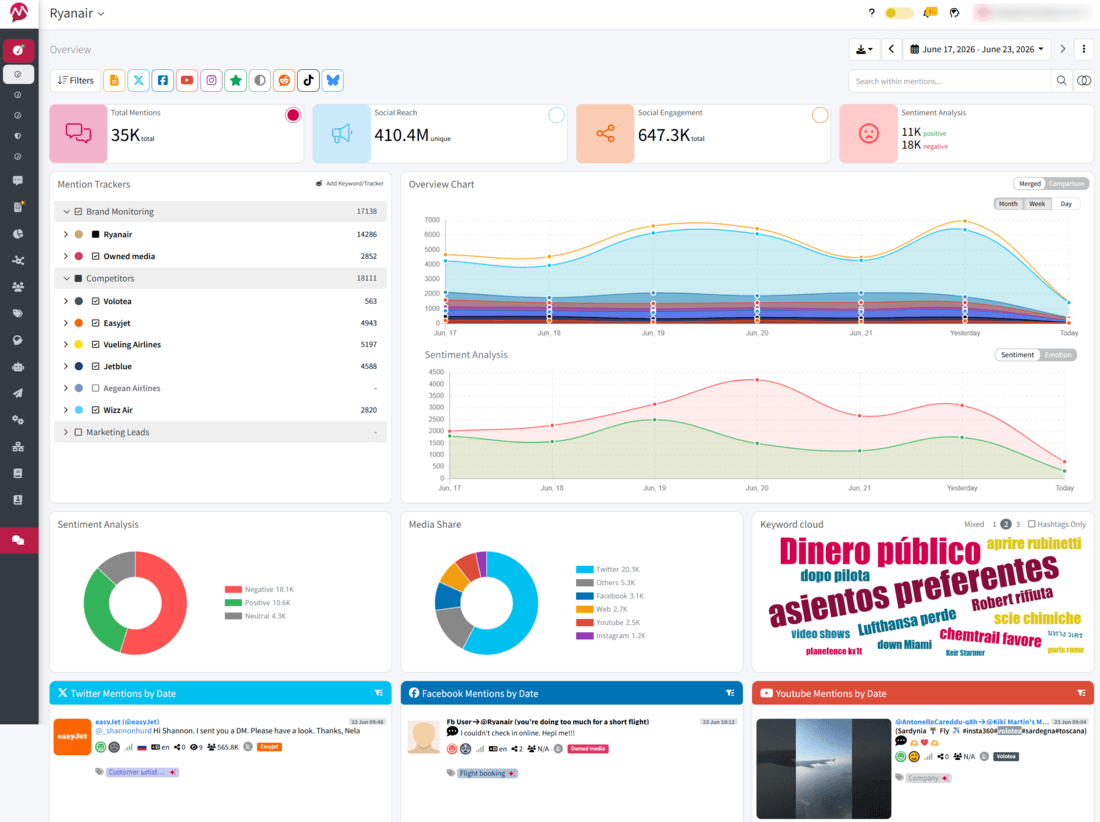
Mentionlytics goes the extra mile in Twitter data analytics tools. It gives you answers to “What are people saying about my brand on X?”, “How do they feel?”, “What themes keep coming up”, and “How do we compare with competitors?” It feels less like a basic social media analytics tool and more like an AI-powered brand intelligence layer built on top of social data.
My honest opinion
I admit I might be a little biased here, but only because I was already using Mentionlytics before I joined the company, and I think one of the best things about Mentionlytics is that X monitoring is included right from the basic plan. So, it’s not a premium feature but is available to all users. Now, if you are used to having social listening, audience analysis, sentiment, emotion, and non-tagged brand mentions, Mentionlytics is the most complete replacement for native X Analytics on this list (and gives even more).
G2 shows it at 4.9/5, which lines up with my opinion: it is not the cheapest option once you scale the mention volume, but it gives you actionable insights from your raw social listening data through its AI-powered Social Intelligence Advisor (SIA) that could actually change your social media and marketing strategies.
What I found in my test
The good part is depth. Mentionlytics tracks brand and competitor mentions across social and web sources, offers 96% accurate sentiment analysis (according to user feedback), emotion analysis, AI summaries, anomaly detection, hashtag tracking, and reports that go meaningfully beyond the built-in analytics you get inside X.
For PR and marketing agencies and political campaigns focused on reputation management, that matters a lot more than simply seeing impressions and replies.
Key features
- AI summaries, anomaly detection, and advanced sentiment analysis across all languages
- Emotion analysis that goes beyond positive, negative, and neutral
- Brand, competitor, hashtag, and web monitoring from one dashboard
- 14-day free trial with no credit card required
Pricing
Mentionlytics starts at $69/month, with higher tiers scaling by mention volume and advanced access; it also offers a 14-day free trial.
Pros
- Excellent fit for Twitter analytics tools for business because it blends reporting with social listening
- X (Twitter) available as a source from the lowest-tier plan
- Hashtag analytics and troll detection
Cons
- Mention caps can become tight for noisy brands
- Some AI/report-builder extras sit on higher tiers
- It is a monitoring-first platform, so creators wanting only tweet stats may find it heavier than needed
Best for
Agencies and in-house teams that need a real X analytics tool plus social listening, not just a nicer version of native analytics.
Buffer: Best for simple publishing plus tidy analytics
Buffer is one of those tools that is primarily for publishing and then analytics. It’s a great option if you want to have basic analytics and published posts in one place. Excellent choice for freelancers, creators, and small businesses.
My honest opinion
I love Buffer. I have a free account there and use it to publish on X (yes, only X). What I like most is simplicity. It’s very easy to keep an eye on your chosen social media platform with this tool.
Though if you need deeper analytics, you might consider other options, because you get just the basics, and even with the paid plans, analytics don’t go that deep as you might need. And if you need something more sophisticated, you might opt for some of Buffer’s alternatives.
What I found in my test
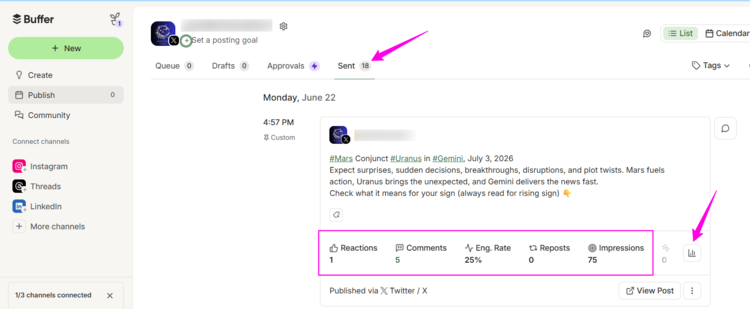
Buffer analytics is understandable and easy to navigate through. You get performance metrics (number of tweets, likes, retweets, engagement, impressions, and number of comments), average performance for impressions, engagement, and clicks per tweet, and you have the graph that shows you what it looks like (you can select any metric you want from the list). You also have hashtag performance analytics, which is very useful.
The platform also gives you advice through the Answers tab on your analytics dashboard, such as the best day to post and how many posts a day are best for you. And every chart you see, you can add to your report easily just by clicking the plus button (+).
Now, I’ve mentioned it’s free and that you can’t expect enterprise-level analytics here, but there’s one thing I really don’t like: you don’t see analytics for your comments under your post. Meaning, if you make a post and then hit the first comment, analytics won’t scope it. So if you implement the tactic of posting + commenting, the analytics you get on impressions, engagement rate, etc., might be slightly off because it won’t include the comment statistics.
So, keep your expectations reasonable, and you’ll have a great tool to manage your X account and check analytics from time to time. Let’s say that if you don’t have a budget, this is the best free Twitter analytics tool you can find on the market.
Key features
- Hashtag performance analytics
- Publishing feature with create hub
- Analyze dashboard for post, channel, and audience data on paid plans
- Simple report builder
Pricing
Buffer has a free plan that’s great for publishing, but you don’t get analytics (except the ones you already have on X). Paid plans start at $6/month and include a 14-day free trial.
Pros
- X (Twitter) is available in a free plan
- Free plan available
- Publisher and analytics in one
Cons
- Sometimes can’t fetch comments on X
- No sentiment analytics
- No competitive analysis
Best for
Small teams and creators who want an affordable analytics tool bundled with scheduling, not a full social listening stack.
Determ: Best for PR teams and real-time X monitoring
Determ approaches X from a media intelligence perspective rather than a social media management one. Alongside tracking conversations on X, it monitors news sites, blogs, forums, and online media, making it a popular choice for PR and communications teams.
My honest opinion
Determ is where I’d go if brand reputation is my primary goal, and my audience hangs out on X. It is less about a cute analytics dashboard and more about social media analytics, media monitoring, sentiment, and real-time alerts. And though it doesn’t have recent reviews, it scores at 4.7/5 on G2.
What I found in my test
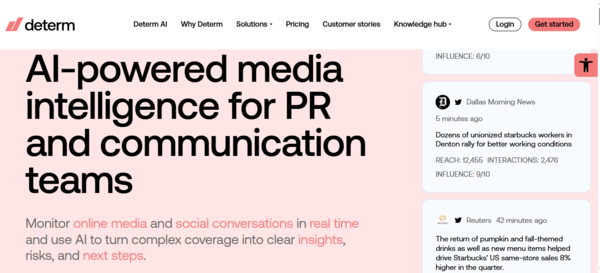
Determ is a pretty complex tool, but what I liked the most are its widgets. It aggregates data into actionable visual widgets that measure total mention volume over time, pinpoint peak activity spikes, and quantify your cumulative potential impressions.
Another thing worth mentioning is their Opinion Leaders table, which helps you identify the most influential accounts driving your brand’s narrative, along with interactive widgets that let you click any data point to immediately filter, export, or summarize the specific X posts behind the metrics.
Key features
- Real-time X monitoring for tweets, replies, hashtags, and mentions
- AI-powered sentiment and broader media intelligence
- Coverage across 100+ million sources
- X (Twitter) dashboard
Pricing
Determ individual plans start at $99/month and include a 5-day free trial.
Pros
- No keyword or user limits by plan
- Strong fit for influencer and brand risk detection
- Actionable visual widgets
Cons
- Might feel overwhelming at first
- Not the cheapest tool for small brands
- More PR monitoring-flavored than simple content marketing reporting
Best for
PR, comms, and brand teams that need real-time monitoring and strategic insight.
Minter.io: Best for affordable profile analytics
Minter.io focuses on helping you understand how your X account is performing. It provides clean reports on follower growth, engagement, audience demographics, and tweet performance, making it a good fit for creators, marketers, and small businesses that simply want better analytics without unnecessary complexity.
My honest opinion
Minter.io is one of the easiest tools in this whole list to explain without waffle. If someone wants a lower-cost Twitter analytics tool focused on their own account performance, this is one of the strongest answers. G2 rating: 4.5/5.
What I found in my test
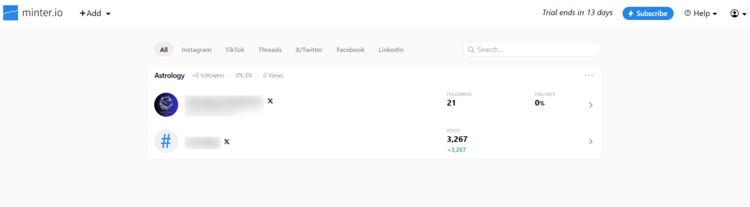
The moment you connect your X account (which takes just one click and one code), the app is already preparing your report (which pleasantly surprised me), but what I didn’t expect was that creating those reports takes ages… I spent more than an hour on 25% of the report, but once it’s finished, you have clean, simple graphs with all the data you need.
The basic plan includes X audience analytics, post analytics, mentions, hourly updates, historical data, and export. So even before you move up, you already see follower growth over time, gains and losses in followers, impressions, clicks, video views, the best time to post, and profile mentions. That is a very decent built-in analytics replacement for the price. And if you need promoted post analytics, X hashtag or competitor analytics, you’ll have to level up your plan.
Key features
- X audience analytics with follower growth and gained/lost followers
- X post analytics with engagement, impressions, clicks, and best time to post
- Hourly updates and all available historical data
- Higher plan adds hashtag analytics, competitor analysis, and promoted posts analytics
Pricing
Plans start at $19/month per profile, and the platform offers a 14-day free trial.
Pros
- AI Analyst interprets your data in conversational form
- Great if you mainly care about your own X performance
- Easy to use, and great value for money
Cons
- Narrower than a full social listening platform
- Best for profile-level analytics, not broad share-of-voice work
- No social listening features
Best for
Marketers, freelancers, and small businesses that want affordable Twitter analytics without paying enterprise money for features they will never touch.
Open Tweet: Best for creators and founders who primarily want AI-assisted posting
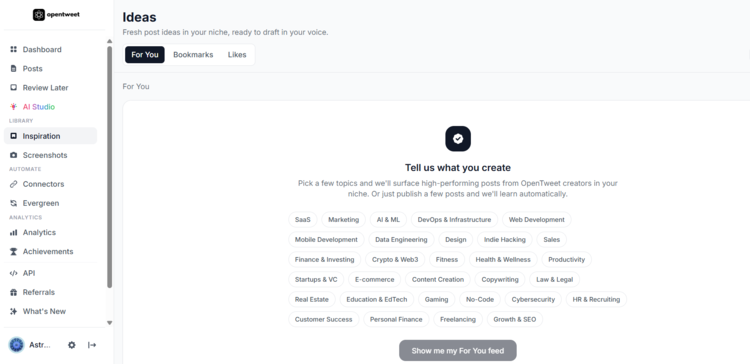
OpenTweet is a new tool on the market, focused on publishing. Analytics comes as a premium feature, and its main focus is on helping creators keep the steady posting schedule.
My honest opinion
Okay, it’s not Twitter analytics tools for business, so I’ll not pretend it is. It is best framed as a creator-friendly, AI-powered scheduler and workflow tool with analytics. Since it’s a relatively new tool without a G2 rating, I wanted to give it a try.
What I found in my test
Its positioning is very explicit: AI tweet generation, a visual calendar, smart connectors, API support, a Discord channel, and an X analytics dashboard (but only as a premium feature, meaning you won’t find it in your basic plan).
The catch is important: the Pro plan is mostly about posting workflow, while for the X analytics dashboard, you’ll need to upgrade your plan (and that was my point of disappointment, have to admit).
Okay, if you level up your plan, you’ll unlock paid campaign analytics, performance reporting, and what I found interesting: trend analytics. You can spot growing topics and analyze how your social strategy aligns with broader market trends.
It’s great to have all these features, but after trying the lower plan first, I can’t shake the feeling that it is more about content strategy and workflow optimization than a serious monitoring, sentiment, or competitive analysis tool.
Key features
- AI-powered tweet and thread generation with voice learning
- Visual calendar and evergreen queue
- Advanced-plan X analytics dashboard
- Trend analytics
Pricing
The Pro plan starts at $11.99/month, and all plans include a 7-day free trial, but higher plans require a credit card.
Pros
- Very affordable entry point
- Strong creator workflow and AI features
- No X developer account needed
Cons
- Not really a deep analytics platform
- Analytics dashboard locked behind higher-tier plans
- No hashtag suggestions or analytics
Best for
Creators, founders, and solo operators who want AI-assisted posting and a lightweight analytics dashboard rather than heavy-duty social media analytics.
Octolens: Best for finding X conversations with buying intent
Octolens is less about classic analytics of your Twitter account and more about catching relevant conversations while they’re still fresh. It tracks keywords, competitors, and brand mentions across X and other platforms, which makes it useful if you care more about finding buying signals, complaints, or industry discussions than staring lovingly at your own engagement rate.
My honest opinion
Octolens is one of those tools that becomes very attractive the second your definition of “X analytics” expands beyond your own tweet performance. Its analytics features are more focused on the environment (as with any tool primarily focused on social listening), which can give you a different perspective on your Twitter strategy.
It has a very high G2 rating: 5.0/5, though its review pool is tiny, so handle with care.
What I found in my test
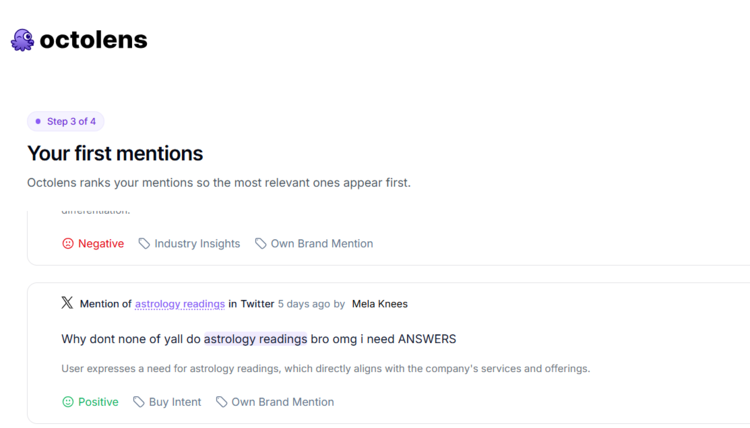
I was a bit confused when trying this tool, because I didn’t expect that kind of analytics (have to admit). So, yes, it’s a social listening tool, and its analytics are very useful for spotting leads. It even has the Buying intent AI tag, which is pretty accurate.
Now, the downside (or advantage for some) is that it doesn’t focus exclusively on X, and you can’t quite track your profile or post performance. It’s a broad approach that doesn’t ask you to connect anything. It just tracks keywords and your competitors, keeping you informed.
With that being said, I wouldn’t sell Octolens as a replacement for native audience demographics or follower insight because that is not what it is. I’d rather say it’s a serious social listening and competitive analysis tool. It is less “look at my engagement rate” and more “catch buying intent, feedback, and competitor chatter before lunch.”
Key features
- X monitoring alongside Reddit, LinkedIn, GitHub, newsletters, and more
- AI relevance scoring and tagging
- Slack alerts, API, webhooks, and MCP on all plans
- AI sentiment analysis
Pricing
Pricing starts at $199/month, and all plans have a 7-day free trial.
Pros
- Accurate sentiment analytics
- Strong AI filtering to reduce noise
- Helpful for spotting buying intent
Cons
- Not the right fit if you only want native-style follower charts
- Not budget-friendly for small teams
- I wasn’t able to find reports anywhere
Best for
Sales teams and businesses that want to spot hot leads on X and other platforms, without focusing on an isolated Twitter analytics page.
Need More Than Buying Intent?
If you like Octolens’ approach but also want sentiment analysis, emotion detection, Share of Voice, hashtag analytics, AI summaries, and customizable reports, give Mentionlytics a try.
Audiense: Best for deep X analytics reporting
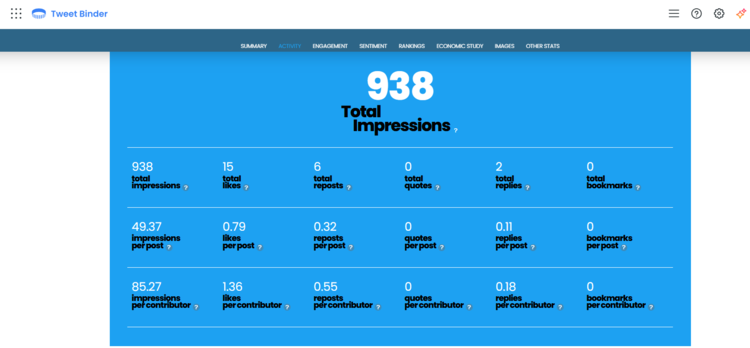
Audiense is a tool entirely focused on X. Its two products, Tweet Binder and Connect, cover X post and keyword analytics, as well as community management and audience insights and demographics.
My honest opinion
Audiense is where I’d deliberately stop the reader and say: this is not the same thing as Minter or Buffer. It is stronger at audience analysis, community intelligence, and segmentation than at plain post reporting. And since it offers different products, it also has different G2 ratings: Audiense 4.5/5; TweetBinder by Audiense 4.4/5.
What I found in my test
Audiense’s X-facing stack is really two pieces. Audiense Connect is the X Marketing product focused on community understanding, follower overlap, and audience research, and it has a free plan with limited access. Then there is Tweet Binder, which is the more directly relevant X analytics and hashtag tracking product. Tweet Binder offers a free 200-post report, supports hashtags, keywords, and accounts, and includes Audiense Connect community features on paid plans.
So basically, you can use a free plan for community management, but if you want a glimpse of analytics, you’ll have to opt for a paid plan.
Key features
- Audiense Connect for X community understanding and audience research
- Tweet Binder for X hashtag, keyword and account reports
- Free Connect plan and free 200-post Tweet Binder report
- Audience intersections and custom audiences on paid paths
Pricing
Connect has a free plan for community management. Pricing for wider Audiense and Tweet Binder is not public, but some of the products are. For example, X Marketing starts at $62.99/month, and a free trial is available for all plans upon request.
Pros
- Strong audience intelligence angle
- Useful free starting points
- Good for campaign hashtags, follower and audience analysis, and community intersections
Cons
- Not the simplest tool to explain
- Pricing transparency is patchy
- Less suitable if you only want a basic analytics dashboard
Best for
Agencies and strategists who need audience analysis, cluster discovery, and smarter Twitter marketing insights, not just a post-by-post metric table.
Dash Social: Best for large marketing teams and overall analytics
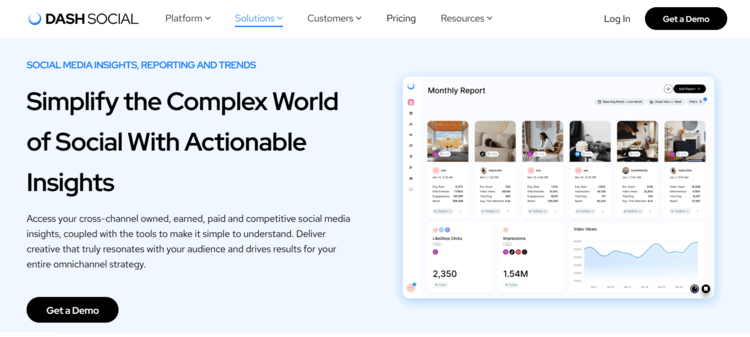
Dash Social is built for large marketing teams that manage multiple social channels and care as much about strategy as they do about reporting. While it supports X analytics, its real strength lies in AI-powered content insights, cross-platform performance tracking, and helping brands understand what actually drives engagement across their entire social media presence.
My honest opinion
Dash Social is impressive, but it is not for dabblers, indie marketers, or anyone hoping for a cute tool that is easy to learn how to use. I would place it high in the rankings for capability and much lower for accessibility. It has a very good G2 rating of 4.7/5, likely due to its robust features.
What I found in my test
The first thing I noticed is that Dash Social clearly isn’t targeting small businesses or solo marketers (the price will bounce you back if you’re in this category). Everything about the platform, from the onboarding to the dashboards, feels built for larger marketing teams managing multiple brands and social channels.
It’s useful to know that for X analytics, follower data only starts collecting from the moment you connect your account, so you won’t get historical audience growth. Post analytics, on the other hand, include up to 30 days of historical data, while competitor tracking goes back as far as 3,200 posts or 30 days. If you’re switching from another platform, that’s useful to know because you won’t be starting completely from scratch.
The tool is really impressive, but the only real downside for me was the pricing. At $999/month for the entry plan, it’s hard to recommend unless you’re part of an enterprise team that will actually use the AI-powered content planning, custom dashboards, and cross-channel reporting.
Key features
- Cross-channel analytics and custom dashboards
- Vision AI trends and content prediction on Advance
- Competitive benchmarks and enterprise reporting
- Custom reporting with shareable reports
Pricing
The price starts at $999/month for the Engage plan and includes a free 14-day trial, but only with the demo.
Pros
- Strong enterprise analytics stack
- Useful AI-driven content and trend layer
- Good fit for team reporting and benchmarking
Cons
- Very expensive
- More enterprise than most readers need
- X historical depth is limited compared with broader listening products
Best for
Enterprise consumer brands that want a polished social media management and analytics dashboard with AI-driven planning baked in.
Sprout Social: Best for teams using multiple platforms
Sprout Social is primarily a social media management tool. It’s built for teams managing multiple social networks from a single dashboard, combining publishing, engagement, reporting, and analytics into a single platform.
My honest opinion
Though I like the simplicity Sprout offers, it is also one of the easiest to oversell despite being feature-rich. The right framing is “excellent all-rounder, expensive once add-ons enter the chat”. Because the moment you think you have the right combo, you figure out you don’t have the feature you need. Perhaps that’s why users rated it 4.4/5 on G2.
What I found in my test
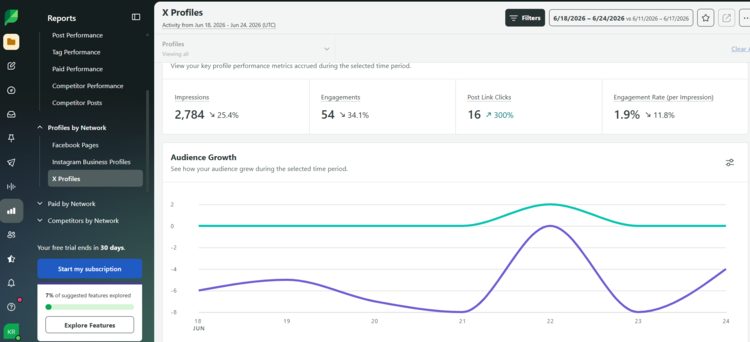
So, the first thing I encountered was a blank dashboard, not because my X profile doesn’t have any posts or engagement, but because Sprout fetches data from the moment you make an account (which is not the case with some of the tools from the list).
Essentials plan already includes profile and post-level reporting, while Standard adds inbox and monitoring features. So, yes, it works as an X reporting tool for lower-paid tiers, but the report will be blank when you open an account. I guess it needs more time (a week, perhaps).
Now, if you want competitor analysis and reporting, that feature is included in the higher plans. And I have to mention that social listening is not included in standard plans, but it’s purchased separately as an add-on. But what I missed the most was the audience insights. No demographics.
So, to make a long story short, Sprout is a great tool if you’re not focused only on X and if you have a budget for it. And if that’s a bit too overwhelming for you, you might want to look at some Sprout Social alternatives.
Key features
- Strong cross-network reporting and dashboards
- Profile and post-level reporting from Essentials
- Unified inbox
- Social Listening available as a paid add-on
Pricing
Sprout Social has segmented plans, but their Essentials (only profile performance and post-level reporting), for example, starts at $99/seat/month, while Standard (with keyword and location monitoring) starts at $249 per seat/month. All plans include 30-day free trial.
Pros
- Very polished user experience
- Great for teams managing multiple networks
- Excellent publishing features
Cons
- Costs rise quickly
- Competitor insights are locked in the higher plans
- Can be overkill if you only need X analytics
Best for
Mid-market and enterprise teams that want a social media publisher, workflow platform, and basic analytics, and can live with add-on pricing.
Get the Whole Package Without Extended Budget
Mentionlytics gives you complete analytics without extra cost. Just choose your plan and give it a try.
Twitonomy: Best for quick audience insights
Twitonomy has been around longer than most Twitter analytics tools on this list, and surprisingly, it’s still relevant if your main focus is X. Instead of trying to manage every social network, it sticks to what it knows best: analyzing X accounts, tweets, followers, mentions, lists, and engagement.
My honest opinion
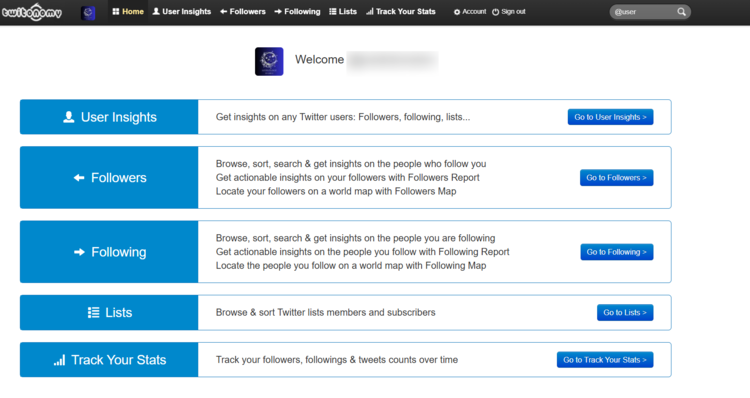
Twitonomy is the scrappy veteran here, and don’t get shocked, its UI looks like that as well. Maybe it’s not the most modern or most sleek tool, but people still use it. The reason behind it might be that it’s a free tool. But its G2 rating is 4.0/5, meaning that free isn’t always the most practical option.
What I found in my test
Its homepage still makes the core use case crystal clear: follower and following insights, exports, list analysis, follower growth tracking, map views, and account cleanup. It has free and premium options, and the Premium page adds exports, stats tracking, and additional productivity features.
In plain English: this is very handy if you want to investigate your Twitter account structure, lists, and follower hygiene.
What it does not feel like is a modern, AI powered X analytics tool for business reporting. There is no real public evidence of advanced sentiment, emotion analysis, share of voice, or slick dashboarding on the level of Mentionlytics, Sprout, or Minter.io.
Key features
- Follower and following analysis
- List member and subscriber exports
- Follower growth tracking
- Free plan
Pricing
Public site positioning is freemium with a Premium upsell at the starting price of $19/month.
Pros
- Still useful for follower and list digging
- Simpler than enterprise suites
- Good legacy option for X-specific account analysis
Cons
- Feels dated beside modern analytics tools
- Limited analytics features
- Free version encounters CreditsDepleted
Best for
Users who need insights about follower audits, lists, and historical account behavior without executive reporting.
What Data Can Official X Analytics Track?
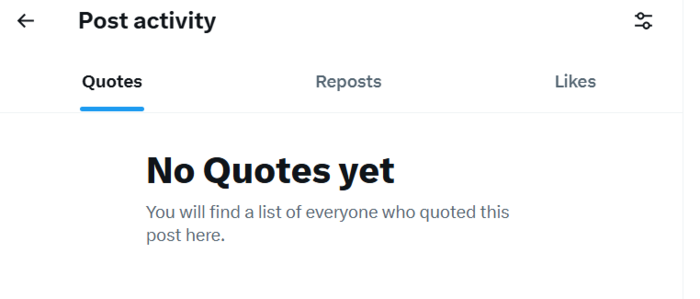
Depending on the account you have, official X Analytics will vary, ranging from basic post insights (quotes, reposts, likes, etc.) for free private accounts to more complex analytics for Premium Business, which has two tiers: Full Access and Basic. So, based on the plan you have, you’re going to have access to these analytics:
- Free Accounts (Personal & Professional)
Post Activity Dashboard (PAD) metrics only (Views/Impressions, Likes, Replies, Reposts, Quotes, and Bookmarks on public posts). Private accounts see an even more restricted version.
- The Individual Paid Tiers (X Premium):
- Premium Basic (approx. $3/month)
No full dashboard yet, but individual post metrics unlock Link Clicks, Profile Clicks, and Detail Expands. - Premium Standard (approx. $8/month)
Everything from Premium Basic, plus a share of ad revenue based on verified impressions on your posts. - Premium Plus (approx. $16 – $40/month)
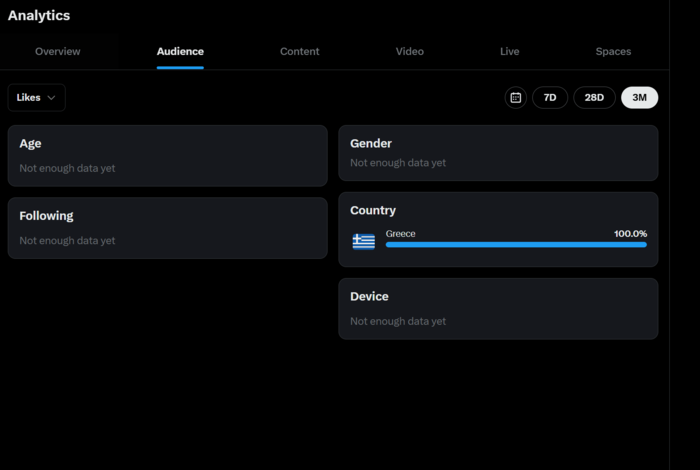
The complete analytics suite features full account trend charts, net follower tracking, and verified follower growth. Within this tier, you have audience demographics, with charts mapping out your followers’ geographic regions, genders, and device types.

You also get the Video Activity Dashboard, with deep video retention graphs, completion rates, and total watch time stats. And lastly, you get Radar Search (Beta), which is advanced keyword and trend monitoring across the entire platform.
- Premium Basic (approx. $3/month)
- Leveled-Up Corporate Paid Tiers (Premium Business):
- Premium Business – Basic (approx. $200/month)
Includes all Premium Plus features plus X Insights Tool (Basic Level), where you can track keyword trends, conversation volumes, and see how often your brand is mentioned across X over time. - Premium Business – Full Access (approx. $1,000/month)
Includes all Business Basic features, plus full access to the X Insights Tool and Ad Campaign Analytics.
- Premium Business – Basic (approx. $200/month)
How much does X Analytics cost?
X Premium in the US starts at $3/month for Basic, $8/month for Premium, and $40/month for Premium+, while X Premium Business starts at $200/month for Basic and $1,000/month for Full Access, with regional pricing variations and feature changes over time.
How to check X analytics without Premium?
You can check X analytics without a Premium subscription to X, but with limitations. Since X moved many of its built-in analytics behind Premium subscriptions, there are only a few ways to monitor your performance without paying for X itself. Here we summarize 3 of them.
Way #1: Use a third-party X analytics tool (recommended)
The easiest and most reliable option is to use a third-party analytics platform. Many tools can connect to your X account and show engagement metrics, follower growth, post performance, and audience insights without relying on the native X Analytics dashboard.
If you need more than just numbers, social listening platforms like Mentionlytics go a step further by tracking conversations happening outside your own profile. That means you can monitor brand mentions (even when you’re not tagged), hashtags, competitors, Twitter sentiment, Share of Voice, and trending topics, all from a single dashboard.
Way #2: Use free analytics tools
Some platforms offer a free plan or trial that includes basic X analytics. Depending on the tool, you may be able to see engagement rates, follower growth, or your top-performing posts before deciding whether to upgrade.
Just keep in mind that free plans often have limitations on historical data, the number of connected accounts, or the analytics available.
Way #3: Track your performance manually
If you only publish occasionally, you can still keep an eye on your account by recording metrics like impressions, likes, reposts, replies, and follower count in a spreadsheet.
It works, but only for basic reporting. As soon as you want to compare campaigns, analyze competitors, or measure performance over time, manual tracking becomes difficult to maintain.
My recommendation
If you’re serious about X/Twitter marketing, I’d skip the manual workarounds and use a social listening platform instead. Native X Analytics only tells you how your account is performing. Tools like Mentionlytics also tell you what’s happening around your brand, who’s talking about you, how people feel, which hashtags are driving conversations, and how you compare with competitors.
What Data Official X Analytics CAN’T Track
Don’t get me wrong, native X Analytics is useful if you want to know how your own content is performing. You can see impressions, engagement, profile visits, follower growth, and other standard metrics. But if you’re using X as a marketing, PR, or customer intelligence channel, you’ll quickly notice that the dashboard only tells part of the story.
Here are a few insights you simply won’t find in the official X Analytics dashboard.
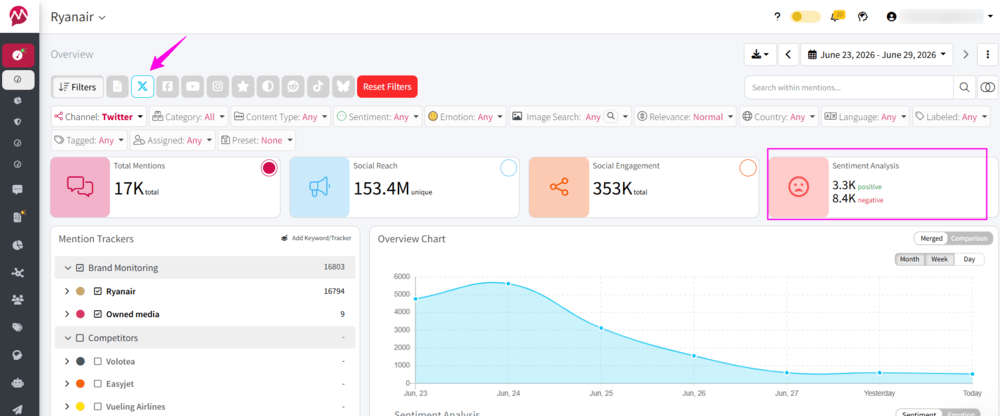
Sentiment Analysis
Imagine your latest product launch generated 5,000 mentions. Sounds great. But are people excited about it, disappointed, or making fun of it? Native X Analytics counts interactions, but it doesn’t tell you how people actually feel. Social listening platforms use AI to classify mentions as positive, neutral, or negative, helping you spot reputation issues long before engagement numbers reveal them.
Emotion Analysis
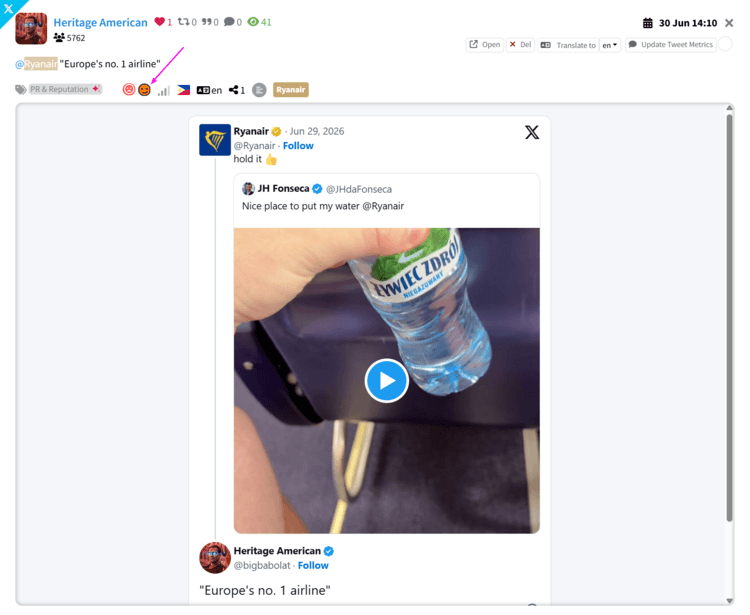
Sentiment is just the beginning. Mentionlytics, for example, can also identify emotions like anger, joy, or even sarcasm (and X is full of it). That extra layer of context is particularly useful during product launches, campaigns, or customer support crises, where thousands of mentions may all be “negative” but for completely different reasons.
Hashtag Analytics
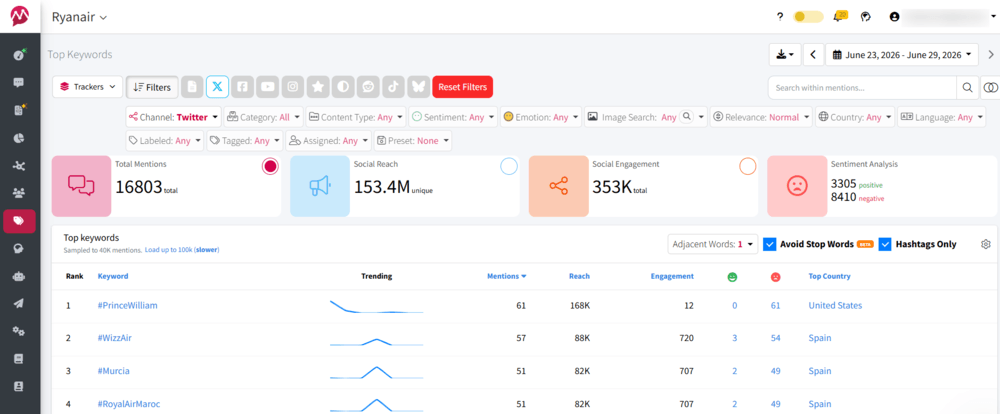
X shows you how individual tweets performed, but it won’t tell you whether your campaign hashtag is gaining momentum across the platform.Dedicated Twitter analytics tools can track hashtag growth, engagement, reach, trending conversations, and even compare your branded hashtag against competitors. That’s invaluable when measuring campaigns or identifying emerging industry trends.
For instance, we can see in the screenshot below, taken from Mentionlytics’ hashtag analytics feature, that during the week June 23rd to June 29th 2026, the most used hashtags for Ryanair were #PrinceWilliam, #Wizz, and #Murcia. The sentiment is mostly negative for all three, and they’ve been most used by the audience from the UK (for #PrinceWilliam hashtag) and Spain for the other two.
Conversation Topics (Mention Clustering)
This is probably one of my favorite metrics because it saves an unbelievable amount of manual work.
Instead of reading hundreds or thousands of tweets one by one, AI groups similar mentions into recurring topics or themes. Within a few seconds, you can see whether people are mostly discussing your pricing, customer support, product quality, delivery, new features, or something completely unexpected.
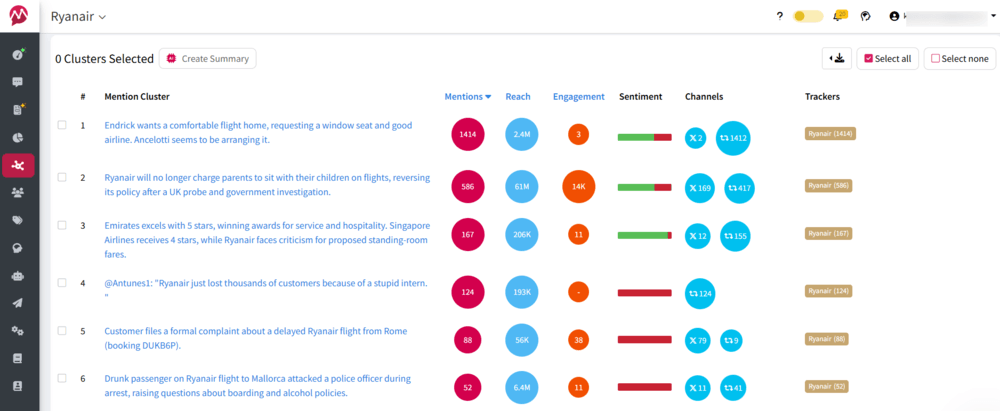
It’s a much faster way to understand why people are talking about your brand.
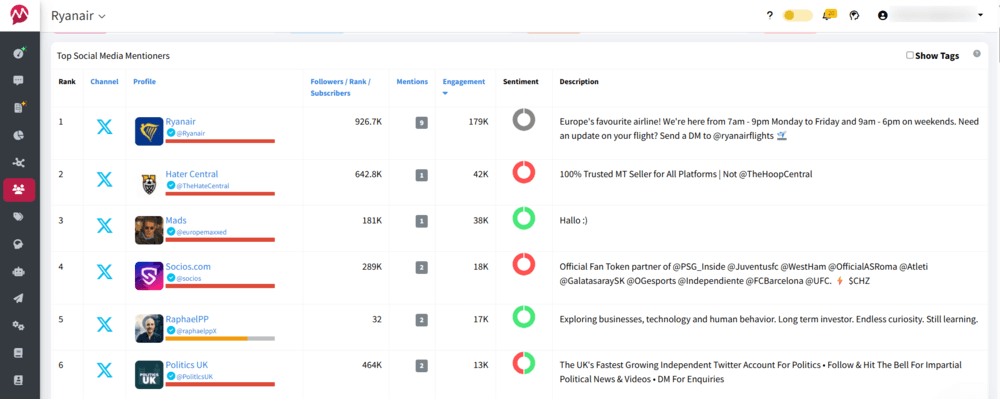
Top Mentioners
One customer mentioning your brand fifty times is very different from fifty different customers mentioning it once. Official X Analytics doesn’t highlight who’s driving the conversation around your brand.
Social listening tools can identify influencers, journalists, creators, your most active advocates, or even recurring critics. Those insights can help you discover potential partnerships, engage loyal customers, or resolve issues before they escalate.
Share of Voice
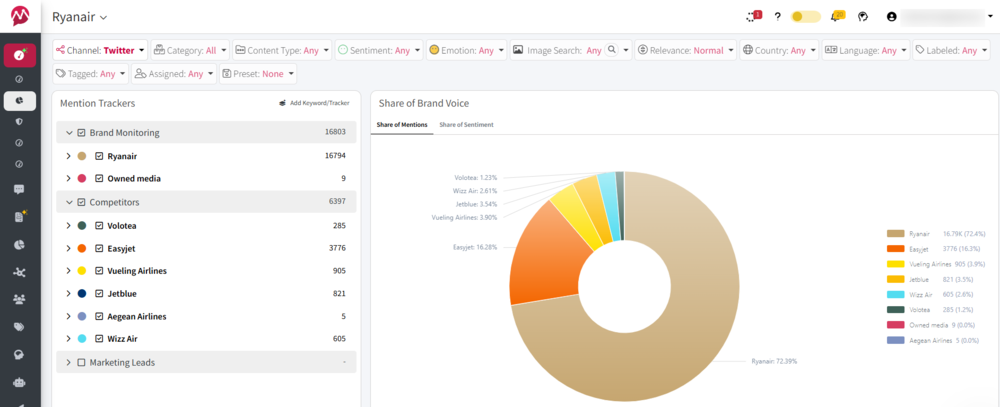
One of the biggest blind spots in native X Analytics is competitive analysis.
Let’s say your brand received 2,000 mentions this month. Is that good? You have no idea until you compare it with your competitors.
Share of Voice measures how much of the total industry conversation belongs to your brand compared to others. It’s one of the most useful KPIs for tracking campaigns, product launches, and long-term brand awareness.
Troll Detection
Not every mention deserves your attention. Some accounts exist solely to provoke reactions, spread negativity, or repeatedly target brands with little intention of having a genuine conversation. When you’re manually reviewing hundreds of mentions, it’s surprisingly easy to spend more time replying to trolls than engaging with actual customers.
While native X Analytics treats every interaction as just another metric, some social listening platforms can help you identify recurring negative accounts, unusual spikes in hostile conversations, or users who repeatedly appear in negative discussions. That allows marketing and customer support teams to focus on meaningful conversations instead of feeding the trolls.

Why is this feature useful? It’s separating genuine customer feedback from coordinated attacks, spam, or accounts that are unlikely to contribute anything constructive.
Earned Media Value (EMV)
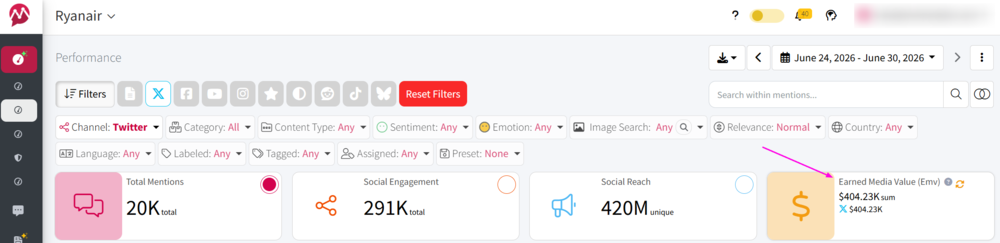
Not every mention needs to come from a paid campaign. Earned Media Value estimates how much exposure your brand receives organically through customer conversations, media coverage, influencers, and user-generated content. While it’s an estimated metric rather than an exact financial value, it helps marketing and PR teams demonstrate the impact of organic visibility without relying solely on engagement numbers.
Likes are Nice, but $ is Better
Mentionlytics gives you insight based on science, how much your X buzz actually is worth. And yes, negative mentions don’t add value.
How to See Your Twitter Analytics for Free?
If you’re simply looking for basic post performance, you have some basic data in a free X account. If you want something more complex, there are a few free tools that can show engagement metrics, follower growth, or limited audience insights. Some tools offer generous free plans, while others unlock their analytics through free trials.
The catch? Most free Twitter analytics tools only tell you what’s happening on your own account. They rarely track conversations outside your profile, competitor activity, or how people actually feel about your brand.
If you’re looking for those insights, a free trial of a social listening platform is usually the better option.
For example, Mentionlytics lets you monitor X alongside platforms like Reddit, YouTube, Bluesky, Threads, news sites, blogs, forums, and review websites, all from a single dashboard. During the free trial, you can explore features such as AI-powered sentiment or hashtag analytics, and you can get a glance at how you stand against your competitors.
If you’re comparing Twitter analytics tools before committing to a paid subscription, I’d recommend starting with a free trial and testing it against your own brand, competitors, or campaign. You’ll quickly see whether basic engagement metrics are enough or whether you need the deeper insights that social listening provides.
Get Advanced X (Twitter) Analytics without Paying Premium
No man is an island… and neither is your X account. If you want truly advanced X (Twitter) analytics, you need more than a dashboard showing your profile’s performance. You need to understand the conversations happening around your brand, your competitors, and your industry.
And while X Premium gives you detailed analytics about your account (for a pretty spicy price), Mentionlytics monitors the bigger picture. Besides the metrics you’d expect, it helps you understand why they happened through social listening, sentiment analysis, competitor tracking, Share of Voice, hashtag analytics, and AI-powered insights.
Monitor X, track competitors, measure sentiment, discover trending topics, analyze hashtags, and uncover your Share of Voice, all starting with a free 14-day trial.
You won’t know what you’re missing until you try it.
FAQ
What is X Analytics used for?
X Analytics helps you understand how your content and account perform on X (formerly Twitter). Depending on your subscription, you can track metrics such as impressions, engagement rate, profile visits, follower growth, link clicks, video views, and audience demographics. Businesses use these insights to measure campaign performance, improve their content strategy, and identify their best-performing tweets.
What are X Analytics alternatives?
If you’re looking for alternatives to native X Analytics, some of the best options include Mentionlytics, Buffer, Determ, Minter.io, Audiense, Octolens, and Open Tweet. The right choice depends on your goals, whether you need simple tweet analytics, audience intelligence, competitor analysis, or full-scale social listening.
What is the best tool for Twitter Analytics?
There isn’t a single “best” Twitter analytics tool because every platform focuses on something different.
- Mentionlytics is best for social listening, sentiment analysis, competitor monitoring, and Share of Voice.
- Buffer is great for content performance and scheduling.
- Audiense specializes in audience intelligence.
- Determ is ideal for PR and media monitoring.
If you’re only measuring your own tweets, native X Analytics may be enough. If you want to understand conversations happening around your brand, a social listening platform offers much deeper insights.
Is TweetDeck still free?
No, TweetDeck has been rebranded as X Pro and is no longer available as a free tool. Access is currently limited to eligible paid X subscribers, and its features focus on managing multiple timelines, lists, and real-time monitoring rather than providing advanced analytics.
Is Twitter scraping possible?
Yes, it’s technically possible to scrape publicly available X data, but it comes with important legal, ethical, and technical considerations. X has introduced API restrictions and terms of service that limit automated data collection. For businesses, it’s generally safer and more reliable to use approved APIs or social listening platforms that access data in a compliant way.
Does Twitter have free analytics?
Not in the way it used to. X still offers analytics for eligible accounts, with limited analytics (quotes, reposts, likes).
What is the best Twitter tracker?
It depends on what you want to track. If you’re monitoring your own account, native X Analytics or tools like Buffer and Minter.io work well. If you’re tracking brand mentions, competitors, hashtags, sentiment, and industry conversations, a social listening platform like Mentionlytics provides a much broader view of what’s happening on and beyond X.
Does X still have Analytics?
Yes, X still provides analytics for eligible accounts, but access and available metrics depend on your subscription tier. The platform offers data such as impressions, engagement, follower growth, profile visits, and video performance, while more advanced marketing insights, like sentiment analysis, Share of Voice, or competitor benchmarking, require third-party analytics tools.
Can you track competitors on X?
Yes, while native X Analytics focuses almost entirely on your own account, many third-party Twitter analytics tools let you monitor competitor activity as well. Depending on the platform, you can compare metrics such as Share of Voice, engagement rates, posting frequency, sentiment, hashtag performance, and the topics competitors are being mentioned alongside. Social listening tools like Mentionlytics take this a step further by tracking competitor mentions across X, news sites, blogs, forums, review platforms, Reddit, YouTube, Bluesky, and other online sources, giving you a much broader picture of your competitive landscape than X Analytics alone.
